Best Printer for Restaurant Menus and Receipts
Choosing the right printer for a restaurant involves balancing speed, reliability, and compatibility. This guide highlights printers that excel at producing clear kitchen tickets, customer receipts, and durable menus. Whether you manage a fast-casual spot or a full-service restaurant, the options below cover high-speed thermal printing, multiple connectivity choices, and practical design features to fit compact or busy back-of-house environments.
| Product | Brand | Key Benefit |
|---|---|---|
| Rongta POS Receipt Printer, 80mm | Rongta | Fast 250mm/s, auto cutter, wall-mountable |
| vretti Thermal Receipt Printer, 80mm | vretti | 260mm/s, USB/Serial/Ethernet, versatile OS support |
| Rongta Kitchen RP850P | Rongta | Fastest 300mm/s, 80mm/58mm paper options |
| NUCOUN Thermal Receipt Printer, 80mm | NUCOUN | 220mm/s, multi-interface, auto-cutter |
| Nicunom Menu Covers, 12 pack | Nicunom | Durable menu protection, 8.5×11 fits standard menus |
Rongta POS Receipt Printer 80mm

The Rongta RP printer offers a high-speed 250mm per second print rate with an 80mm paper width and an auto cutter. It supports ESC/POS commands for easy integration with existing POS systems and cash drawers. The design prioritizes reliability in busy environments, with wall-mount options and a straightforward setup that suits restaurant back-of-house needs.
Its durability and simple maintenance make it a solid choice for kitchen tickets and customer receipts. While it does not include wireless connectivity, its wired USB/serial/ethernet interfaces provide stable integrations with point-of-sale setups and cash drawers commonly used in small businesses. The large paper capacity and robust construction support long operation hours.
vretti 80mm USB Thermal Receipt Printer

The vretti M817 thermal receipt printer delivers 260mm/s printing speed for high-volume environments, reducing processing times for orders and customer receipts. It uses 203 DPI thermal printing, avoiding ink costs while delivering crisp receipts. The device supports USB, Serial (RS-232), and Ethernet, making it adaptable to Windows, MacOS, and Linux environments, with broad compatibility across various POS ecosystems.
Notes indicate compatibility considerations: it does not support Square, Clover, or certain on-demand delivery platforms. The package includes a starter roll and emphasizes energy efficiency and long-term cost savings, suitable for fast-paced restaurant settings and other busy operations.
Rongta Kitchen RP850P 80mm Printer
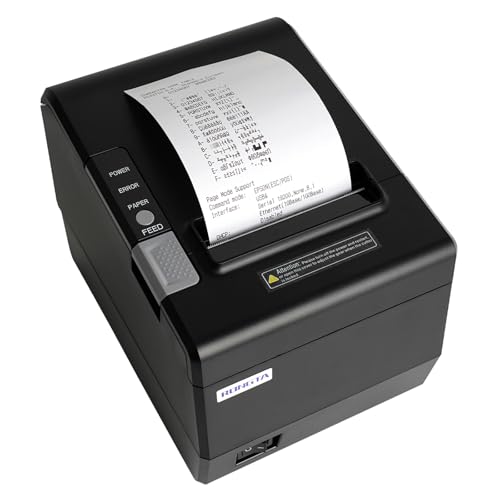
Rongta’s RP850P concentrates on speed and versatility, offering up to 300mm/s and dual-width paper compatibility (80mm and 58mm). It features wall-manging capability and supports USB, Serial, and Ethernet interfaces, ensuring broad compatibility with Windows, Mac, and Linux systems. The printer’s auto cutter helps streamline kitchen and front-of-house workflows, with emphasis on quiet operation and long-term durability in restaurant environments.
Important considerations include ensuring correct paper width selection and compatibility with your POS software. This model is marketed for ESC/POS compatibility and can work with various cash drawers, enhancing overall workflow efficiency in a multi-station restaurant setup.
NUCOUN 80mm Thermal Receipt Printer

The NUCOUN VCP-8370 series offers wide compatibility with ESC/POS commands across Windows, Linux, Mac, and OPOS environments. It supports 80mm paper width, an auto-cutter, and a multi-interface setup including USB, LAN, and a cash drawer RJ11 port. The printer emphasizes high-definition 203 DPI output with a focus on low-noise operation, making it suitable for busy dining rooms and kitchen endpoints alike.
Users should consider software requirements to download the recommended drivers and applications to enable full functionality. The device is positioned as a cost-effective, reliable option for high-volume restaurants and beverage venues that require steady receipt and order printing with durable components for continuous use.
Nicunom 12 Pack Menu Covers

These Nicunom menu covers are designed for durability and ease of use, with 12 covers in a pack and a double-stitched edge for added strength. They fit 8.5 x 11 inch menus and feature a slide-in design for quick changes. Constructed from durable PVC, the covers are non-toxic and easy to clean, making them suitable for high-traffic dining areas, banquet spaces, or casual eateries seeking professional-looking menus that withstand frequent handling.
When selecting menu covers, consider the menu size, page count, and the level of protection versus the need for quick updates. These covers provide clear visibility of menu content while protecting printed pages from spills and handling wear, contributing to a polished restaurant presentation.
Buying Guide: Key Purchase Considerations
- Print speed and paper width: For high-volume kitchens, prioritize printers with speeds around 260–300 mm/s and 80mm paper width to balance output with durability.
- Connectivity and compatibility: Choose devices offering USB, Ethernet, or Serial interfaces that align with your POS ecosystem. Confirm ESC/POS compatibility if you use generic POS software.
- Auto cutter reliability: An auto cutter reduces manual handling and speeds up service; check for cutter longevity and easy paper loading.
- Noise and footprint: Consider quiet models for front-of-house use and compact designs that fit tight back-of-house spaces.
- Durability and maintenance: Wall-mount options, sturdy housings, and clear maintenance guidelines extend device life in busy environments.
- Menu protection: If you need physical menus, select durable covers with easy insert-and-change features, suitable for frequent updates and cleaning.
- Platform limitations: Some printers mark incompatibilities with popular delivery platforms. Verify compatibility with your delivery workflows and POS software before purchasing.
The products above offer a mix of high-speed thermal printing for receipts and durable options for menu protection. When evaluating options, align printer capabilities with your restaurant’s workflow—kitchen orders, front-of-house receipts, and on-table or takeout printing. For menus, pairing a reliable paper with sturdy covers ensures longevity and a professional presentation that supports brand consistency.