Best Dual Monitor Stand for 32 Inch Monitors: Clear Choices for Multi‑Screen Setups
Looking for a reliable dual monitor stand that supports 32″ screens? This guide identifies five sturdy options, each best suited for different work styles—from balanced ergonomics to gaming and heavy-duty office use. All picks support VESA 75x75mm or 100x100mm and offer full motion so you can position screens for comfort and productivity. Whether you need a freestanding base, C-clamp, or grommet mounting, these stands help keep desks clear and organized.
Summary table of selected products
| Product | Best For | Mount Type | Key Benefit |
|---|---|---|---|
| VIVO Freestanding Dual Monitor Stand STAND-V002FG | Balanced setups with glass base | Freestanding | Strong glass base and full motion arms |
| VIVO Dual LED LCD Monitor Mount STAND-V032F | Two 32″ displays with tidy cable management | Freestanding | Detachable cable clips and robust base |
| HUANUO FlowLift Dual Monitor Stand | Large ergonomic adjustability | Clamped/Grommet | Wide range of motion with sturdy build |
| Perlegear Dual Monitor Stand PGTVS41B | Built-in power and surge protection | Freestanding | Cable management plus power strip |
| Mount-It! Dual Monitor Desk Stand Mount | Versatile freestanding option | Freestanding | Solid height and tilt adjustments |
VIVO Freestanding Dual Monitor Stand With Glass Base

The VIVO STAND-V002FG is designed for two monitors up to 32 inches and 22 lbs each, positioned on a strong tempered glass base. It uses a steel pole and arms for stability and adjusts across tilt, swivel, and rotation, with height changes along the central pole. It supports portrait or landscape layouts. Best for users who want a stable, floating look and a visually sturdy base. A potential limitation is the need to bolt down if mounting forcefully forward or backward to maintain stability.
VIVO Dual LED LCD Monitor Mount STAND-V032F
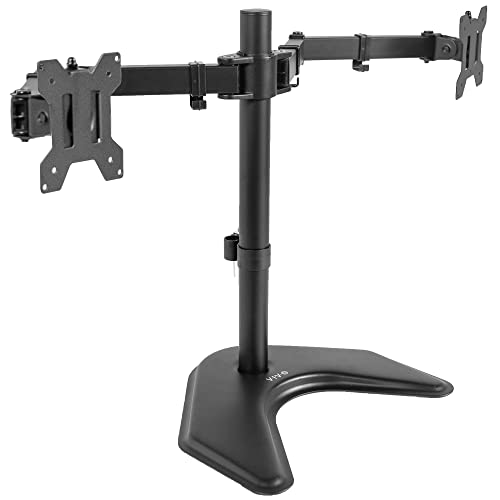
This stand fits two screens from 13″ to 32″ and up to 10 kg per monitor, with detachable cable clips for clean cable management. It offers +90° to -90° tilt, 180° swivel, and 360° rotation for flexible viewing angles. The base measures 33 cm x 26.7 cm and includes desk-protective padding. Best for users who want a robust, cable-organized setup and easy adjustments; avoid excessive forward or backward pulling to maintain balance.
HUANUO FlowLift Dual Monitor Stand

The FlowLift supports 13″–32″ monitors with VESA 75×75/100×100 and weights 4.4–19.8 lbs per arm. It emphasizes a wide desk-dedicated mounting option, including C-clamp or grommet bases for secure attachment. It uses a larger dual-clamp system to reduce wobble and supports full motion: +/-90° tilt, +/-45° tilt, and 360° rotation with height adjustments. Choose this if you want very adaptive positioning; beware desk compatibility requirements (wooden desks preferred, specific thickness and under-desk clearance).
Perlegear Dual Monitor Stand With Power Strip

The Perlegear PGTVS41B offers two 13″–32″ displays up to 22 lbs per arm and includes a built-in 6.5 ft power strip with USB-A, USB-C, and three AC outlets. It features a tempered-glass base for stability and non-slip desk pads, along with wide VESA compatibility (75×75 or 100×100). Best for users who want on-desk power access and tidy cable management. A limitation is that the weight and power components add some depth to the footprint, which may affect compact desks.
Mount-It! Dual Monitor Desk Stand Mount

The Mount-It! stand supports two 32″ monitors with 19.8 lbs per arm and provides a freestanding base for flexible placement. It offers a 16.5-inch height-adjustable center pole and solid tilt and swivel options to create an ergonomic setup. Best for users who want a straightforward freestanding solution without clamps or grommets. A potential drawback is that freestanding bases require enough desk space to avoid tipping when fully extended.
Buying Guide: What To Consider When Buying a 32-Inch Dual Monitor Stand
- Mounting Style: Freestanding, C-clamp, or grommet. Freestanding is easier to move; clamps and grommets provide tighter stability on large screens.
- Weight Capacity: Ensure each arm can support up to 22 lbs if your 32″ monitors are heavy. Some models cap at 17.6–19.8 lbs per arm.
- VESA Compatibility: Most 32″ displays use 75x75mm or 100x100mm patterns. Confirm your monitors match.
- Adjustability: Look for tilt, swivel, rotation, and height adjustment to achieve ergonomic eye level and reduce neck strain.
- Desk Compatibility: Check desk material, thickness, and available clearance for C-clamps or grommets; wooden desks are typically recommended for secure mounting.
- Cable Management: Integrated clips or channels help keep cables tidy and minimize clutter.
- Special Features: Some models include built-in power strips, additional USB ports, or heavy bases for extra stability. Consider if these features fit your workflow.
Choosing The Right Option For Your Setup
- Best for a visually streamlined look with a glass base: VIVO Freestanding Dual Monitor Stand STAND-V002FG.
- Best for cable organization and two large displays with a solid, wide base: VIVO STAND-V032F.
- Best for maximum adjustability and ergonomic precision: HUANUO FlowLift Dual Monitor Stand.
- Best for built-in power access on the desk: Perlegear PGTVS41B.
- Best for a straightforward freestanding option with height versatility: Mount-It! Dual Monitor Desk Stand Mount.
FAQ
- Can a 32″ monitor be mounted on all these stands? Yes, all listed options support 32″ displays with VESA 75x75mm or 100x100mm patterns.
- Do these stands require tools to install? Most have tool-free mounts or simple assembly; check each product’s installation guide for specifics.
- What is the typical weight per arm these stands support? Most models support around 17.6–22 lbs per arm; confirm with your exact monitor weight.
- Are there any desk compatibility restrictions? Some stands require wooden desks or have thickness limits for clamps or grommets; review product notes carefully.
- Is cable management included? Several models offer detachable clips or built-in channels to keep cables tidy.