Best Desk Charging Stations for Clean, Efficient Power Your Workspace Deserves
Finding the right desk charging station means balancing power, safety, and desk space. The top picks below are best for different buyers: professionals who need multiple ports, students seeking compact clamps, and smart-home users who want wireless convenience. This guide highlights five reliable options designed to keep your desk organized while delivering fast charging for laptops, phones, watches, and accessories. A quick buyer summary table follows to compare key capabilities at a glance.
| Product | Key Strength | Best For |
|---|---|---|
| Anker Desktop Charger, 9-in-1 | 9 outlets/ports, strong safety | Power users needing many ports on desktop |
| Wireless Charger iPhone Station (GETPALS) | 3-in-1 wireless with watch and buds | Wireless-first desks |
| Acozvin Flat Plug Desk Clamp Power Strip | Desk-edge mount, 17 devices | Clamped, tidy edge mounting |
| Anker Nano Power Strip, Desk Clamp | 70W PD charging, dual zones | Compact, high-power needs |
| Mifaso PD30W Desk Clamp Power Strip | PD 30W, 8 devices | Faster USB-C charging on a clamp |
Anker Desktop Charger, 9-in-1 Power Strip

The Anker 9-in-1 desktop charger combines three AC outlets, four USB-C ports, and two USB-A ports into a compact power strip. Each USB-C port can deliver up to 100W when used individually, supporting fast charging for laptops, tablets, and phones. An 8-point safety system helps guard devices against surges and short circuits. This unit is best for a desktop with high power needs from multiple devices, especially when you want a single hub for everything on your desk.
Best for: Power users who require many ports at their workstation without stacking adapters or power bricks. Consider this if you regularly charge a laptop, phone, tablet, headphones, and a watch from a single compact device. Caution: The total system capacity is high, but ensure your outlet circuit can support multiple high-wattage devices simultaneously.
Wireless Charger Station for Apple Devices

This 3-in-1 wireless charger supports iPhone, Apple Watch, and AirPods with up to 7.5W (phones), 3W (earbuds), and 2.5W (watches). It’s a practical choice for a wireless-centric desk setup where cable clutter is a concern. It’s especially suitable for homes or offices where quick phone charging and watch/buds charging are a daily routine. Note: AirPods 2–4 may require a MagSafe charging case for optimal compatibility.
Best for: A wireless-first desk that prefers a neat, cable-free surface and straightforward charging for iPhone and accessories. Choose this if you value a tidy look and minimal cable handling. Limitation: Wireless charging speeds and universal device compatibility can vary with newer models.
Flat Plug Desk Clamp Power Strip (Acozvin)

This 17-in-1 clamp-style power strip mounts on the desk edge, offering 9 AC outlets and 8 USB ports (4 USB-C, 4 USB-A). Dual PD 20W USB-C ports provide strong fast charging for laptops and devices, with a 40W total output. It’s ideal for crowded workstations or shared desks where outlets must be accessible without consuming tabletop real estate.
Best for: Users needing a high-capacity, edge-mounted power station. It’s a solid pick for shared desks or setups with many peripherals. Caution: Clamp compatibility requires a desk edge thick enough (up to the specified limit) to fit securely.
Anker Nano Power Strip, Desk Clamp
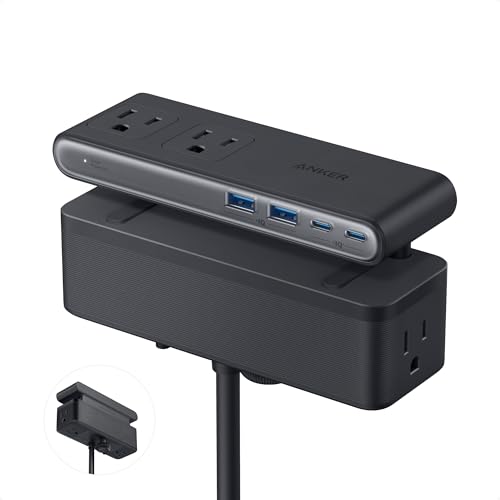
The Anker Nano Power Strip features a two-zone layout with six AC outlets, two USB-C, and two USB-A ports. The USB-C supports up to 70W for laptops, leveraging GaN technology for compact, high-power delivery. It’s crafted to reduce desk clutter while delivering strong charging performance and organization.
Best for: Desk setups that need high-power USB-C charging in a compact form, without sacrificing desk space. Choose this if you want to minimize cable clutter while keeping laptop or tablet charging swift. Limitation: Total power distribution is shared across ports; heavy use of multiple high-wattage devices may reduce per-port speed.
PD30W Desk Clamp Power Strip

This 8-in-1 desk clamp device provides four outlets, two USB-C ports, two USB-A ports, and a 30W USB-C PD charger. It supports multiple voltage outputs up to 20V for fast charging of laptops and mobile devices, with a 5-foot extension cord and a secure edge-mount design. It’s a strong option for small to medium desks needing robust USB-C charging.
Best for: Offices or dorm rooms needing fast single-port USB-C charging (PD 30W) alongside several outlets. Choose this if you value a dedicated fast-charging USB-C port and a compact clamp footprint. Limitation: The total PD power is distributed; using all ports at once may limit individual port speeds.
Buying Guide: Key Factors to Consider
Power needs and port variety: Identify how many devices you charge daily and which ports you rely on—USB-C PD for laptops, USB-A for older devices, or wireless charging. A multi-port unit with a mix of AC outlets and USB-C/USB-A ports balances flexibility with simplicity.
Desk space and mounting: Decide between a desktop power strip and a desk-clamp model. Desk clamps save surface area and reduce cable tangling but require a compatible desk edge. Consider the desk edge thickness and available mounting space.
Power delivery and safety: Look for PD charging capabilities (especially 20–100W per USB-C port) and a robust safety system (overvoltage, short circuit protection). A higher Joule surge rating helps protect devices during power spikes.
Cable management: Choose solutions with flat extension cords, 90-degree plugs, or spacing between outlets to accommodate large plugs. Mind outlet spacing to avoid blocked ports.
Device compatibility: Ensure the unit supports your primary devices (laptops, tablets, phones, smartwatches). Wireless charging add-ons are convenient but check compatibility with your cases and models.
FAQ
- What is a desk clamp power strip and when should I use one? A desk clamp power strip attaches to the desk edge, saving surface space and reducing cable tangling. It’s ideal for small desks or shared spaces where a compact footprint is essential.
- Do USB-C PD ports require a separate power adapter? No. USB-C PD ports on these power strips provide fast charging directly through the strip, supplied by the built-in power supply. The total power may be shared among ports, so plan usage accordingly.
- Is surge protection important for desk chargers? Yes. A surge rating helps shield devices from spikes. Look for units with a minimum of 600–900 Joules or higher, depending on connected equipment.
- Can I charge multiple devices at once without slowing down? It depends on total wattage and port distribution. High-power devices (laptops) may share the available power with other devices. Prioritize ports for devices needing the fastest charge.
- Will these work with a standard home outlet? Yes. Most units are designed for 110–120V US outlets. Always verify compatibility with your wall socket and consider outlet load on the circuit.
- Are wireless charging options as fast as wired charging? Wireless charging is convenient but often slower than wired PD charging, especially for laptops. Use wireless charging for phones and earbuds when speed is less critical.