Best 360mm Aio Cooler for High-Performance PCs in 2026
Choosing the right 360mm all-in-one (AIO) liquid cooler can impact thermal performance, acoustics, and system build simplicity. This guide highlights top 360mm AIOs from trusted brands, focusing on airflow, pump quietness, and ease of installation. Each option supports modern Intel and AMD sockets and offers features like ARGB lighting, direct motherboard connections, and daisy-chain fan setups. Use the buying guide below to compare cooling power, noise levels, and user experience across the featured models.
| Product | Brand | Key Benefit |
|---|---|---|
| Corsair Nautilus 360 RS | Corsair | Low-noise performance |
| Corsair Nautilus 360 RS ARGB | Corsair | ARGB lighting with Daisy-Chain |
| Corsair Nautilus 360 RS ARGB White | Corsair | Bright ARGB aesthetics |
| Thermalright FW360 SE ARGB V2 | Thermalright | 2″ LCD display and daisy-chain |
| NZXT Kraken Plus 360 | NZXT | Customizable LCD and CAM software control |
| ARCTIC Liquid Freezer III Pro 360 ARGB | ARCTIC | Strong cooling with native offset mounting |
| Corsair iCUE Link Titan 360 RX | Corsair | iCUE Link ecosystem and FlowDrive |
| MSI MAG Coreliquid A13 360 | MSI | High flow with in-built PWM fans |
Corsair Nautilus 360 RS – Black

The Corsair Nautilus 360 RS offers a balance of performance and quiet operation. Its 360mm radiator is paired with three RS120 fans designed for low noise while maintaining solid heat dissipation. The system is built for straightforward CPU cooling with Corsair’s reliable flow pump and a convex cold plate that maximizes contact with the CPU. This model supports Intel and AMD platforms, including the latest sockets, and can be integrated with Corsair’s ecosystem for centralized lighting and control. The low-noise design makes it suitable for quiet gaming rigs and home workstations alike.
Construction emphasizes durable components and a compact daisy-chain approach to fan wiring. The low-noise pump reduces audible vibration at typical load ranges, contributing to a calmer PC build. Users can expect smooth operation across gaming sessions or content creation workloads. For those seeking a balance of performance and simplicity, this Corsair option remains a dependable choice among 360mm AIOs.
Corsair Nautilus 360 RS ARGB – Black

This ARGB variant builds on Corsair’s core performance with addressable lighting to enhance PC aesthetics. The cooler maintains a quiet cooling profile thanks to an efficient pump and optimized coolant path. The ARGB fans deliver vibrant lighting that can be synchronized with other Corsair hardware via iCUE, enabling synchronized effects across the rig. Daisy-chaining simplifies fan connections, reducing cable clutter in larger builds. If visual customization is important along with solid cooling, this model offers a well-rounded package.
In practical terms, users benefit from reliable heat transfer and consistent fan performance under load. The cooler’s design aims to keep CPU temperatures favorable during extended gaming sessions or streaming workloads, while maintaining a quiet acoustic footprint. The ARGB ecosystem is a plus for enthusiasts who value synchronized lighting as part of the system’s identity.
Corsair Nautilus 360 RS ARGB – White

The white ARGB version emphasizes aesthetics alongside performance. Lighting accents can be tailored to match other white or light-themed components, providing a cohesive build appearance. The cooling core remains based on Corsair’s established FlowDrive technology, ensuring dependable coolant circulation and reduced noise during operation. As with other Corsair 360mm options, installation is aided by pre-applied thermal paste and a convex cold plate design to maximize contact with the CPU heat spreader.
For builders prioritizing style without compromising cooling efficiency, this variant presents a practical choice. It integrates well with Corsair’s iCUE-enabled systems, offering synchronized lighting and firmware updates that can refine performance or add features over time.
Thermalright FW360 SE ARGB V2 – 360mm
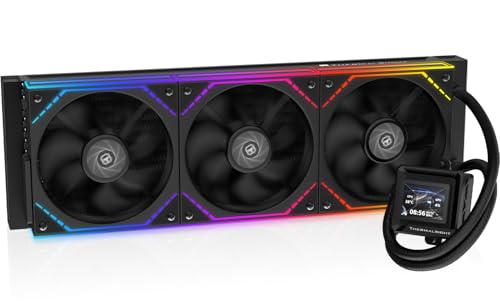
The Thermalright FW360 SE ARGB V2 stands out with a large 2″ LCD display, offering real-time stats and the ability to show custom images or animations via Thermalright’s software. The daisy-chain fan arrangement simplifies cable management by connecting three TL-M12Q fans in a single chain. The cooler’s pump is designed for efficient heat transfer while staying relatively quiet, and the system’s pre-applied thermal paste helps speed up installation. The kit aims to deliver strong cooling for demanding workloads with a visually engaging front panel.
Beyond raw cooling capacity, the LCD enables users to monitor temps and fan speeds at a glance. The integrated RGB lighting provides customization while the daisy-chain approach reduces clutter. This model suits enthusiasts who appreciate both performance and a distinctive display element within their build.
NZXT Kraken Plus 360

NZXT’s Kraken Plus 360 combines strong cooling performance with a highly customizable user experience. The 1.54″ square LCD on the pump can display system temps, animated visuals, or web integrations via NZXT CAM software, offering a unique approach to monitoring and personalization. The fans are designed for quiet operation and solid static pressure, ensuring effective heat removal from the 360mm radiator. NZXT’s CAM software provides ongoing control for profiles, lighting, and system diagnostics, making it a compelling pick for users who enjoy software-driven customization.
As a broader ecosystem option, Kraken Plus 360 users often appreciate the tight integration between hardware and software. The interface supports scenario-based lighting and performance profiles, which can optimize for gaming, streaming, or content creation without manual tweaks in BIOS or voltages. For those who value both performance and aesthetic software control, this model is a strong contender.
ARCTIC Liquid Freezer III Pro 360 ARGB – White

The ARCTIC Liquid Freezer III Pro 360 ARGB emphasizes efficient cooling with a bold focus on reliability and mounting versatility. The design includes native offset mounting tailored for Intel LGA 1851 and AMD AM5/AM4 platforms, helping ensure even heat distribution on the CPU. The P12 PRO fans balance performance with low noise, while the PWM pump maintains solid coolant flow. The white ARGB edition provides a clean, minimalist look that pairs well with white-themed builds and RGB ecosystems that support ARGB lighting effects.
ARCTIC’s solution is notable for robust thermal performance and a streamlined installation process. The offset mounting helps optimize contact at the hotspots, which can translate to lower CPU temperatures under sustained loads. For builders seeking a straightforward, high-thermal-capacity cooler with ARGB flair, this option is worth consideration.
Buying Guide: Key Considerations For A 360mm AIO Cooler
- Thermal performance vs. noise: Higher radiator surface area usually improves cooling, but you’ll want to balance fans and pump noise with your tolerance for sound during gaming or rendering.
- Socket compatibility: Ensure the cooler supports Intel LGA 1700/1851 and AMD AM4/AM5, plus any less common sockets in your build. Check mounting kits included in the box.
- Pump and flow design: A quiet, durable pump with a smooth flow is crucial for long-term reliability. Look for low dB(A) ratings and positive customer feedback on pump longevity.
- Cooling path and cold plate: Convex or flat cold plates with pre-applied paste can speed up installation and improve heat transfer efficiency at the CPU die.
- RGB and software ecosystem: If aesthetics matter, consider ARGB capabilities and software control (iCUE, NZXT CAM, or Thermalright’s software). Ensure compatibility with your motherboard lighting and control preferences.
- Wiring and installation: Daisy-chain fan configurations can reduce cable clutter. Verify hose length, tubing quality, and mounting hardware compatibility with your case and motherboard.
- Build goals: For quiet living room PCs, prioritize lower noise profiles and fan curves. For gaming rigs, push performance while managing temperatures at higher loads.
- Maintenance: Longer-term upkeep includes cleaning dust filters and headlights on fans. Consider models with serviceable components and easily replaceable fans.
- Future-proofing: If you plan to upgrade other components or CPUs, choose a cooler with robust warranty and broad socket support to minimize future replacements.