Best Backlit Wireless Keyboard for Mac: Top Picks for 2026
Finding a backlit wireless keyboard for Mac that pairs cleanly with Apple devices and stays easy on the eyes is essential for late-night work, coding sessions, or creative tasks. This guide highlights five top options, chosen for Mac compatibility, backlight quality, multi-device switching, and build durability. It’s ideal for MacBook users, iMac setups, or anyone seeking a seamless Mac-centric wireless keyboard experience. The table below summarizes why each pick stands out for different needs.
| Product | Best For | Why It Stands Out |
|---|---|---|
| ProtoArc KM100-A (Space Gray) | Multi-device Mac users | Full-size layout with numeric keypad, three device pairing, strong Bluetooth 5.1, rechargeable, USB-C charging |
| Macally Backlit Bluetooth Keyboard | Mac workflows with Mac-specific layout | Mac-optimized layout, crisp 3-level backlight, 107 keys, reliable 3-device Bluetooth |
| ProtoArc K110-A Aluminum Keyboard | Premium aluminum build fans | Ultra-slim unibody, aerospace-grade aluminum, three-device switching, USB-C charging |
| OMOTON Wireless Keyboard for Mac | Flexible connectivity | 2.4G and Bluetooth dual interfaces, dual-channel Bluetooth, easy device switching |
| SABLUTE KM61PRO | Colorful backlighting with Windows/Mac toggle | RGB backlights, separate Windows/Mac layouts, long standby via auto-sleep |
ProtoArc KM100-A Backlit Keyboard for Mac

The ProtoArc KM100-A is a full-size Mac-oriented wireless keyboard with a numeric keypad and rechargeable power. It supports up to three devices via Bluetooth 5.1 and does not require a USB dongle. Best for users who want a spacious layout that mirrors the classic magic keyboard but with backlighting for dim environments. A caution: Macs manufactured before 2013 or non-Mac operating systems may not be compatible, so verify device compatibility first.
- Mac-ready layout and Bluetooth 5.1
- Three-device switching with a mode button
- Soft white backlit with three brightness levels
Who it’s for: MacBook Pro/Air users who prefer a full-size keyboard with a numeric keypad and multi-device workflow. Choose this if you need a familiar key layout and easy switching without a USB dongle.
Macally Backlit Bluetooth Keyboard for Mac

This keyboard emphasizes a Mac-specific layout with a crisp backlit experience and a 30-foot wireless range. It uses Bluetooth to connect to up to three devices and offers 107 scissor-switch keys plus dedicated Mac shortcuts. Best for users who value native Mac ergonomics and a reliable three-device switch capability. Limitation: the backlight has three brightness levels and can be turned off when needed, but some users may prefer brighter options for very dark environments.
- MacOS-optimized layout
- Three-backlight brightness levels
- Bluetooth for up to three devices
Who it’s for: Mac users who want precise Mac-style shortcuts and a compact, reliable backlit experience. Choose this if you work across multiple Apple devices and want easy device swapping.
ProtoArc K110-A Aluminum Keyboard for Mac
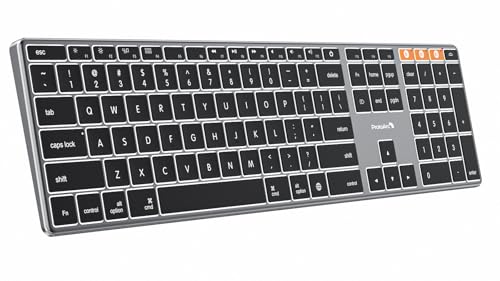
The K110-A is designed with a premium aluminum unibody and a slim profile. It targets Mac users seeking durability and a space-saving form without sacrificing the familiar Mac key layout. It supports Bluetooth 5.1 and three-device switching, with USB-C charging. Best for a sleek, professional desk setup. Caution: some users may find it less comfortable if they prefer a full-size keyboard with numeric keypad for data-heavy numeric entry.
- Aluminum unibody chassis
- Backlit Mac keys and 3-device switching
- USB-C charging
Who it’s for: Professionals who want a lightweight, durable Mac keyboard with modern aesthetics. Choose this if you value build quality and a low-thickness footprint.
OMOTON Wireless Keyboard for Mac

The OMOTON keyboard offers dual interface options: a 2.4G USB receiver and Bluetooth with BT1/BT2 channels for two devices. It is compatible with a wide range of Mac devices and file-syncs smoothly via Bluetooth or a wired-like 2.4G connection. Best for mixed Mac environments where easy switching between two devices is a priority. Limitation: the dual-interface requires careful connection order (USB A must be used with the Type-C port when using the Type-C option).
- 2.4G receiver plus Bluetooth
- BT1/BT2 for two devices
- Mac OS 10.10 or later compatibility
Who it’s for: Users who work across two Macs or want flexibility between Bluetooth and a dongle. Choose this if you need reliable multi-connection options without a dongle dongle dependency.
SABLUTE KM61PRO Backlit Keyboard and Mouse Combo

The SABLUTE KM61PRO combo pairs a compact, backlit keyboard with an RGB mouse. It supports Windows and Mac layouts, with a simple Fn key combo to switch between modes. It offers a long standby time courtesy of an auto-sleep feature and rechargeable batteries. Best for users who want a portable, color-changing setup that works across ecosystems. Limitation: RGB lighting may be more than some users need and could affect battery life in heavy use scenarios.
- 7-color backlighting with 4 brightness levels
- Mac and Windows layout support
- Auto-sleep, long standby
Who it’s for: Travelers or shared desks where a colorful, compact keyboard-mouse set is preferred. Choose this if you want quick Mac/Windows switching alongside a vibrant aesthetic.
Buying Guide: How To Choose The Right Backlit Mac Keyboard
Key questions help narrow choices to what matters most: device compatibility, connectivity, and ergonomic comfort.
What connectivity do you need?
Bluetooth is standard for most modern Mac keyboards. Look for models that support Bluetooth 5.0 or 5.1 for reliable pairing and longer range. Some keyboards offer a second option, like a USB receiver, for devices that lack robust Bluetooth.
How many devices will you connect?
If you work across multiple Apple devices, a keyboard with multi-device switching (3-device or more) offers smoother workflow. Ensure the keys for switching are clearly accessible and that the pairing is stable across devices.
How important is backlighting?
Backlight brightness levels affect usability in dim rooms. Three brightness levels are common and sufficient for most users. If you type in low-light environments often, you may prefer a keyboard with higher brightness or even RGB options for visibility.
Build quality and design matters?
Premium aluminum frames tend to be more durable and visually aligned with Mac aesthetics. For portability, consider slim, lightweight options with protected edge finishes and reliable keystroke feel, such as scissor-switch designs.
Is compatibility a concern?
Confirm that the keyboard supports Mac OS 10.12 or later, iOS, and iPadOS versions you use. Some models explicitly exclude Windows, Linux, or older Macs, which is critical for a seamless experience.
FAQ
- What is the best backlit keyboard for Mac with multi-device support?
Key candidates include models that offer three-device Bluetooth switching, enabling quick transitions between MacBook, iPad, and iMac.
- Do these keyboards require drivers?
Most backlit Mac keyboards rely on native Mac OS drivers and Bluetooth profiles; no additional driver installation is typically required.
- Can I use these keyboards with non-Mac devices?
Some models support Windows or other OS layouts, but features may vary. Check compatibility notes for each product.
- Is backlighting energy efficient?
Backlighting uses additional power, but most keyboards offer efficient LEDs and automatic sleep modes to extend battery life.
- Which keyboard is best if I value premium build?
Aluminum unibody designs (like the K110-A) typically offer superior durability and a sleek Mac aesthetic.
- Should I avoid keyboards with USB dongles?
If you rely on Bluetooth-only devices, a dongle-free model is preferable; however, a dongle can improve compatibility with older devices.