Best Bluetooth Transmitters for Hearing Aids: Clear Audio for Auracast and Classic Bluetooth
Finding the right Bluetooth transmitter for hearing aids means matching two needs: compatibility with Auracast-enabled devices and reliable connection for everyday TV viewing, gaming, or travel. This guide focuses on transmitters that support Auracast or offer strong general Bluetooth performance, with emphasis on ease of use for hearing-aid users. The top picks below are suited for different listening environments, from home theaters to airplanes. A quick buyer table follows to highlight who each product best serves.
| Product | Best For |
|---|---|
| Avantree Audikast 4 | Auracast and classic Bluetooth users, future-ready setups |
| HomeSpot BA210 v2 | Hearing aid users and multi-device environments |
| SOOMFON Bluetooth Transmitter | Dual-headphones watching with simple setup |
| 1Mii B06TX | Budget-friendly, easy TX with multiple inputs |
| Avantree Audikast 4HA | Auracast-enabled hearing aids, private TV listening |
Avantree Audikast 4

Best for both Auracast and classic Bluetooth users, this transmitter supports Auracast-enabled devices and regular Bluetooth headphones, with optical and AUX outputs for TV and media players. It is designed to be future-ready with upgradeable firmware. Important: verify your TV has an Optical (TOSLINK) or 3.5 mm AUX output before buying, as HDMI-only TVs are not supported. This model is ideal for hearing aid wearers who want flexibility across devices and listening modes.
Who this is for: hearing aid users who want Auracast compatibility and a single device that can also pair with standard Bluetooth headphones. Why selected: strong Auracast support, dual listening modes, and optical/AUX outputs for versatile TV setups. Caution: some TV setups with only HDMI outputs will not work; check output options first.
HomeSpot BA210 v2 Auracast Transmitter

Best for hearing aid users seeking Auracast broadcast audio with flexible configuration. It supports LC3, aptX Lossless, and aptX HD, with both Optical and 3.5mm inputs. A desktop app (QK CastTool) lets you adjust broadcast parameters, which is helpful when tuning audio for different hearing devices. This transmitter is a strong choice for users who want precise control over Auracast settings and high-quality audio.
Who this is for: hearing aid users who value fine-tuning of broadcast audio and high‑fidelity streaming. Why selected: Auracast broadcasting options and a companion app for configuration. Caution: may be more complex to set up for casual users due to the extra settings.
SOOMFON Bluetooth Transmitter for TV

Best for dual-headphone listening with simple operation. This 3-in-1 transmitter supports TV to two headphones simultaneously and provides an LCD display for status. It offers a long range of up to 30 meters under ideal conditions and includes convenient built-in volume controls for devices without their own, such as some AirPods. Suitable for families who want to watch together without disturbances.
Who this is for: households needing dual connections and straightforward controls. Why selected: reliable dual-link capability and visible status indicator. Caution: actual range can vary with walls and interference; performance may decline in crowded spaces.
1Mii B06TX Bluetooth 5.3 Transmitter

Best for upgrading older TVs to Bluetooth listening on a budget. This transmitter offers multiple input options (AUX, RCA, Optical, Coaxial) and supports aptX Low Latency for reduced audio delay. It supports dual-link and is a plug-and-play option for users seeking an affordable entry into wireless listening without replacing their TV or receivers.
Who this is for: cost-conscious users needing easy TX with wide input compatibility. Why selected: low-latency options and broad input support. Caution: does not include a receiver built-in, so you’ll need compatible headphones or speakers to pair.
Avantree Audikast 4HA
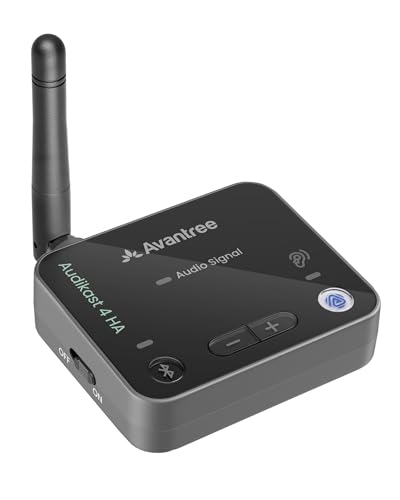
Best for Auracast-enabled hearing aids seeking private TV listening with direct streaming. The Audikast 4HA is designed specifically for Auracast hearing aids shown in product images, offering private listening at the user’s chosen volume. It uses Optical or AUX connections and supports firmware upgrades for long-term compatibility. Suitable for individuals who want a tailored Auracast experience with hearing aid devices.
Who this is for: users with Auracast-enabled hearing aids requiring direct TV audio streaming. Why selected: dedicated Auracast compatibility and private listening control. Caution: check whether your hearing aid model is listed as Auracast-enabled in the product images before purchasing.
Buying Guide: Key Considerations for Bluetooth Transmitters and Hearing Aids
How to choose the right transmitter for Auracast vs. classic Bluetooth
Identify whether your hearing aids support Auracast. If not, a classic Bluetooth transmitter may still work with your headphones or speakers. Auracast-enabled devices often require compatibility checks with the transmitter’s broadcast mode to ensure secure pairing and audio quality.
What TV outputs do you have?
Many modern TVs provide Optical (TOSLINK) or 3.5 mm AUX outputs. If your TV offers only HDMI or HDMI ARC, you may need a separate adapter or a different model that supports HDMI-compatible inputs. Optical and AUX are the most universally supported and simplest to configure.
Latency and synchronization
Low-latency codecs like aptX Low Latency help prevent lip-sync issues when watching TV or video. If you frequently watch content with dialogue or fast-paced scenes, prioritize a transmitter that explicitly mentions low latency and supports your devices’ codecs.
Multi-device use and pairing convenience
Consider whether you need to pair two devices at once. Some models offer dual-link or multi-point pairing, which is useful for sharing TV audio with a partner or using two hearing aids. Look for automatic reconnect features for hassle-free use after setup.
Firmware updates and future compatibility
Transmitters that offer firmware upgrades help maintain compatibility with evolving Auracast standards and new hearing aid models. If future-proofing is important, select a model with upgrade options via USB-C or similar.
Ease of setup and control
Simple plug-and-play models suit casual users, while others provide companion apps for fine-tuning audio, broadcast names, or volume settings. If you value control without complexity, prioritize devices with clear on-device indicators and straightforward pairing steps.
Inline cautions and limitations
Always verify device compatibility with your specific TV outputs and hearing aid model. Some products may require specific cables or adapters, and not all TVs support every input type. If you rely on a specific hearing aid firmware, confirm Auracast support and required app features before purchase.
FAQ
- What is Auracast, and do I need it for my hearing aids?
Auracast is a new standard that broadcasts audio to compatible hearing aids and devices. If your hearing aids support Auracast, using an Auracast-enabled transmitter can improve compatibility and convenience. If not, a classic Bluetooth transmitter will still work with compatible headphones or speakers. - Which TV outputs are best for these transmitters?
Optical (TOSLINK) and 3.5 mm AUX are widely supported. HDMI-only TVs require a model that explicitly supports HDMI or requires adapters. Always check your TV’s audio output options before buying. - Can I pair two hearing aids or two headsets at once?
Many models offer dual-link or multi-device pairing, enabling two listening devices simultaneously. This is useful for sharing TV audio or listening with a second listener. - Will these transmitters create noticeable audio latency?
Some models support low-latency codecs like aptX Low Latency. Look for explicit latency specs if you are watching video where lip-sync matters. - Do these require special software to work with hearing aids?
Some transmitters offer companion apps for configuration, but many are plug-and-play. If you need advanced tuning, select a model with a dedicated app or detailed on-device controls. - How important are firmware updates?
Firmware updates help maintain compatibility with new Auracast devices and improve performance. Choose models that provide routine updates via USB-C or similar.