Best Bluetooth Transmitter for PC: Top 5 USB Adapters for Smooth Wireless Connectivity
If you need a reliable Bluetooth transmitter for your PC, these USB dongles provide easy plug‑and‑play setup, broad compatibility, and strong range. The best picks are suited for different buyers: casual desktop users need solid everyday connectivity; gamers benefit from low latency and stable links; and professionals may prioritize extended range and multi‑device feeding. Below, find five top options with clear pros, who they’re best for, and any notable limitations.
| Product | Best For | Key Benefit |
|---|---|---|
| TP-Link UB500 | General PC users | Bluetooth 5.4 with faster speeds and broader range |
| TP-Link UB500 Plus | Power users seeking longer range | Bluetooth 5.3 with extended coverage |
| UGREEN USB Bluetooth 6.0 | Multi‑device setups | Latest 6.0 tech with up to 5 devices connected |
| Techkey Long Range 5.3 | Distance‑sensitive tasks | Class 1 range up to 328 ft / 100 m |
| ASUS USB-BT500 | Budget‑friendly upgrade | Bluetooth 5.0 with broad backward compatibility |
TP-Link USB Bluetooth Adapter UB500 — Bluetooth 5.4

Best for: Everyday PC use and stable audio/video streaming. This dongle offers Bluetooth 5.4 plus EDR for faster data transfer and improved range, making it suitable for keyboard, mouse, headphones, and speakers. It remains backward compatible with older Bluetooth versions for legacy devices. The device is plug‑and‑play on supported Windows versions, reducing setup steps for most users.
Why selected: It balances speed, range, and compatibility in a compact design. EDR and BLE support help optimize power use for longer sessions. Caution: Real‑world range varies by environment and interference from Wi‑Fi networks or walls.
TP-Link UB500 Plus — Bluetooth 5.3 Long Range

Best for: Users needing improved coverage in rooms with multiple devices. UB500 Plus leverages Bluetooth 5.3 and EDR to deliver faster speeds and broader coverage than earlier versions, making it suitable for dense device environments. It maintains plug‑and‑play simplicity for Windows systems.
Why selected: The enhanced range supports more flexible desktop layouts. Limitation: It remains Windows‑centric and may not work with non‑Windows systems without driver considerations.
UGREEN USB Bluetooth 6.0 Dongle for PC

Best for: Multi‑device environments where several Bluetooth peripherals connect concurrently. This dongle uses Bluetooth 6.0 with backward compatibility to 5.x standards and supports up to five devices simultaneously, with caveats for same‑type audio devices.
Why selected: The 6.0 protocol can improve data throughput and efficiency, which is beneficial for high‑quality audio and rapid peripheral pairing. Caution: If several similar audio devices are used at once, only one may play audio at a time.
Techkey Long Range USB Bluetooth 5.3 Adapter

Best for: Users who need extended range for desktop setups across larger rooms or studios. This adapter uses Class 1 technology and a longer antenna to push range up to 328 ft in open areas, with reduced interference noted in typical environments.
Why selected: Long‑range capability helps avoid dead spots and lag in expansive workspaces. Caution: Actual distance depends on obstacles and interference; not all environments reach the stated maximum.
ASUS USB-BT500 USB Adapter
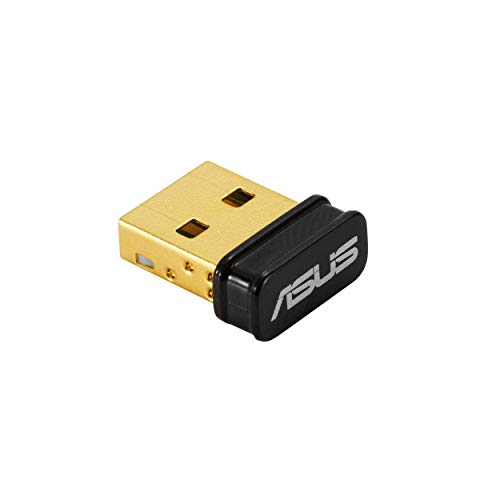
Best for: Budget‑conscious buyers seeking a straightforward Bluetooth 5.0 upgrade for PC. Compatibility is strong across Windows versions, and the small form factor makes it easy to move between devices.
Why selected: It offers robust backward compatibility with older Bluetooth generations at a lower price point. Limitation: Features and performance align with Bluetooth 5.0 rather than the latest 5.3/5.4 standards.
Buying Guide: Choosing the Right Bluetooth Transmitter for PC
What to consider when selecting a Bluetooth dongle for PC
Compatibility: Check Windows versions supported and ensure the dongle is backward compatible with older Bluetooth devices you own. Some adapters advertise Windows only support.
Bluetooth version: Higher versions (6.0, 5.4, 5.3) offer faster data rates, lower power consumption, and better range. Consider 5.x family for most users; 6.0 is best for speed and multi‑device efficiency.
Range vs. environment: Long‑range dongles use Class 1 radios and external antennas. Real‑world distance depends on walls, interference, and Wi‑Fi networks.
Multi‑device pairing: If you plan to connect multiple peripherals simultaneously, look for adapters that advertise 5 devices or more. Note that same‑type devices (two speakers, for example) may compete for playback in some models.
Plug‑and‑play vs. drivers: Some devices require no driver installation, while others may need small drivers for full functionality. Verify Windows 11/10/8.1 support if you avoid manual installs.
How to install and optimize for best performance
- Plug the dongle into an available USB port on your PC.
- If prompted, install any recommended drivers or confirm driver updates from Windows Update.
- Pair your devices one at a time to minimize interference.
- Position the dongle away from large metal objects and routers when possible to reduce signal obstruction.
- Disable built‑in Bluetooth temporarily if you switch between devices to ensure a clean connection.
Frequently asked questions
- What is the difference between Bluetooth 5.4 and 6.0 for PCs?
- Do I need drivers for these dongles?
- Can I connect multiple audio devices at the same time?
- Will these dongles work with macOS or Linux?
- Is longer range always better?
- Do these devices affect latency for gaming?
Bluetooth 6.0 introduces newer optimization for data transfer and device management, with backward compatibility to earlier versions. It can offer faster throughput and better multi‑device handling in some layouts.
Many are plug‑and‑play on modern Windows versions, but some may require drivers for full functionality or on older systems. Check product pages for specifics.
Some adapters support multiple devices simultaneously, especially for non‑audio peripherals. If you plan to use multiple audio devices, verify the model’s stated concurrency and playback behavior.
Some models are Windows‑only. If you need compatibility with macOS or Linux, select a model that explicitly states cross‑platform support.
Longer range helps in larger rooms but may introduce more interference in crowded spaces. Consider the layout and environmental factors when selecting a model.
Bluetooth latency varies by device and usage. If gaming latency is critical, look for adapters that emphasize low latency and consider wired alternatives for ultra‑low delay needs.