Best Calculators for High School Students: Top 5 Picks for 2026
Finding the right calculator for high school needs can boost accuracy and confidence in math and science courses. This guide highlights five strong options, explaining who each model fits best and why it stands out. The selections mix scientific and graphing features to cover algebra, statistics, geometry, and calculus topics commonly taught in high school. Ideal buyers include students needing reliable scientific functions, teachers seeking classroom-friendly options, and parents buying durable, long-term calculators.
| Product | Best For | Why It Stands Out |
|---|---|---|
| Texas Instruments TI-30XIIS Black | Middle/High School Students | Reliable scientific functions and a 2-line display for entry and results. |
| Texas Instruments TI-84 Plus CE Color Graphing | Graphing and STEM courses | Color display, preloaded apps, and graphing versatility. |
| Texas Instruments TI-30XS MultiView | Hands-on practice with fractions and statistics | Multi-entry calculations and common math notation view. |
| Texas Instruments TI-84 Plus Graphics | Advanced graphing work | Cabri Jr geometry and multiple saved graphs. |
| YesBes 2 Pack Scientific Calculators | Budget-conscious buyers or classroom sets | Two-line display and 240 functions for wide coverage. |
Texas Instruments TI-30XIIS Black

Best for accurate scientific calculations in both classroom drills and homework assignments. It supports logs, antilogs, and a two-line display that shows your entry alongside the calculated result. This model handles one- and two-variable statistics and offers degrees, radians, and grads. It also supports scientific and engineering modes for more advanced topics. Choose this if you want a dependable scientific calculator without graphing features.
Caution: It lacks graphing capabilities, so it may be less suitable for courses that require visual function graphs or interactive geometry.
Texas Instruments TI-84 Plus CE Color Graphing
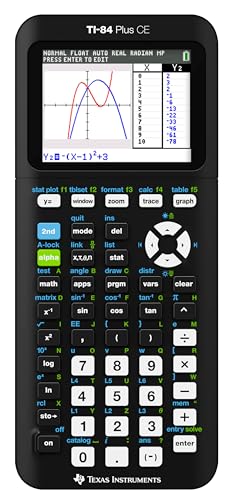
Best for students who need graphing and color interface in STEM or advanced math courses. It features a high-resolution backlit display, horizontal and vertical split-screen options, and preloaded apps and images. A rechargeable battery makes it practical for daily classroom use. Choose this if you want robust graphing, interactive features, and a broad app ecosystem. It is better for advanced algebra, trig, and pre-calculus work than basic scientific models.
Limitation: Graphing requires some learning time to maximize features, and the color interface may be distracting for some test scenarios.
Texas Instruments TI-30XS MultiView

Best for classrooms and independent study when multiple calculations need to be compared side by side. This model supports entering more than one calculation, keeps results visible, and includes a math print mode to view fractions, exponents, and exact square roots. It’s ideal for students who regularly work with fractions and mixed forms. Choose this if you want quick cross-checks and a clear view of results on the same screen.
Limitation: It does not graph, so students pursuing higher-level math that requires graphing will need an additional device.
Texas Instruments TI-84 Plus Graphics

Best for high school geometry, algebra, and pre-calculus with strong graphing capabilities. It ships with software and can handle up to ten graphing functions simultaneously. Advanced functions are accessible via pull-down menus, making complex tasks more manageable. Choose this if you need comprehensive graphing and analytical tools for visual learning and multi-function analysis.
Caution: The feature set is powerful; beginners may require time to learn the interface and menus.
YesBes 2 Pack Scientific Calculators

Best for budget-conscious buyers or classroom sets, offering a large two-line display and 240 functions for broad coverage. These capabilities support statistics, trigonometry, fractions, and more, with a design that emphasizes readability and portability. Choose this if you want multiple calculators at a lower price point for group use.
Caution: The build and key quality may be less premium than higher-end TI models, which could affect long-term durability in heavy use environments.
Texas Instruments TI-30XIIS White

Best for students who prefer a lighter color option while needing reliable scientific calculation features. This model mirrors the TI-30XIIS Black in functionality, including dual-line display, logs, antilogs, and multiple angle modes. It’s chosen for users who value consistency across TI’s non-graphing line. Use this if color choice matters for personal preference or classroom differentiation.
Limitation: Non-graphing design means it won’t satisfy needs for graphing-focused coursework.
Buying Guide: Key Considerations For High School Calculators
Which calculator type best fits your course load?
Graphing calculators are ideal for algebra, geometry, precalculus, and calculus, while scientific calculators cover statistics, basic algebra, and general math. For mixed coursework, a versatile scientific model with optional graphing can be the best balance.
Display and readability matters
Look for a clear two-line or multi-line display, large digit size, and backlighting for visibility in different lighting. A larger screen helps when fractions, exponents, and long expressions appear.
Battery life and power options
Rechargeable power is convenient, especially for daily classroom use. If batteries are preferred, check expected life and ease of replacing them.
Ease of learning and use
Consider the calculator’s interface, menus, and available learning aids. Simple models reduce setup time, while feature-rich models require some practice to master.
Durability and portability
Classroom and homework use benefit from sturdy construction and compact designs. A protective cover or case can extend life in school environments.
Storage, memory, and compatibility
Memory for graphs, calculations, and programs can save time. Ensure compatibility with your school’s test policies and curriculum requirements.
Budget considerations
Price often reflects feature set. For many students, a reliable scientific model is sufficient, while graphing functions justify higher costs for higher-level courses.
Frequently Asked Questions
What should I look for in a high school calculator?
Look for display readability, essential functions (scientific vs. graphing), battery type, durability, and compatibility with your courses.
Are graphing calculators necessary for all high school students?
Not always. Algebra and statistics often need scientific calculators, while geometry and calculus may require graphing capabilities.
Do calculators come with built-in learning tools?
Many graphing models include apps, preloaded software, and geometry tools to assist with learning and visualization.
Is a 2-line display better than a 1-line display?
Yes, a 2-line display helps track input and results simultaneously, reducing mistakes during long calculations.
Can I reuse a calculator across multiple years of coursework?
Yes, a durable scientific or graphing calculator can serve through many math and science courses, making it a good long-term investment.
Do these calculators affect test performance or policies?
Some tests have restrictions on graphing features. Check exam guidelines and school policy before selecting a model.