Best Camera and Speaker for Computer: Top 5 All‑In‑One USB Webcams
Find the right camera and speaker combo for clear video and audio during meetings, streams, or online classes. This guide highlights five USB webcams with built‑in microphones and speakers, chosen for reliability, ease of use, and compatibility with common platforms. Ideal for remote workers, educators, content creators, and casual streamers seeking a simple plug‑and‑play setup.
| Product | Best For | Why It Stands Out |
|---|---|---|
| EMEET C960 1080P Webcam | Home office workers; frequent video calls | Fixed focus, dual omnidirectional mics, automatic light adjustment; great balance of cost and performance. |
| Logitech C920x HD Pro PC Webcam | Professional meetings; streaming | Full HD 1080p/30fps, reliable autofocus and light correction; well‑established compatibility with Teams, Zoom, Meet. |
| EMEET C980 PRO 3‑in‑1 Webcam | Team meetings with integrated audio | 3‑in‑1 with 4 mics, 2 speakers; low‑light correction; strong for collaborative environments. |
| ROCWARE RC08 2K Webcam with Speaker | Small teams; multi‑person calls | 0.2s auto‑focus, Harman speaker, built‑in privacy cover; higher resolution for crisp video. |
| CofunKool 1080P 3‑in‑1 Webcam | All‑in‑one conference setups | Quad mic array, 3W speaker, privacy shield; solid for webinars and group chats. |
EMEET C960 1080P Webcam with Microphone

Features: Full HD 1080P with 5‑layer anti‑glare lens; fixed focus from 11.8 to 118.1 inches; built‑in dual omnidirectional mics; automatic light adjustment; privacy cover. Best for: home office users who want solid video quality with straightforward mic pickup. Limitation: fixed focus may require manual distance adjustments for very close or very far subjects.
Logitech C920x HD Pro PC Webcam

Features: Full HD 1080p/30fps video; automatic light correction and autofocus; designed for reliability with Teams, Google Meet, Zoom; compatible with Nintendo Switch 2’s GameChat mode. Best for: professionals who need dependable, widely supported video with easy setup. Limitation: 1080p at 30fps may feel less smooth for fast motion streams compared to higher frame rates.
EMEET C980 PRO 3‑in‑1 Webcam

Features: 1080P camera plus 2 speakers and 4 mics; auto low light correction; 60°‑98° wide angle; removes background noise with noise cancellation. Best for: small meeting rooms or classrooms needing built‑in high‑fidelity audio and clear video. Limitation: compact 60°‑98° view may require camera repositioning for larger groups or whiteboard captures.
ROCWARE RC08 2K Webcam with Speaker

Features: 0.2s ToF auto‑focus; Harman full‑range speaker; privacy cover; 1080p/2K style clarity; low‑illumination performance. Best for: users who value fast focus and integrated audio in a compact package. Limitation: some users may prefer external audio for higher volume or deeper bass in large rooms.
CofunKool Full 1080P 3‑in‑1 Webcam
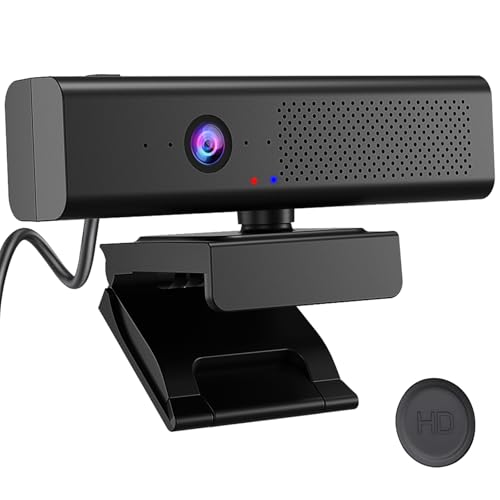
Features: 1080P video with 3W stereo speaker and quad‑mic AI noise reduction; magnetic privacy shield; left‑top mute button; designed for webinars, online classes, and streaming. Best for: educators and presenters needing a straightforward, all‑in‑one conferencing device. Limitation: built‑in mic array may not replace a dedicated USB microphone in noisy environments.
Buying Guide: Key Considerations For Choosing The Right Camera And Speaker
- Video quality: Look for 1080p resolution as baseline; higher frame rates matter for dynamic content or streaming. Consider low-light correction if you work in dim spaces.
- Microphone quality: Dual or multiple mics improve voice capture and reduce background noise. Noise cancellation helps in busy environments.
- Built‑in speakers: Decide if you need a single device with integrated speakers or if you will use external audio for larger rooms.
- Field of view: Narrow vs wide angle affects participation capture. Wider angles are better for groups; narrower for close‑up faces.
- Privacy features: A physical cover or magnetic shield protects privacy when not in use.
- Platform compatibility: Ensure compatibility with Zoom, Teams, Meet, and other conferencing apps; some models offer optimized modes for specific platforms.
- Plug‑and‑play ease: USB webcams with simple setup save time and reduce driver requirements.
- Portability and setup: Consider if you need a compact, travel‑friendly option or a desktop‑bound device with robust mounting options.
Frequently Asked Questions
- Do these webcams include microphones and speakers?
Yes. The listed models either include built‑in mics, speakers, or both, providing an all‑in‑one solution for video calls and streaming. - Is 1080p sufficient for professional meetings?
For most professional meetings and online classes, 1080p provides clear video. Some models offer 2K or enhanced low‑light performance for advanced needs. - Will these work with major video platforms?
Yes. They are designed for common platforms like Zoom, Microsoft Teams, and Google Meet. Some models also support specific modes for game chat or cross‑compatibility. - Should I buy a separate microphone or speaker?
If your space has background noise or you require richer audio, a dedicated microphone or speaker may offer better sound quality and coverage. - What about privacy concerns?
Many models include a physical privacy cover or magnetic shield to ensure camera is blocked when not in use. - Are these easy to install?
All listed devices are designed for plug‑and‑play use via USB, with minimal setup in most conferencing apps.