Best Clock in Machines for Employees: Top Time Clocks for Small Businesses
Finding the right clock in machine for employees starts with matching the system to your team size, work patterns, and payroll needs. This guide highlights five reliable options suited for small businesses, retail teams, or offices seeking accurate time tracking without heavy setup. Each choice is explained for who benefits most, plus potential drawbacks to consider before buying.
| Product | Best For | Key Benefit |
|---|---|---|
| uPunch HN1500 Starter Bundle | Small teams needing a complete, offline-ready system | Includes time clock, cards, rack, and ribbons for instant setup |
| NGTeco 4-in-1 Attendance Clock | Offices wanting multiple verification methods | Facial recognition, fingerprint, RFID, and PIN in one device |
| uAttend JR2000 | Cloud-based payroll and real-time data access | All-in-one cloud system with payroll integration options |
| Mokhike Time Clock | Offline-friendly, USB data export | 2-in-1 fingerprint and password with USB report export |
| NGTeco APP Time Clock | Mobile-friendly, remote scheduling | iOS/Android app with flexible payroll sync |
uPunch HN1500 Starter Time Clock Bundle

The uPunch HN1500 bundle is designed for small businesses that want a turnkey solution. It includes the HN3000 AutoAlign time clock, 100 time cards, a card rack, ribbon, and keys for straightforward operation. This setup is best for teams that prefer a traditional punch-card workflow with reliable hardware.
Best for: small teams that value an all-in-one physical setup with minimal software dependence. The AutoAlign feature helps reduce stamping errors in payroll records.
Selected because it provides a complete hardware-first package, ideal for immediate deployment without complex configuration. A potential limitation is that it relies on physical cards, which some shops may want to phase out in favor of digital time tracking.
NGTeco 4-in-1 Time Clock
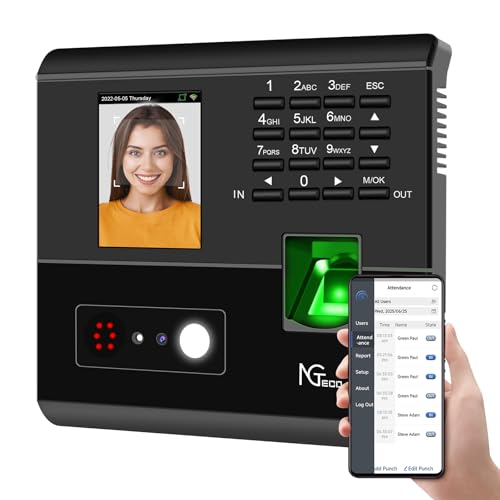
This model supports four verification modes—facial recognition, fingerprint, RFID card, and PIN—designed to prevent buddy punching and attendance disputes. It’s well-suited for offices seeking accuracy and enforcement with less manual supervision.
Best for: teams needing versatile verification methods in one device and real-time attendance management via a mobile app. A consideration is that some users may require a stable network setup to leverage remote reporting effectively.
uAttend JR2000 Biometric Time Clock

The uAttend JR2000 emphasizes cloud-based time tracking, with payroll tasks automated and real-time data access from any device. It’s a strong fit for businesses that want centralized control and smooth payroll workflows without onsite software maintenance.
Best for: organizations seeking cloud-enabled attendance with easy payroll integration. Limitation: depends on internet access for full functionality, which may require contingency planning in outages.
Mokhike Time Clock For Employees
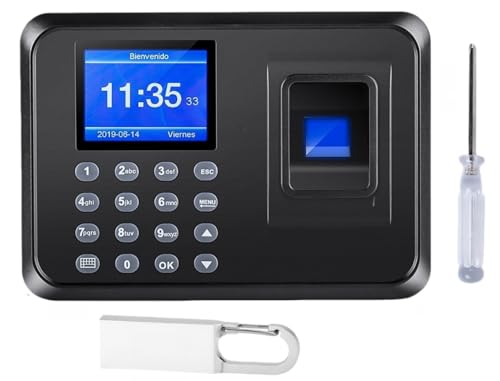
This clock offers 2-in-1 fingerprint and password punching, designed for small businesses that want secure, offline operation. It supports USB data export for simple payroll review and avoids monthly fees by staying offline.
Best for: teams needing a cost-effective, offline-ready time clock with easy data export. Limitation: USB export means manual transfer to the payroll system, which may be slower than automatic cloud sync.
TIMOZIA Time Clock With Dual-Zone Support

The TIMOZIA device covers six U.S. time zones and automates daylight saving adjustments. It uses a punch card system with 6 punches per day, and provides dual-color printing to indicate late or early departures. This makes it a strong pick for multi-location teams and precise daily tracking.
Best for: businesses with multiple sites across time zones or those needing automatic DST adjustments. Limitation: the screen and card system can require more manual monitoring than cloud-based options.
NGTeco Fingerprint & PIN Standalone Clock

This standalone model operates without WiFi or software, exporting data via USB with ready-to-use Excel reports. It’s scalable for growing teams and eliminates monthly fees, making it a practical offline option.
Best for: businesses that want a simple, independent clocking system with straightforward payroll export. Limitation: lacks cloud-based remote monitoring; on-site data management remains essential.
NGTeco APP Time Clock With Mobile Control
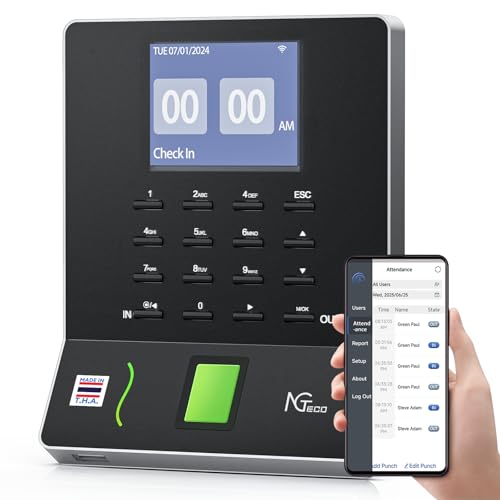
This model emphasizes an app-driven approach with real-time punch detection and flexible payroll export. It’s useful for teams that value mobile access and simplified shift management across multiple sites.
Best for: managers who need mobile attendance control and instant data sharing. Caution: app performance can depend on network quality and device compatibility.
Buying Guide: Key Purchase Considerations
- Verification methods: Choose biometric (fingerprint), card, PIN, or facial recognition based on your risk of buddy punching and privacy considerations.
- Connection type: Decide between offline devices (USB export, no internet) and cloud-based clocks (remote access, real-time reporting).
- Data export: Ensure the system exports to Excel, CSV, or payroll software and that formats align with your payroll provider.
- Multiple sites: If you manage several locations, a cloud solution with remote access can save administration time.
- Maintenance: Some bundles include ribbons, cards, and racks, reducing setup friction; others rely on digital data only.
- Future scaling: Look for systems that support more users and punch events as your team grows.
FAQ
- What is the simplest clock in solution for a small team?
An offline clock with USB data export or a bundled starter kit is typically easiest to deploy and maintain with minimal IT support.
- Do I need a cloud-based system for payroll integration?
Cloud-based systems often streamline payroll integration, but many offline clocks offer export formats compatible with payroll software.
- Can multiple verification methods reduce time theft?
Yes, devices offering biometric, RFID, and PIN verification can reduce buddy punching and improve attendance accuracy.
- Is it better to choose a device with a mobile app?
If you manage a remote or multi-site staff, a mobile app can provide real-time monitoring and easier scheduling across locations.
- What should I consider about data security?
Prefer systems with encrypted data transfer and secure cloud storage, especially when using facial or biometric verification.
- Are there any ongoing costs with these devices?
Some models advertise no monthly fees, while cloud-enabled options may require ongoing subscriptions for access to features and updates.