Best Clocks for the Blind: Clear Time at a Glance for Visually Impaired Users
Clear, accessible time-telling devices help independent living. This guide highlights five reliable talking clocks designed for blind or visually impaired users, seniors, or those with dementia. Each pick emphasizes large audio prompts, simple operation, and high-contrast controls. Best for: elderly users who rely on audible time, caregivers seeking straightforward gifts, and individuals needing minimal setup.
Summary Table
| Product | Best For | Key Benefit | Limitations |
|---|---|---|---|
| Cirbic Extra Large Talking Button Clock | Elderly, visually impaired | Very large button, high-contrast, date and time by voice | Basic features; limited customization |
| NADOBA Talking Clock for Blind Elderly | Blind users needing guided setup | Voice-guided setup, large button, adjustable volume | May require initial familiarization |
| Top Life Talking Clock | Seniors with Alzheimer’s or visual impairment | Clear English voice, date and time, single-button use | Brighter design may affect aesthetics |
| LAKXIUL Talking Button Clock | Low-vision users needing loud alerts | High-contrast, four voice levels, alarm feature | Button feel may vary by user |
| Top Life Talking Clock (Extra Loud) | Hard-of-hearing users needing high volume | Very loud 85 dB option, time and date spoken | High volume may be disruptive in quiet spaces |
Note: The table summarizes five strong options. Each product is described in detail below to help you compare features, accessibility, and suitability for different users.
Cirbic Extra Large Talking Button Clock

This clock features an extra-large, high-contrast button and a blue talking display. It announces current time with a push, and repeats to provide the current date. An alarm is included, with two voice settings (high and low). Best for: visually impaired users who rely on a single, easy-to-locate button and straightforward audio feedback. Limitation: relying on a single button may limit quick access to additional functions for some users.
Talking Clock for Blind Elderly – NADOBA

NADOBA’s model emphasizes a one-touch time announcement with a guided setup designed for blind users. It announces current time and date with clear North American English voice, and includes a large button plus volume control. Best for: users who benefit from audio-guided setup and tactile controls. Limitation: setup and navigation may still require initial assistance for some families.
Top Life Talking Clock (Neutral Accent)

Top Life’s clock provides the time and date with proper English grammar and a neutral American accent. It’s designed for elders and those with visual impairment, featuring a simple interface and a single prominent button. Best for: users who prefer a clean, straightforward auditory readout and clear day/date prompts. Limitation: the single-button design may feel limiting for users who want more quick-access features.
LAKXIUL Talking Button Clock
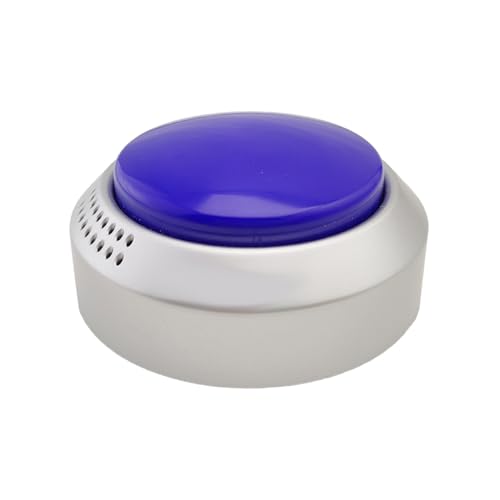
LAKXIUL emphasizes high contrast and a four-voice setting range, including super loud options, to aid users with hearing challenges. It repeats the current time and date and supports an alarm. Best for: users who need strong audible output and flexible voice levels. Limitation: some users may prefer a larger or more tactile control surface than the button layout provides.
Top Life Talking Clock – Extra Loud Time and Date
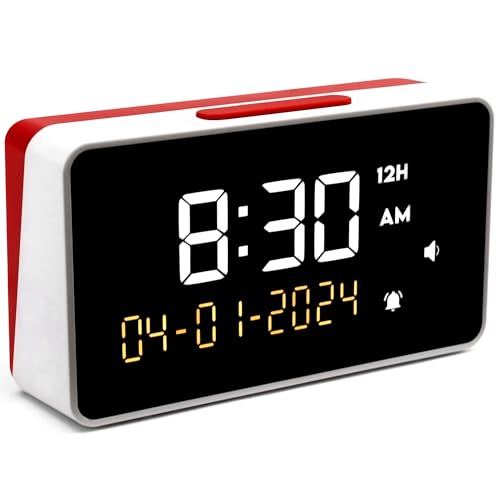
This model offers an extra loud 85 dB voice option, clearly providing time and date. It is ideal for users with significant hearing impairment or environments where sounds may be muted. Best for: hard-of-hearing individuals who need pronounced audio cues. Limitation: higher volume may not suit quiet bedrooms or shared spaces; consider using a lower setting when appropriate.
Buying Guide: Key Considerations For Choosing A Talking Clock
- Voice clarity and language: Look for models with clear North American English pronunciation and simple prompts for setting time, date, and alarms.
- Button size and accessibility: Extra-large buttons and high-contrast displays help users locate controls quickly.
- Volume control range: A broad volume range (including very loud options) supports users with varying hearing needs and noisy environments.
- Audiovisual balance: Some clocks announce time and date, while others add day-of-week or reminders. Choose based on which information is most useful.
- Setup simplicity: Guided voice setup or one-touch operation reduces the need for caregiver involvement.
- Alarms and reminders: Consider models with multiple alarms or customizable reminders for medications or appointments.
- Portability: Lightweight, pocket-friendly designs support travel or bedside use.
- Durability and battery life: While many are plugged in, some offer battery backups or portable options for on-the-go use.
How To Choose By Scenario
- Best all-around for seniors with limited vision: A model with large button, clear speech, and date/time readouts.
- Best for caregivers: A device with guided setup and reliable alarms that can be adjusted easily.
- Best for travel or on-the-go use: A compact unit that announces time clearly without requiring a wall outlet.
- Best for high-noise environments: A model offering very loud voice output or adjustable amplification.
FAQ
- Q: Do these clocks require Wi-Fi or an app? A: Most listed models operate independently with built-in voices and buttons; no Wi-Fi is required.
- Q: Can I adjust the volume easily? A: Yes, several models include a dedicated volume control or multiple voice levels.
- Q: Are these suitable for people with dementia? A: Yes, many models are designed for simple operation, clear prompts, and reliable reminders.
- Q: Is there a model with both time and date readouts? A: All five featured clocks announce both time and date, with some offering day-of-week as well.
- Q: Can these be used on a bedside table? A: Most are designed for bedside use, with a compact footprint and audible prompts suitable for sleeping environments.
- Q: Do these clocks include alarms? A: Yes, each model includes an alarm feature, and several offer multiple reminders or alarms.