Best Computers for CAD: High-Performance Choices for Design Professionals
For CAD work, you need a balance of powerful CPUs, capable GPUs, ample RAM, and fast storage. The following selections emphasize workstation-grade graphics, reliable multitasking, and space-efficient designs suited for design studios and home offices. Each option below is evaluated for 3D modeling, drafting, and rendering workloads, giving you credible performance across different budgets and form factors.
| Product | CPU / GPU Highlights | RAM / Storage | Form Factor |
|---|---|---|---|
| GMKtec M3 Ultra | Intel Core i7-12700H, Iris Xe Graphics | 32GB RAM, 1TB NVMe | Mini PC |
| Dell Precision Workstation PC | Core i5-9500, NVIDIA Quadro P620 | 16GB RAM, 1TB SSD | Desktop |
| Lenovo V-Series V15 | AMD Ryzen 7 7730U, Radeon Graphics | 40GB RAM, 1TB SSD | Laptop |
| PCSP Z4 G4 Workstation | Intel Xeon W-2133, Quadro M4000 | 64GB RAM, 512GB NVMe SSD + 2TB HDD | Desktop |
| HP Pro 400 G9 Mini PC | Intel CPU, integrated graphics | 16GB DDR5, up to 32GB, 256GB SSD | Mini PC |
Note: All models offer capabilities relevant to CAD workflows, with variations in GPU power, RAM capacity, and expandability. The selection below highlights five options optimized for professional drafting, modeling, and rendering tasks while maintaining practical everyday usability.
GMKtec M3 Ultra Mini PC Review
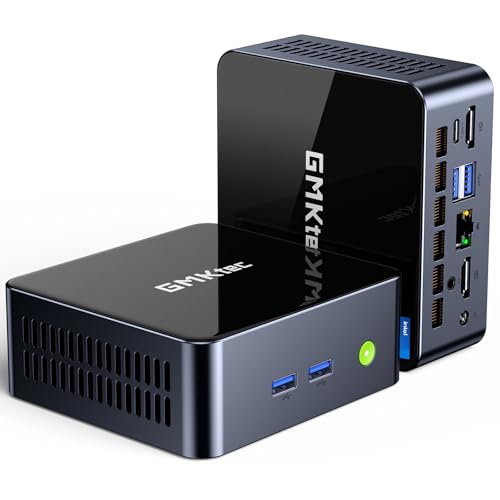
The GMKtec M3 Ultra combines compact design with serious CPU power. It uses the Intel Core i7-12700H, a 14-core (6 Performance + 8 Efficient), 20-thread processor that can boost to 4.70 GHz. With 24 MB Intel Smart Cache and a 45W base power, it offers strong multitasking and fast responsiveness for CAD workstations on a small footprint. The integrated Intel Iris Xe Graphics supports smooth navigation through complex spreadsheets and presentations, and can handle multiple 4K displays. The system ships with 32GB DDR4 RAM and a 1TB NVMe SSD, expandable to 64GB RAM and up to 4TB storage, making it versatile for large CAD projects.
Dell Precision Workstation PC

Enterprise-grade performance is emphasized with this Dell Precision 3431 entry. Powered by an Intel Core i5-9500 (9th Gen) with a NVIDIA Quadro P620 GPU, it focuses on reliability for CAD, 3D modeling, and multi-display setups. The system includes 16GB DDR4 RAM and a 1TB SSD, delivering fast boot and file access for professional workflows. This configuration is well-suited for design professionals who need a dependable workstation for drafting, visualization, and light rendering in Windows 11 Pro environment. The optimized memory and storage support rapid project load times and efficient multitasking in CAD suites.
Lenovo V-Series V15 Business Laptop

The Lenovo V15 brings portability without sacrificing core CAD capabilities. It features an AMD Ryzen 7 7730U processor (8 cores, 16 threads) with Radeon Graphics and a strong memory/storage package: 40GB RAM and 1TB SSD. The 15.6″ FHD display provides clear visuals for drafting and modeling, while the CPU and GPU support more demanding CAD tasks when working on the go. This configuration is appropriate for mobile CAD work, field design review, and on-site modeling, offering an excellent balance of performance, battery life, and mobility.
PCSP Z4 G4 Workstation Tower

The PCSP Z4 G4 Workstation is engineered for CAD professionals needing robust performance and expansive memory. It features an Intel Xeon W-2133 processor (6-core, up to 3.9GHz) paired with 64GB DDR4 RAM, a 512GB NVMe SSD boot drive, and a 2TB HDD for data storage. The NVIDIA Quadro M4000 8GB GPU is designed to optimize rendering and design workloads across multiple displays. This workstation is well-suited for heavy CAD tasks, simulations, and rendering pipelines, offering dependable professional-grade performance in a tower form factor.
HP Pro 400 G9 Mini PC

The HP Pro 400 G9 Mini PC offers a compact, quiet design with reliable business performance. It uses an Intel-based CPU (Celeron in some models) with integrated graphics, but supports up to 32GB DDR5 RAM and up to a 4TB PCIe M.2 SSD, making it capable of handling CAD software at modest scales while occupying minimal desk space. The device is suitable for lightweight CAD tasks, design review, and on-site design adjustments where portability and a small footprint are prioritized. It also supports triple 4K displays for expanded CAD workspace.
Buying Guide: Key Considerations For CAD Performance
- CPU Power and Cores: CAD workloads benefit from higher clocks and more cores, especially in modeling and rendering. Look for CPUs with multiple cores and strong single-thread performance, such as modern Intel or AMD options, to reduce wait times in large assemblies.
- GPU Capability: Professional CAD workflows often rely on GPUs for viewport performance and rendering. Quadro and RTX-series GPUs offer certified drivers for CAD software and improved stability with complex models. If a workstation-class GPU isn’t feasible, a capable consumer GPU with ample VRAM is the next best choice.
- RAM and Expandability: 16GB is a baseline for light CAD tasks; 32GB or more is recommended for large assemblies, complex simulations, and rendering. Check upgrade paths: RAM capacity and M.2 NVMe storage options.
- Storage Speed and Capacity: Fast NVMe SSDs speed up boot times and project loading. Consider 1TB+ SSDs for active CAD projects, plus additional HDDs for archiving large datasets.
- Display and Multi-Display Setup: CAD often benefits from multiple monitors or a large high-resolution display. Ensure the system supports at least two or three displays with adequate video outputs and ports (HDMI, DP, USB-C).
- Portability vs. Power: Desktops and workstations offer maximum performance and upgradeability, while mini PCs and laptops provide mobility. Choose based on whether on-site work or studio-based tasks dominate your workflow.
- Reliability and Support: Workstations with professional-grade GPUs and Xeon processors tend to offer longer-term driver support and hardware reliability, essential for professional environments.
- Software Certifications: If you rely on specific CAD software, verify hardware certifications and driver compatibility to ensure stability and optimal performance.
- Thermals and Noise: Powerful CAD systems can run hot. Consider hardware with good cooling solutions and noise levels suitable for your workspace.