Best External SSD for PS4: Fast, Reliable Storage for Your Console
Looking for an external drive to expand your PS4 storage with faster load times? This guide highlights top external SSDs that work well with PS4, focusing on speed, reliability, and ease of use. Best for gamers who want quicker transfers and more space without sacrificing performance. The selections cover compact, portable options and higher-capacity drives for expanding game libraries. Below, compare five solid SSD choices and a practical buying guide to help you pick the right one for your setup.
| Product | Capacity | Interface | Best For |
|---|---|---|---|
| BUFFALO External SSD 1TB – PUT1.0U3B | 1 TB | USB-C / USB-A / USB 3.2 | On-the-go storage with fast transfers for PS4 and PC |
| BUFFALO External SSD 1TB – PG1.0U3B | 1 TB | USB-C / USB-A / USB 3.2 | Compact, value-oriented upgrade for PS4 games |
| Seagate Game Drive for PS4/PS5 2TB | 2 TB | USB 3.0 | Large capacity storage for PS4 game vault |
| WD_BLACK 1TB P40 Game Drive SSD | 1 TB | USB 3.2 Gen 2×2 | High-speed loading and console compatibility |
| Avolusion X1 1TB USB 3.0 Portable | 1 TB | USB 3.0 | Pre-formatted, plug-and-play PS4 ready |
BUFFALO External SSD 1TB – PUT1.0U3B

The BUFFALO PUT1.0U3B is a compact 1TB external SSD designed for versatile use with PS4, PS5, Windows, and Mac. It supports USB-C and USB-A connections, delivering up to USB 3.2 speeds for quicker data transfers and game loading. Best for gamers who want a dependable, portable SSD that can move between consoles and computers without hassle. This drive is best for players who need reliable, on-the-go storage with straightforward setup.
Who it’s best for: players who value portability and compatibility across devices. Why selected: strong balance of capacity, speed, and universal connectivity. Caution: actual transfer speeds depend on host device and USB interface; performance varies by system configuration.
BUFFALO External SSD 1TB – PG1.0U3B
The PG1.0U3B variant emphasizes a value-oriented, compact design with robust heat management and a lightweight footprint. With USB-C/USB-A compatibility and USB 3.2 speeds, it’s well-suited for PS4 users who want a slim, easy-to-carry SSD for expanding their game library. Best for travelers and casual gamers who want quick plug-and-play storage without extra bulk.
Who it’s best for: budget-conscious players seeking portable SSD performance. Why selected: compact design coupled with solid transfer speeds. Caution: long-term reliability figures aren’t provided in product listings; real-world performance may vary.
Seagate Game Drive for PS4/PS5 2TB
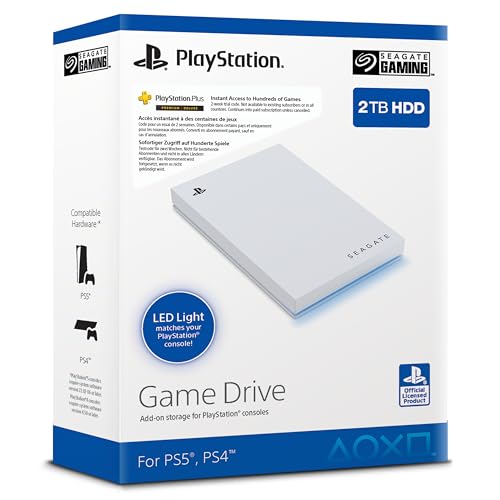
Seagate’s Game Drive offers a 2TB capacity designed to store and play PS4 and PS5 titles. It is officially licensed for PlayStation systems, with simple setup and plug-and-play operation. Best for players who need substantial space for a growing library and want a drive that’s ready to go with minimal configuration. Limitations: 2TB may still require category-specific formatting or organization for some users depending on system software updates.
WD_BLACK 1TB P40 Game Drive SSD

WD_BLACK P40 combines high-speed performance with a compact design, featuring USB 3.2 Gen 2×2 for speeds up to 2,000 MB/s (theoretical). It’s compatible with PlayStation consoles and is aimed at gamers who want near-internal SSD load times. Best for: players seeking top-tier transfer speeds to minimize load times. Caution: performance depends on host device capabilities and may vary in real-world use.
Avolusion X1 1TB USB 3.0 Portable External

Avolusion X1 offers 1TB of pre-formatted capacity with USB 3.0, providing a straightforward plug-and-play setup for PS4. It’s designed for quick installation and portability, with the aim of streamlining game storage expansion. Best for: PS4 owners who want a readily formatted option that minimizes setup time. Caution: USB 3.0 interfaces may not match USB 3.2 speeds on all devices, potentially limiting peak performance.
Buying Guide: Key Considerations For PS4 External Drives
- Capacity and growth: Decide between 1TB for a modest library or 2TB+ if you plan to store many games and downloadable content.
- Interface and speed: USB 3.0 is common and compatible with PS4; USB 3.2 Gen 2×2 offers higher theoretical speeds but depends on PS4 model and cables used.
- Form factor and portability: Compact drives are easy to carry; larger drives may offer more durability and better heat management in stationary setups.
- PS4 compatibility: Look for drives explicitly marketed as PS4/PS5 compatible or officially licensed, to ensure smooth operation with console firmware.
- Pre-formatted and setup: Some drives come pre-formatted for game consoles, enabling plug-and-play without manual formatting.
- Durability and heat: Slim designs can still handle long gaming sessions, but consider drives with efficient heat dissipation for stability.
- Brand and support: Reputable brands often provide better warranty coverage and compatibility updates.
FAQ
- Can I use any external SSD with PS4?
- In most cases, PS4 supports USB external drives formatted for gaming. Check compatibility listings and ensure the drive is USB-based and properly formatted for the PS4.
- What size drive is best for PS4?
- Common choices are 1TB for a balanced library, or 2TB for larger game collections. Larger capacity reduces the need to swap games frequently.
- Do SSDs load games faster on PS4 than HDDs?
- Yes, SSDs generally offer faster transfer speeds and improved load times over HDDs, though actual gains depend on the PS4 model and game.
- Is it safe to transport external SSDs with a PS4?
- Yes, use a protective case and avoid extreme temperatures or drops. Proper cable management helps prevent accidental disconnections during use.