Best Extra Storage for Switch: Top MicroSD Express Picks for Nintendo Systems
Yes — expanding your Nintendo Switch storage is a smart move for more games, save data, and smoother performance. This guide highlights five microSD cards that are most relevant for Switch users seeking extra storage, including those compatible with Switch 2 and other models. If you own a Nintendo Switch 2, prioritize microSD Express cards for faster access speeds; older Switch models may still use standard microSDXC cards. The table below compares the core options to help you choose quickly.
| Product | Capacity | Best For | Notes |
|---|---|---|---|
| Samsung microSD Express Card – 256GB for Nintendo Switch 2 | 256GB | Switch 2 users needing Express speeds | Express standard required for Switch 2 |
| SanDisk 256GB microSDXC-Card, Licensed for Nintendo-Switch | 256GB | Switch 1, OLED, Lite models | Not compatible with Switch 2 |
| TEKNOSTONE Gaming 128GB MicroSDXC | 128GB | Budget gaming on Switch 1 | Up to 100MB/s read |
| GIGASTONE 256GB Micro SD Card, Gaming Plus | 256GB | Switch 1 and related devices | Not compatible with Switch 2 |
| SUNEAST microSD Express 1TB Memory Card | 1TB | Heavy game libraries and 4K-ready devices | Express speed for Switch 2 |
Samsung MicroSD Express Card – 256GB (Nintendo Switch 2)

Best for Switch 2 owners who need Express speeds. This card uses the microSD Express standard essential for Nintendo’s newer hardware, delivering faster load times and smoother gameplay. It is explicitly designed for Switch 2 compatibility, making it the top choice when performance matters for larger digital libraries or frequent updates. Choose this if you own Switch 2 and want maximum speed from your expanded storage.
Who it suits: Switch 2 gamers seeking official-leaning Express performance and reliable expansion without tradeoffs in speed. Best for players who install many large games and crave quick loading times that minimize waiting during transitions between titles.
Limitation: Not compatible with older Switch models or non-Express cards. If you operate a Switch 1 or OLED without Express support, this card may not work as intended.
SanDisk 256GB MicroSDXC Card – Licensed for Nintendo Switch

Best for Switch 1, OLED, and Lite owners who want solid, reliable performance with high read speeds. This card is officially licensed for Nintendo Switch and provides read speeds up to 100MB/s and write speeds up to 90MB/s, supporting quick game launches and smooth in-game loading. It’s a solid, ready-to-use upgrade for users who don’t need the Express standard.
Who it suits: Players with Switch 1 or OLED seeking dependable, official-licensed storage without the need for Express compatibility.
Limitation: Not compatible with Nintendo Switch 2. If you upgrade to a Switch 2 later, you’ll want Express-capable cards for best results.
TEKNOSTONE Gaming 128GB MicroSDXC
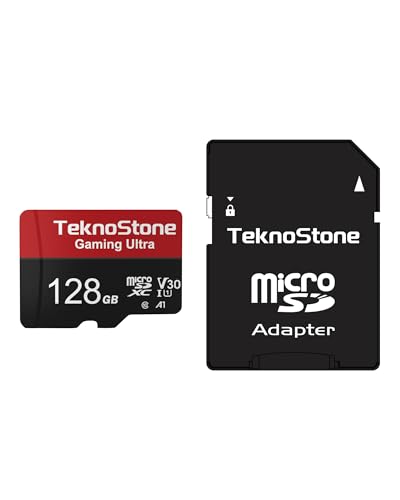
Best for budget-minded Switch 1 gamers who still want solid performance. Teknostone emphasizes gaming-optimized speeds up to 100MB/s read with UHS-I, plus A1-rated performance for smoother app launches. It includes a full-size SD adapter for use with laptops and other devices, which adds versatility beyond handheld consoles.
Who it suits: Switch 1 players or those who want a cost-effective option with easy compatibility across devices. Avoid this if you specifically need Switch 2 Express speeds, as this model targets older hardware.
Limitation: Not compatible with Switch 2; newer models benefit more from Express cards for peak performance.
GIGASTONE 256GB Micro SD Card, Gaming Plus

This option is well-suited for Switch 1 owners who want a high-capacity card with fast read/write performance. The Gaming Plus line emphasizes gaming-oriented speeds with up to 100MB/s read. It comes with an adapter for use in computers, which can be convenient for managing large game libraries or transferring data.
Who it suits: Switch 1 players needing a reliable, larger-capacity card with broad compatibility. Choose this if you want an all-in-one option with included adapter. Limitation: Not compatible with Switch 2; if you upgrade, consider Express-compatible models for best performance.
GIGASTONE 256GB microSD Express Card (Designed for Switch 2)

Best for Switch 2 users who want peak Express performance. This card is built with microSD Express support to maximize data transfer, enabling faster game loading and smoother open-world experiences on Switch 2. The data sheet highlights read/write speeds that aim to reduce in-game stutters and delays during large-title loads.
Who it suits: Switch 2 owners prioritizing express speeds and compatible with the newer standard. Limitation: Availability and price considerations may vary; ensure model claims Express compatibility to avoid non-Express performance gaps.
SUNEAST microSD Express 1TB

Best for heavy digital libraries and future-proof storage. The SUNEAST card offers up to 900 MB/s read and 620 MB/s write, with UHS-I U3 and A1 ratings. It is designed for device families that support microSD Express, including Switch 2 and other modern consoles, laptops, and cameras. It is ideal for gamers who install many titles and capture gameplay footage in high resolution.
Who it suits: Power users with large game collections and 4K-friendly workflows. Limitation: 1TB capacity can be overkill for casual players; ensure you actually need that much space and verifySwitch 2 compatibility before purchase.
Buying Guide
What should you look for when buying extra storage for Switch? Consider capacity, speed class, compatibility, and future-proofing. If you own Switch 2, prioritize microSD Express cards for maximum performance. For Switch 1, microSDXC with strong read/write speeds remains a solid choice.
- Capacity: Start with 128GB for a few games or 256GB for a larger library. 1TB is best for large, multi-title collections and media storage.
- Speed: For Switch 2, microSD Express is recommended. Look for read speeds of 100MB/s or higher and U3 designation for reliable performance during gameplay.
- Compatibility: Check model compatibility (Switch 2 vs. Switch 1). Some cards explicitly state “Not compatible with Switch 2.”
- Adapter availability: Some cards come with adapters to use in laptops or cameras; this can help data management across devices.
- Reliability: Choose trusted brands with clear licensing or official Nintendo endorsements when possible to ensure consistent support and compatibility.
Frequently Asked Questions
- What is the difference between microSD and microSD Express?
– microSD Express supports faster data transfer suitable for Switch 2 and newer devices, improving load times and game performance. - Can I use a standard microSD card with Nintendo Switch 2?
– No. Switch 2 requires microSD Express to operate at full performance. - Is 256GB enough for most Switch players?
– For many players, 256GB strikes a balance between capacity and cost, but power users may prefer 512GB or 1TB. - Will a larger card improve game load times?
– Not directly; load times depend on the card’s read speed and the device’s data handling, but higher speeds help stutter-free loading. - Should I format the card before use?
– Yes. Follow Nintendo’s guidance to format the card for optimal performance and game compatibility. - Do all microSD cards come with adapters?
– Some do; adapters are common for easier data transfer with laptops or cameras. Check product details for adapter inclusion.