Best GPS Systems for Trucks: Custom Routing and Real-Time Tips
If you drive a commercial vehicle, you need a GPS built for trucks. This guide highlights five reliable options with custom routing, hazard alerts, and up-to-date maps. Best for long-haul drivers, fleet operators, and owner-operators who prioritize safe routing and easy loading-dock access. The table below compares core features to help you choose quickly.
| Product | Best For | Key Benefit |
|---|---|---|
| Garmin dezl OTR720 | Large-cab drivers | 7″ high-res display with custom truck routing and BirdsEye satellite imagery |
| Garmin Dezl OTR620 | Professional truckers on the go | 6″ touchscreen with size/weight-based routing and loading-dock insights |
| Navmoir Truck GPS Navigation 9″ | Truck and RV drivers | Custom routing by size/weight with lifetime map updates |
| UNSXHIT 9″ Truck/Car GPS | Multi-vehicle households or mixed fleets | 9″ display with lifetime map updates and voice guidance |
| Garmin dezl OTR610 | Budget-minded truckers | Large 6″ display with custom routing and Birdseye imagery |
Garmin dezl OTR720: 7-Inch Bridge-Ready Truck GPS
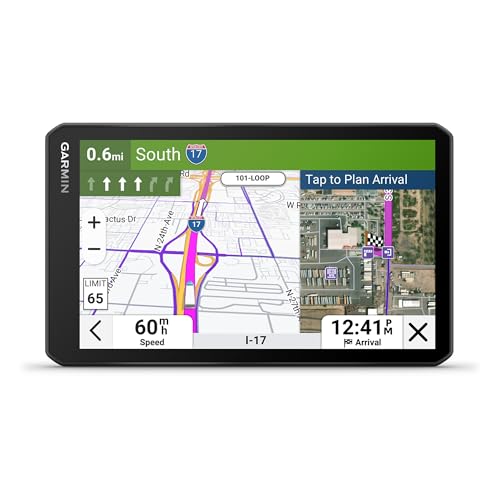
The OTR720 offers a large 7-inch touchscreen with bright, high-resolution display for in-cab visibility. It provides custom truck routing based on truck size and weight and alerts for upcoming bridge heights and sharp curves. BirdEye Direct Satellite Imagery helps with destination overview. Best for drivers who want detailed route planning and satellite views before arrival, particularly on longer routes with fixed loading points.
Best for: Drivers who value a big display and destination imagery. Better for: routes that require height and weight constraints. Caution: Not all areas support custom routing; always follow posted road signs and conditions.
Garmin Dezl OTR620: Compact Truck Navigator

The Dezl OTR620 provides a 6″ high-resolution touchscreen designed for professional truckers. It uses custom routing based on vehicle size and weight to avoid unsuitable roads and hazards. A key feature is community-driven insights about parking, loading docks, and truck-friendly stops, enhancing planning on long hauls. Best for: drivers who want a compact screen with strong routing and user-shared parking data. Caution: Routing may not account for all local conditions; verify with road signs.
Truck GPS Navigation 9″ by Navmoir

Designed for truck drivers, this GPS creates routes based on vehicle size and weight, helping avoid low bridges and restricted roads. It includes latest North American maps with lifetime updates and turn-by-turn voice guidance with safety alerts. Best for: drivers needing robust routing that specifically considers truck constraints. Caution: Larger 9″ screen may require more dashboard space; verify fit in your cab.
UNSXHIT 9″ GPS Navigator: Car, Truck, RV

UNSXHIT offers a 9-inch HD touch screen with lifetime North American map updates and extensive language options. It provides voice turn-by-turn guidance and speed/red-light warnings, plus custom truck routing. Best for: fleets and households needing a single device for multiple vehicle types. Caution: Feature list is broad; verify long-term map update support and customer service responsiveness.
Garmin dezl OTR610: 6-Inch Truck Navigator

OTR610 provides a large 6″ display with custom truck routing and Birdseye satellite imagery for destination planning. It emphasizes easy viewing and reliable routing for everyday long-haul trips. Best for: drivers who need a straightforward, durable option with strong imagery. Caution: Six inches may feel small on busy dashboards; consider a larger alternative if you frequently view maps while driving.
Buying Guide: How To Choose The Right Truck GPS
- Size and readability: For cab visibility, a larger screen can reduce glare and scrolling. Consider whether you prefer 6″, 7″, or 9″ displays based on your dashboard space.
- Custom truck routing: Look for routing that accounts for vehicle size, weight, and HazMat restrictions. Ensure the device clearly states when data may not reflect local signs.
- Map updates: Lifelong updates are valuable for accurate routing and new roads. Check update frequency and region coverage (USA, Canada, Mexico).
- Destination data: Access to loading docks, parking lots, and truck stops can save time. Community-driven insights can be helpful but verify with current signs.
- Alerts and safety: Speed camera alerts, sharp curves, and weather/wind alerts add safety during long hauls. Ensure alerts are localizable to your routes.
- Ease of use: A clear interface and responsive touchscreen reduce distraction. Voice-guided directions help keep eyes on the road.
- Battery and power: If the device is frequently used without a charger, consider battery life and car charger compatibility.
Frequently Asked Questions
- What is the main advantage of truck-specific GPS versus a regular car GPS?
– Truck-specific GPS accounts for vehicle dimensions, weight, and road restrictions, helping to avoid low bridges and restricted routes. - How important are lifetime map updates?
– Lifetime updates help maintain accurate routing across changing roads and new interchanges, reducing detours and fines. - Can these devices show loading dock and parking details?
– Some models include loading dock and parking insight, often through community-driven data, which can improve stop planning. - Is a larger screen always better for truck use?
– A larger screen improves visibility but may not fit all cabs. Choose a size that fits your dashboard and reduces distraction. - Do these devices support red-light and speed-camera alerts?
– Several models offer speed and red-light warnings, which can improve safety and compliance on busy routes. - Are these GPS devices compatible with all trucks?
– Routing works best when vehicle size and weight are accurately entered. Verify supports your vehicle profile and route restrictions.