Best Hard Drives for Security Camera DVR Systems: Reliable Choices for 24/7 Surveillance
When building or upgrading a security camera DVR setup, choosing a reliable hard drive is essential for continuous recording and data integrity. This guide highlights drives well-suited for DVR workloads, with emphasis on capacity, endurance, and quiet operation. It targets buyers seeking durable, predictable storage for home or small-business surveillance, including systems that run 24/7 at 720P to 1080P. The top picks below are selected for reliability, low power use, and compatibility with common DVR configurations. The quick reference table helps compare core specs at a glance.
| Product | ||||
|---|---|---|---|---|
| MaxDigitalData MD500GSA859DVR | 0.5 TB | 5900 | 8 MB | Smaller, budget-friendly DVRs |
| MDD MAXDIGITALDATA MD2000GSA3272DVR | 2 TB | 7200 | 32 MB | Longer retention for moderate workloads |
| WD Purple WD64PURZ | 6 TB | — | 256 MB | Heavy surveillance workloads |
| MDD MAXDIGITALDATA MD3000GSA3257DVR | 3 TB | 5700 | 32 MB | Durable, 24/7 operation |
| Seagate SkyHawk ST20000VE003 | 20 TB | — | 512 MB | High-channel, AI-ready systems |
| MDD MAXDIGITALDATA MD1000GSA3272DVR | 1 TB | 7200 | 32 MB | Small-to-mid systems with steady duty |
The selections below are organized by product, focusing on reliability and suitability for security DVR environments. Each entry notes who should consider it, plus a practical caveat to help avoid common setup issues.
MaxDigitalData 500GB Surveillance HDD

Capacity and speed align with smaller DVR configurations. Features include a 500 GB capacity, 5900 RPM operation, and 8 MB cache designed for surveillance workloads. It emphasizes quiet operation, low power consumption, and cool temperatures, which helps extend drive life in always-on DVR setups. Best for entry-level or compact systems with modest retention needs.
Best for: Home or small-business DVR users with limited storage requirements and a need for reliable continuous recording without high heat output. Limitations: May require more frequent archiving or shorter retention compared with larger drives in multi-camera environments.
MDD MAXDIGITALDATA MD2000GSA3272DVR (2 TB)

With 2 TB capacity and a 7200 RPM speed, this drive targets DVRs that need longer retention for higher activity. A 32 MB cache supports smoother writes in busy systems, and the drive is noted for low power consumption and cool operation. It’s a solid middle-ground choice for mid-range surveillance where 720p streams are common.
Best for: DVR setups that require extended recording windows without doubling the enclosure footprint. Caution: Renewed status may imply prior usage; verify warranty terms and health indicators when available.
WD Purple 6TB Surveillance HDD

Designed for mainstream surveillance systems, WD AllFrame technology optimizes for write-intensive workloads common in CCTV. A 6 TB capacity supports larger camera counts and longer retention, while the 256 MB cache enhances burst writes. It supports up to high workload rates, making it suitable for busy 24/7 DVR setups.
Best for: Larger DVR configurations or systems with many cameras and higher streaming demands. Limitation: Workload rate can vary with hardware and software, so plan capacity with future growth in mind.
MDD MAXDIGITALDATA MD3000GSA3257DVR (3 TB)
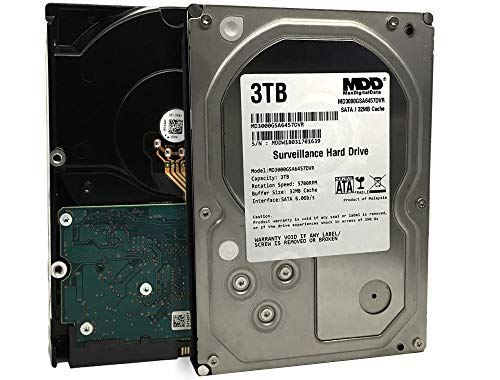
Offering 3 TB with a 5700 RPM engine and 32 MB cache, this drive is built for durable, 24/7 operation in surveillance systems. It emphasizes cool spin technology and low noise, which helps maintain cooler temps and quieter DVR operation. It is a practical choice for mid-to-large DVRs seeking a balance of capacity and endurance.
Best for: DVRs that require dependable daily recording with robust endurance and a modest boost in capacity. Caution: Lower RPM can translate to slightly slower sustained writes compared with 7200 RPM drives.
Seagate SkyHawk AI 20TB

Engineered for high-channel surveillance and AI-enabled environments, SkyHawk AI supports up to 64 HD video streams and 32 AI streams. Features include ImagePerfect AI for zero dropped frames and SkyHawk Health Management for proactive storage protection. RAID rapid rebuilds are included to speed up recovery after failures. This drive is best for large, complex systems with AI analytics needs.
Best for: NVR/DVR ecosystems with many cameras or AI features, where reliability and rapid recovery matter. Limitation: Higher capacity drives can require more power and heat management in compact enclosures.
MaxDigitalData MD1000GSA3272DVR 1TB

This 1 TB drive offers a balance of capacity and performance with 7200 RPM and a 32 MB cache. It’s designed as a heavy-duty option suitable for CCTV DVR systems and surveillance setups that require consistent 30 FPS recording at 720p. It’s a compact choice for mid-sized installations or upgrades to existing systems.
Best for: Small to mid-sized DVRs needing reliable daily recording with stronger performance than entry-level drives. Caution: Ensure compatible firmware and power supply in the DVR enclosure to avoid compatibility issues.
Buying Guide
What capacity do I really need for a DVR?
Consider the number of camera streams, resolution, frame rate, and retention goals. Higher resolution and longer retention require more storage. For most home systems with 4–8 cameras at 1080p, 4–6 TB is a practical starting point, with larger capacities for AI-enabled or enterprise setups.
Spin speed and cache matter, but how?
7200 RPM drives often deliver better sustained writes than 5400 RPM, which can matter for continuous recording. Larger caches help with burst writes, but the overall reliability of the drive is more important in surveillance workloads.
Why choose a drive labeled for surveillance?
Surveillance HDDs are designed for write-heavy, 24/7 operation, with features toward durability and steady performance. They typically handle constant recording workloads better than standard desktop drives.
What about AI and analytics features?
Higher-end drives like SkyHawk AI are built to support multiple streams and AI workloads, which can be beneficial for larger systems or those using onboard analytics. Factor in your number of streams and expected growth.
Renewed vs. new: should I care?
Renewed drives can offer cost savings but may carry unknown health history. If you choose renewed, verify warranty terms and ensure the seller provides a health status report when possible.
Power, heat, and enclosure considerations
Surveillance drives can generate more heat in busy setups. Ensure the DVR enclosure has adequate ventilation and consider placing drives in a temperature-controlled environment to maximize lifespan.
FAQ
- Are surveillance hard drives the same as standard hard drives?
Surveillance drives are optimized for 24/7 operation with sustained writes and multiple streams, offering higher endurance for DVR workloads.
- Should I buy a 4 TB or 6 TB drive for a 4-camera system?
Six terabytes provides more room for longer retention and future growth, but the best choice depends on your retention needs and budget.
- Is a higher RPM drive always better for DVRs?
Higher RPM can improve sustained write performance, but reliability, heat, and power use also matter. For many systems, 7200 RPM offers a good balance.
- What is the advantage of a drive with a large cache?
A larger cache helps with burst writes and smoother operation during recording, especially in busy systems with many cameras.
- Can I mix different drives in a single DVR system?
Yes, many DVRs support mixed drives, but align workloads by capacity and performance so that the system remains balanced and reliable.