Best Hard Drives for PS5: Expand Storage With Confidence
Answering the call for more PS5 storage, these drives are chosen for real-world compatibility and clear value. The top picks suit different buyers: fast, compact SSD options for quick game transfers; large-capacity HDDs for bulk game libraries; and official-looking, plug-and-play solutions for easy setup. This guide highlights five solid options and explains who benefits most from each choice.
Summary of selected products
| Product | Best For | Notes |
|---|---|---|
| Seagate Game Drive for PS4/PS5 2TB (STLV2000202) | Casual gamers with compact needs | Bright blue LED, official firmware |
| Seagate Portable 2TB External HDD (STGX2000400) | Budget storage on the go | USB 3.0, simple drag-and-drop |
| Seagate Game Drive for PS Consoles 5 TB (STLV5000100) | Large library, steady growth | Officially licensed, PS4/PS5 ready |
| Seagate Portable 1TB External HDD (STGX1000400) | Compact starter storage | 1 TB, USB 3.0 |
| WD_BLACK 1TB SN850P NVMe M.2 SSD | Best performance, PS5 internal expansion | High speed, heatsink, official licensing |
Seagate Game Drive PS4/PS5 2TB — Xbox-Style Blue Accent
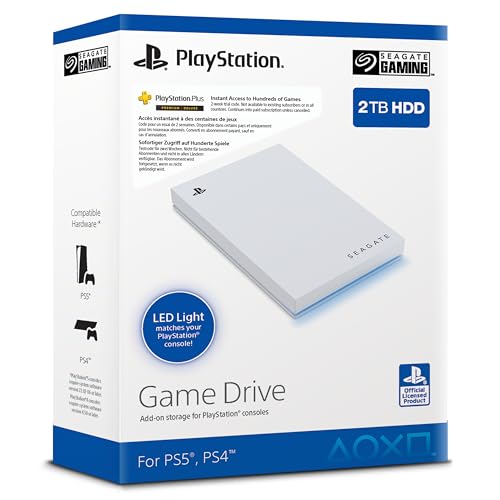
The Seagate Game Drive 2TB for PS4/PS5 provides a compact, portable option with official firmware to ensure compatibility across PS5 and PS4 models. It’s ideal for players who want extra capacity without sacrificing portability or setup simplicity. Best for gamers who want plug-and-play storage with a dash of style thanks to blue LED lighting.
Best for: You want easy, ready-to-use storage that travels well with your gaming setup. Choose this if you prefer a visually distinctive drive with straightforward use and official compatibility.
Limitation: While 2TB suits many users, heavy digital collectors may outgrow it quickly and require a larger model later on.
Seagate Portable 2TB External HDD — USB 3.0

This Seagate 2TB Portable HDD delivers simple, on-the-go storage for Windows or Mac, with drag-and-drop backups and automatic recognition on connect. It’s a practical option for expanding game libraries without worrying about internal SSD space. Best for: players who want bulk storage without fuss.
Best for: Budget-conscious buyers who need a reliable, portable drive for PS5 and other devices. It’s a solid general-purpose upgrade when you’re not prioritizing speed over quantity.
Limitation: HDDs are slower than SSDs; expect longer game transfer times compared with NVMe or internal storage solutions.
Seagate Game Drive for PS Consoles 5 TB

The 5TB Seagate Game Drive is officially licensed and designed to expand your PS5 or PS4 library. It supports PS5-ready storage for game transfer and retains compatibility with PS4 titles. Best for: gamers with large collections who want a high-capacity, plug-and-play solution.
Best for: Those who want a big, reliable external option that maintains cross-console compatibility and easy setup. It’s particularly appealing for households with both PS5 and PS4 systems.
Limitation: Even at 5TB, some users may still reach capacity quickly given modern game file sizes; consider additional storage planning if you add many titles.
Seagate Game Drive PS4/PS5 5TB — White LED Spotlight

This officially licensed 5TB Seagate drive features blue LED lighting and sits as a robust, ready-to-use option for expanding your PS5 and PS4 game libraries. Best for: players who want generous space with a simple plug-and-play approach and a brand they trust.
Best for: Users who value front-and-center LED aesthetics paired with dependable storage capacity for ongoing game collections.
Limitation: Like other external HDDs, the speed is limited by USB 3.0 interfaces; expect transfer speeds lower than NVMe-based options.
WD_BLACK 1TB SN850P NVMe M.2 SSD For PS5

The WD_BLACK SN850P is an official M.2 SSD expansion that delivers high-speed performance for PS5. It’s ideal for users who want substantial performance improvements and the ability to install or move games with minimal wait times. Best for: gamers seeking top-tier load times and seamless integration with PS5’s internal storage ecosystem.
Better for: Enthusiasts who prioritize speed and want a heatsink-equipped model to maintain thermal performance during intense gaming sessions.
Limitation: This is an internal-style upgrade requiring compatible slots and installation; not a plug-and-play external option. It’s best for users comfortable with internal PS5 expansion or professional installation.
Buying Guide
What storage type should I choose for PS5?
External hard drives (HDDs) provide affordable capacity and plug-and-play convenience, ideal for expanding your library without affecting internal SSD space. NVMe SSDs in the PS5’s internal slot offer the fastest load times and seamless gameplay, but require installation and typically cost more per gigabyte. Consider your priorities: capacity versus speed.
How much capacity do I really need?
For casual players, 1–2 TB can cover several dozen games. If you frequently download many titles, or you own a large back catalog, 4–5 TB or more is practical. High-demand titles with large files can quickly fill even sizeable drives.
Which products are easiest to use with PS5?
Officially licensed drives ensure firmware and compatibility align with PS5 and PS4 requirements. Plug-and-play models with clear setup steps reduce tinkering. If you prefer minimal setup, choose official or branded drives with straightforward formatting guidance.
What about performance versus price?
External HDDs deliver best cost-per-gigabyte and broad compatibility. NVMe SSD upgrades offer the fastest performance but at a higher cost. If you mainly store games and rarely transfer, HDDs are often sufficient; for faster load times on frequently played titles, an SSD option is worth the premium.
Are there any caveats I should know?
External drives can be slower than internal SSDs, affecting transfer times. The PS5 requires moving games between external storage and internal SSD to play certain titles. For best results, plan a storage strategy that aligns with your play patterns and internet bandwidth for downloads.
How should I manage multiple drives?
Organize by console compatibility (PS5 vs PS4), and label drives by capacity and intended use. Maintain a routine to move frequently played titles to internal storage or the fastest external option to minimize load times.
Quick reference buying tips
- Choose officially licensed drives for guaranteed compatibility.
- Prefer USB 3.0 or better for reliable performance with the PS5.
- Assess long-term needs: bigger libraries may justify larger capacities.
- Consider a mixed approach: use an SSD for top titles and HDDs for bulk storage.
FAQ
- Can I use any USB drive with PS5? Yes, but official licensing and firmware compatibility improve reliability for PS5 and PS4 games.
- Do external drives affect PS5 performance? They affect load times and storage capacity, with SSDs offering the best speed advantages.
- Is PS5 internal storage upgrade necessary? Not required, but internal SSD upgrades provide the fastest game loading times.
- Will all games run from external storage? PS5 games can be moved between external and internal storage; some operations may require internal storage.
- What happens if I run out of space? You can delete or move games to free space or upgrade to a larger drive.
- Are refurbished drives okay? It depends on the source; renewals can offer value, but verify warranty and return policies.