Best Hardware for Video Conferencing: Mounts and Mounting Adapters for Clear, Clutter-Free Setups
Finding the right hardware for video conferencing starts with choosing mounting solutions that maximize space, improve camera angles, and keep cables tidy. This guide highlights five compatible options, with clear pros and limitations to help buyers select the best fit. Ideal buyers include small-business teams seeking above- or below-screen mounting, corporate conference rooms needing stable wall setups, and anyone aiming to reclaim desk space without sacrificing video quality.
Overview table of selected products:
| Product | Brand | Best For | Why It Stands Out |
|---|---|---|---|
| Jabra PanaCast 50 Screen Mount | Jabra | Above/below TV mounting for PanaCast 50 | VESA-compatible, supports up to 84-inch screens, flexible TV mounting |
| Poly Wall Mount for Video Conferencing System | HP | Wall-mounted, secure system mounting | VESA compatible, space-saving |
| 939-001498 TV Mount for MeetUp | Opheart | MeetUp above or below monitor | Sturdy carbon steel build, dual-position capability |
| Poly Mounting Adapter for Video Conferencing | POLY | Universal mounting on walls or flat surfaces | Simple universal solution |
| Additional Notable Mention | Various | General mounting flexibility | Extra options to fit specific room layouts |
Jabra PanaCast 50 Screen Mount for TV Mounting

Best for: Conference rooms using the Jabra PanaCast 50 camera with TV mounting needs. Why selected: This mount is designed specifically for the PanaCast 50, offering a cross-shaped, robust bracket that can position the camera above or below the TV for flexible viewing angles. It is VESA-compatible and supports large screens up to 84 inches, maximizing camera visibility and meeting room coverage.
Limitation: The mount’s size is tuned to the PanaCast 50 and may not fit non-Jabra cameras without adapters. Consider room layout and TV dimensions before purchase.
Poly Wall Mount for Video Conferencing System
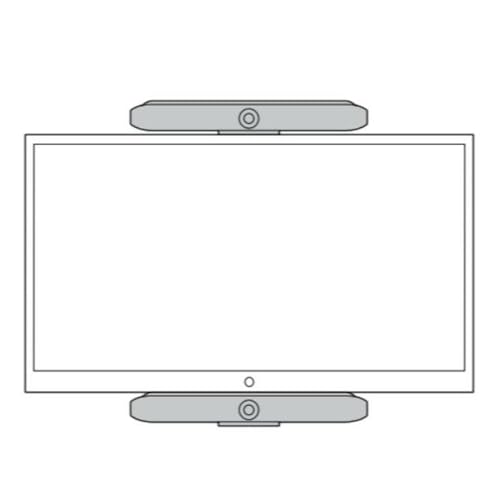
Best for: Teams needing a secure wall-mounted solution for multiple devices. Why selected: This HP wall mount emphasizes VESA compatibility and space efficiency, enabling standardized, stable installation of conferencing gear. It’s ideal for conference rooms with fixed wall space and a need for clean, permanent mounting.
Limitation: It may require additional brackets or adapters for non-standard devices; verify compatibility with existing conference cameras before ordering.
939-001498 TV Mount for MeetUp
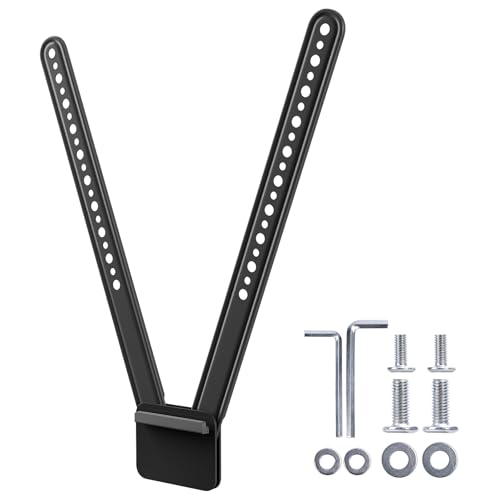
Best for: MeetUp users seeking a flexible mounting option above or below a monitor. Why selected: The 939-001498 mount uses a robust carbon steel design and provides alternate hole patterns to fit different configurations, helping reclaim shelf space and deliver a natural camera angle.
Limitation: Availability of mounting holes and compatibility with specific monitor sizes should be checked to ensure a proper fit in your setup.
Poly Mounting Adapter for Video Conferencing

Best for: Users needing a universal mounting solution for diverse camera systems. Why selected: The Poly mounting adapter offers universal camera mounting and supports wall or flat-surface installation, making it versatile for varied rooms.
Limitation: Being universal, it may require additional adapters or screws to fit some devices; confirm the mounting pattern before purchase.
Buying Guide: Key Purchase Considerations
What should you evaluate when choosing video conferencing mounts? Start with compatibility: verify that the mount supports your camera’s VESA pattern and weight. Consider the mounting surface: wall, TV stand, or desk-based setups demand different load ratings and space needs. Angle and reach matter: ensure the mount provides the correct tilt and swivel range for natural meeting angles. Cable management: look for mounts with integrated channels or routing options to minimize clutter. Installation ease: some mounts come with DIY-friendly hardware, while others may require professional attachment for stability in busy conference rooms.
How do you choose between above-TV versus below-TV mounting? Above-TV mounting often yields a higher central line of sight, which can reduce glare and provide a broad field of view. Below-TV mounting tends to align with seated participants for more natural eye contact. In rooms with large screens or ceiling lighting, test both options if possible before finalizing the setup. Weight support and VESA compatibility should guide your final decision to avoid instability or improper alignment.
Which mounting style works best for MeetUp or PanaCast 50 cameras? For PanaCast 50, a dedicated screen mount that aligns with your TV and supports large screens can maximize visibility and stability. For MeetUp, a versatile mount that can be placed above or below the monitor helps optimize camera angles for different seating arrangements. In both cases, ensure the mounting hardware matches the device’s weight and VESA pattern.
FAQ: Quick Answers For Buyers
- What is VESA compatibility and why does it matter? VESA compatibility ensures standardized hole patterns for easier, universal mounting across devices and mounts.
- Can these mounts support multiple cameras? Some mounts are universal or adjustable, but always check weight capacity and mounting hole patterns for each device.
- Is above-the-TV mounting better than below-the-TV mounting? It depends on the room layout and seating; test both if possible to determine the best angle for your participants.
- Can I mix mounts from different brands? Yes, as long as the mounting pattern and weight ratings match your cameras and displays. Verify compatibility before purchasing.