Best HDMI ARC Adapter for Soundbar: Top Picks for Clear TV Audio
If you need reliable, plug-and-play HDMI ARC to optical or coaxial solutions, these adapters optimize sound quality for your soundbar and home theater. This guide highlights options best suited for TV soundbars, older receivers, and setups that require digital-to-analog conversion or ARC/eARC compatibility checks. The top picks are categorized by compatibility, ease of use, and output formats to help you choose the right adapter for your setup.
| Product | Best For | Output | Notes |
|---|---|---|---|
| 192KHz HDMI ARC to Optical Audio Adapter (IHTHER) | Modern TVs with ARC | Optical | Plug & Play, LED indicators |
| XPTSFDU HDMI ARC Adapter | TVs lacking analog outputs | L/R + 3.5mm | Dual output; ARC must be enabled |
| VPFET HDMI ARC Audio Extractor | Older audio gear | Optical / RCA / 3.5mm | 192kHz support |
| YEUGICEO 192KHz HDMI ARC to Optical/Coaxial | ARC-enabled TVs with PCM/Dolby/DTS | Optical or Coaxial | CEC volume control |
| Unstincer 192KHz eARC/ARC to Optical | Modern TVs with eARC | Optical | 3.4 ft cable included |
Note: This guide focuses on adapters that convert HDMI ARC/eARC signals to optical, coaxial, or analog outputs. All listed products are designed to improve compatibility with soundbars, amplifiers, and home theater systems while preserving high-quality audio formats.
192KHz HDMI ARC to Optical Audio Adapter

Best for: TV setups where the sound system accepts optical input and your TV supports ARC. This adapter extracts high-quality audio from HDMI ARC and converts it to an optical signal. It supports PCM, LPCM, Dolby 5.1, and DTS 5.1, making it suitable for most modern soundbars and home theater receivers. It is a solid choice for flat-screen TVs with ARC but not eARC. A key limitation is that it relies on the TV’s ARC port to deliver audio; if your TV uses eARC without ARC, and your system requires eARC, you may need a different solution.
XPTSFDU HDMI ARC Adapter

Best for: TVs with ARC that lack integrated analog outputs. This adapter forwards TV audio through HDMI ARC to L/R channels and 3.5mm output, enabling connection to traditional speakers or amplifiers. Important: ensure your TV’s HDMI port labeled ARC is active and PCM2.0 is selected; some brands require enabling CEC or ARC-related options. It may be less convenient for setups needing only optical output and may not work with non-TV HDMI ARC devices.
VPFET HDMI ARC Audio Extractor
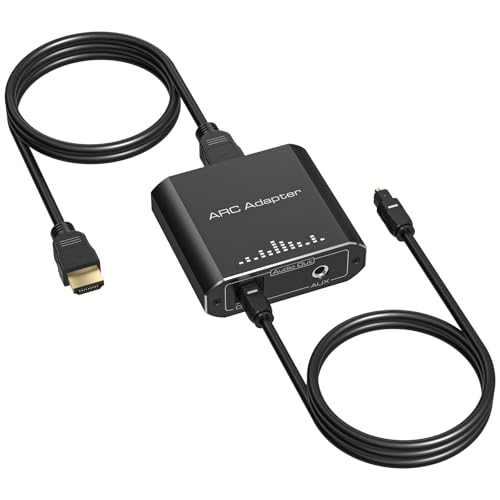
Best for: Getting digital TV audio to older speakers or headphones, or when you need to drive multiple outputs from an ARC-capable TV. It converts HDMI ARC to optical or 3.5mm analog, supporting up to 192kHz sampling. The device is ideal if you want to add an optical output to a receiver that lacks one, but it does not support non-ARC HDMI devices as input. Verify compatibility with your TV’s ARC port and check if you require optical only or both optical and analog outputs.
YEUGICEO 192KHz ARC to Optical/Coaxial

Best for: TVs with ARC that need to connect to either optical or coaxial sound systems, with added CEC volume control for ease of use. It supports PCM 2.0, Dolby 5.1, and DTS 5.1, expanding compatibility with many soundbars and AV receivers. It requires enabling TV CEC settings and selecting the ARC audio format in the TV. A limitation is the need for a manual setup on some TVs to route ARC audio correctly to the converter.
Unstincer 192KHz ARC to Optical Converter

Best for: TVs with eARC/ARC interfaces seeking a simple optical output path. The bundled optical SPDIF cable provides a straightforward bridge from TV to sound system. It supports 24-bit/192kHz audio and is a convenient choice for home theater setups that want fewer cables. It is important to ensure your TV and soundbar are configured to use ARC/EARC with PCM output to avoid compatibility issues. This option may be less ideal if you require multiple simultaneous outputs beyond optical.
Buying Guide: Key Considerations
- What audio formats does your system need? If you require Dolby Digital, DTS 5.1, or LPCM, ensure the adapter supports those formats.
- Is your TV ARC or eARC? Some adapters only work with ARC; others explicitly support eARC and may require extra configuration in TV settings.
- Which output do you prefer? Optical, coaxial, or 3.5mm analog? Choose based on your soundbar or receiver’s inputs.
- Is driver installation required? Most arc-to-digital adapters are plug-and-play; avoid devices that need software without necessity.
- Power and placement: Some adapters require USB power; consider where you will provide power and how cables will be routed.
- Compatibility with TV settings: Some TVs require enabling CEC, ARC, or PCM output. Verify your TV’s manual for precise steps.
- Connection distance: If you have a long distance between TV and audio gear, check the included cable length and whether you need a longer run.
FAQ
- Do HDMI ARC adapters work with all TVs?
- Can these adapters output Dolby Digital or DTS through optical?
- Will I lose video when using an ARC to optical adapter?
No, these adapters typically only handle audio and do not affect video signals between TV and display.
- Is a power connection required for these adapters?
- What if my TV only outputs PCM 2.0 audio?
- Can I use more than one output at once?
Adapters work with ARC-enabled TVs; some models also support eARC. Always verify your TV’s ARC/eARC compatibility and required settings in the manual.
Yes, most listed adapters support Dolby Digital and DTS formats when the TV outputs those formats via ARC, and the external sound system supports them.
Many models include USB power to ensure stable signal conversion. Using the power port helps maintain consistent audio output.
Check the adapter’s supported formats; some models require PCM 2.0 or higher. If PCM 2.0 is not available, the adapter may not output surround formats correctly.
Some adapters support simultaneous outputs (e.g., L/R and 3.5mm). If you need multiple outputs, confirm this capability in the product features.