Best Head Trackers for Flight Sim Enthusiasts
Answering the question: the best head trackers for flight sims convert natural head movements into on-screen camera control for a more immersive experience. This guide compares five reliable options, highlighting who each product is best for, and where to avoid potential drawbacks. Ideal for PC flight, racing, and combat simulators, these trackers let you look around a cockpit with precise, low-latency motion.
| Product | Best For | Why It Stands Out |
|---|---|---|
| TrackIR 5 Bundle With TrackClip PRO | Serious sim players who want complete setup | Includes TrackClip PRO for accurate infrared reflection and precision tracking across 6DOF |
| Fit Point Tracker Single IR Transmitter | Compact, budget-friendly setups | Single IR transmitter solution for DCS and other sims |
| Track Clip Pro LED Head Tracker | Upgrade for existing TrackIR users | Active LEDs, USB power tap, and passthrough for easy integration |
| MiYee Head Tracking System | Installation without wearing any equipment | No wearables needed; designed for easy placement and setup |
| TrackNPClip Active Infrared Head Tracker | Alternative infrared solution | Active infrared clip-based tracking for head movement |
TrackIR 5 Head Tracking System With TrackClip PRO

The TrackIR 5 with TrackClip PRO is the classic option for flight, racing, and combat sims. It uses an infrared clip to reflect signals detected by the USB sensor, delivering precise 6DOF motion across yaw, pitch, roll, and X/Y/Z axes. This setup is best for dedicated sim players who want reliable tracking with a proven track record.
Best for: Serious flight sim enthusiasts who want a complete, documented tracking system with a dedicated clip. It’s especially suited to environments where lighting might vary, because the infrared signals are designed to maintain tracking in different conditions.
Why chosen: It delivers accurate, low-latency head tracking and full 3D control, supported by a widely used, mature ecosystem.
Caution: Setup can be more involved, and you’ll rely on the Clip PRO for optimal tracking—stock configurations without it may underperform in low-light conditions.
TrackIR 5 Head Tracking System

This TrackIR 5 model emphasizes high-precision USB optical tracking for full 3D movement. It is compatible with a broad range of PC games and simulation software, making it a versatile choice for players who want to enhance realism without adding more hardware to the cockpit. Note that the package may not include TrackClip PRO in every listing, so verify what’s included before purchase.
Best for: Gamers who want a flexible, high-precision head-tracking option and already own a compatible Clip or are willing to purchase one separately.
Why chosen: The 6DOF tracking and high-precision sensing help improve situational awareness in flight sims and other simulators.
Caution: Some listings don’t include the Clip PRO by default, which is essential for infrared-based tracking accuracy in low-light conditions.
Fit Point Tracker Single IR Transmitter

The Fit Point Tracker offers a compact infrared transmitter solution designed for DCS and other simulations. It emphasizes a straightforward setup with minimal additional hardware, appealing to users who want a lower-profile approach to head tracking. The description highlights an active IR transmitter approach suitable for mid-range setups.
Best for: Players seeking a simple, cost-conscious IR-based tracker without complex accessories.
Why chosen: It provides essential infrared tracking in a compact form factor, which can be easier to install in smaller cockpits or desk spaces.
Caution: Availability of documentation and compatible software support can vary, so confirm compatibility with your flight sim titles before buying.
Track Clip Pro LED Head Tracker

The Track Clip Pro LED Head Tracker is designed to work with TrackIR units, featuring active LEDs for precise tracking and a USB power tap with pass-through. It is ultralight, ensuring comfortable wear or attachment during extended sessions. This upgrade is ideal for users who already own a TrackIR base unit and want to improve tracking reliability in varying lighting.
Best for: Existing TrackIR users who need enhanced tracking reliability and easier power management.
Why chosen: The LED-based tracking is consistently reliable and the pass-through USB simplifies cabling in compact cockpits.
Caution: It requires a compatible base unit and can add to the overall hardware footprint for small desk setups.
Natural Point TrackIR 5 Bundle
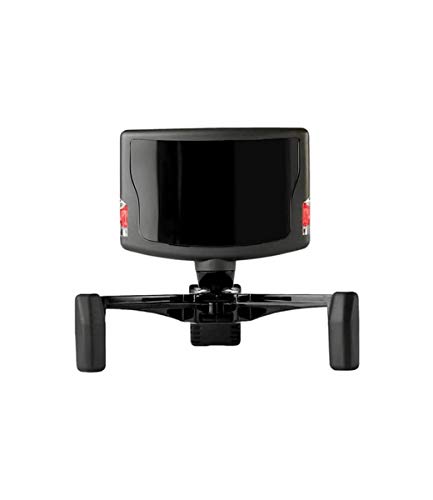
This bundle combines the TrackIR 5 with essential accessories to provide a ready-to-use head-tracking experience. It’s aimed at users who want a turnkey package for PC flight sims, racing sims, and similar environments. The listing mentions material and component packaging, which may reflect a complete setup that reduces compatibility concerns for new buyers.
Best for: Buyers seeking a comprehensive starter kit with proven components for a ready-to-go sim experience.
Why chosen: A bundled option reduces the risk of missing essential accessories and ensures cohesive operation across supported software.
Caution: Availability and exact contents can vary by seller; confirm what’s included before purchase to avoid missing critical pieces like the Clip PRO or leads.
Buying Guide: Key Considerations For Flight Sim Head Trackers
- Tracking method: Infrared Clip vs. non-wearable sensors. Infrared clips typically provide reliable tracking across lighting conditions, while wearable or clip-free options rely on alternative sensing methods.
- 6DOF coverage: Ensure the device tracks yaw, pitch, roll, and X/Y/Z axes for natural cockpit movement. This matters most for realism in flight sims.
- Compatibility: Check compatibility with your flight titles and PC specs. Some trackers work best with certain software ecosystems or require specific drivers.
- Ease of setup: If you prefer quick installation, consider bundles that include necessary clips and mounting hardware, plus clear setup guides.
- Comfort and ergonomics: For long sessions, choose devices with lightweight builds or wearables designed to minimize fatigue.
- Lighting robustness: Some trackers perform better in varied lighting; infrared-based systems generally handle lighting changes well.
- Upgrade path: If you start with a basic setup, consider a model that offers straightforward upgrades (e.g., adding a TrackClip PRO or LED tracker) without replacing the core unit.
- Space and placement: Evaluate your cockpit or desk space to determine if a non-wearable or wearable solution fits best without obstructing dialogue or head movement.
Frequently Asked Questions
- What is a head tracker for flight sims used for?
– It translates head movements into camera controls, increasing situational awareness and cockpit realism in supported games. - Do I need a TrackClip PRO to use TrackIR?
– Some TrackIR bundles include it; however, certain models may work with alternative clips or require separate purchase. - Are non-wearable trackers better for comfort?
– Non-wearable designs can be more comfortable for long sessions, but wearables may offer more flexible placement in compact spaces. - Can head trackers work with VR headsets?
– Some setups can be used alongside VR, but integration depends on software and hardware compatibility with the flight sims you play. - Is higher 6DOF always better?
– Generally yes for realism, but ensure your games support full 6DOF tracking to realize the benefit. - What should I verify before buying?
– Confirm included accessories, compatibility with your software, and whether the unit meets your lighting and space requirements.