Best Headphones for Elderly Hard of Hearing: Clear Dialogue and Comfort for TV and Private Listening
The best headphones for elderly users with hearing challenges focus on clarity, comfortable wear, and reliable connection. This guide highlights five top options that are well-suited for aging ears, offering amplified sound, easy setup, and minimal latency. Ideal buyers include seniors who want private TV listening, caregivers seeking simple devices for loved ones, and users needing clearer dialogue for soft voices. The summary table below helps compare core features at a glance.
| Product | Brand | Best For | Key Benefit |
|---|---|---|---|
| Williams Sound PockeTalker Ultra DUO | Williams AV | TV listening, one-on-one conversations | 20-40 dB gain with external controls |
| Wireless Headphones for TV Watching (Earbay) | Earbay | Private TV watching, long sessions | Multiple connections, low-latency sound |
| Wireless Headphones for TV Watching (NOUII) | NOUUI | Simple setup, Bluetooth versatility | Bluetooth 5.4, 40 ms latency, 100 ft range |
| Wireless Headphones for TV (Earbay) | Earbay | Easy use, 3 audio modes | Low latency, 100 ft range |
| OHAYO Wireless TV Headphones | OHAYO | Frustration-free use, strong speech clarity | Low latency, 100 ft range, auto-pair |
Williams Sound PockeTalker Ultra DUO Sound Amplifier

This device is designed for users who need significant gain and portable amplification. It includes a PockeTalker Ultra with a microphone, a 12-foot TV listening cord, and both a headset and an earbud. Features include 20-40 dB acoustic gain, up to 100 hours of battery life, and external volume and tone controls. A removable microphone with extension cord and belt clip adds flexibility for conversations or small gatherings. Best for seniors who want a compact, all-day listening solution with adjustable gain and easy on/off control.
Who it’s best for: seniors seeking straightforward TV listening or personal amplification without complex setup. Why selected: high adjustable gain and long battery life make this a reliable choice for softer dialogue and background noise minimization. Caution: setup involves separate headset and microphone components, which may require a brief acclimation period for new users.
Wireless Headphones for TV Watching (Earbay) With Three Audio Modes

These wireless TV headphones are designed for elder users who want private listening with versatile connections. They support optical, 3.5mm AUX, and RCA cables, with Bluetooth pairing for TVs lacking ports. This model emphasizes private, comfortable listening and includes easy volume tuning for crisp dialogue. Best for: seniors who want a simple, plug-and-play setup with reliable compatibility across various TVs. Limitation: audio latency can vary with some connection types, so the best experience is with the included wired options.
Wireless Headphones for TV Watching (NOUII) With Transmitter Dock
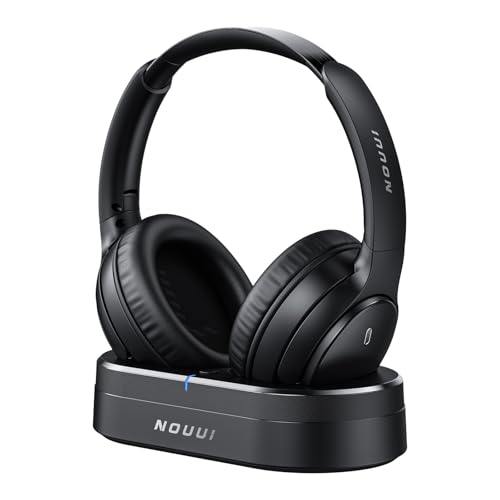
This NOUII system features a simple plug-and-play setup with multiple connection methods (Optical, 3.5mm AUX, RCA). It claims ultra-low latency with Bluetooth 5.4 and a long-range wireless link up to 100 feet. The 2-in-1 dock charges the headphones, ensuring longer sessions without frequent recharging. Best for: seniors who value seamless pairing and the flexibility to use the headset with other devices. Caution: some users may experience brief pairing prompts during initial setup.
Wireless Headphones for TV (Earbay) With Transmitter Dock

These Earbay headphones emphasize ease of use and a dedicated charging base. They offer a 100-foot wireless range and Bluetooth 5.4 compatibility, with three audio modes for customizable listening. Best for: seniors who want private listening with minimal setup and strong speech clarity. Limitation: some users may prefer a wired backup option for particularly loud environments.
OHAYO Wireless TV Headphones With Dock

OHAYO’s system aims for frustration-free operation with auto-pairing and a low latency under 27 ms. It supports optical, RCA, and 3.5mm inputs and provides a SNR above 85 dB for clearer speech. The design includes a long battery life and a 100-foot range. Best for: residents who want a hands-off setup that reliably follows them around the home. Caution: Bluetooth optional use means some devices may need direct connections to maintain best audio sync.
Buying Guide: Key Purchase Considerations
- Ease of setup: Look for plug-and-play devices with auto-pairing and straightforward controls. If setup is challenging, consider products with a docking base.
- Sound clarity and gain: For hard-of-hearing users, prioritize devices with adjustable gain, good SNR, and clear speech emphasis.
- Latency and lip-sync: Low latency is crucial to keep dialogue synchronized with video, especially for fast-paced shows or movies.
- Connection options: Wired (Optical, RCA, 3.5mm) and Bluetooth options increase compatibility with different TVs and devices.
- Comfort and wear: Lightweight headbands or over-ear cushions help after extended watching sessions. Check ear pad material and weight.
- Battery life and charging: Longer battery life reduces the need for frequent recharging. A dock or base can simplify charging.
- Portability vs. fixed use: Some models are desk-bound with a base, others are fully wireless for moving around the house.
- Environment considerations: If the room has lots of background noise, select noise-reducing cups and tailored dialogue focus.
Frequently Asked Questions
- What features matter most for elderly users with hearing loss? Answer: Clear dialogue emphasis, adjustable volume/gain, low latency, and easy operation.
- Should I choose wired or wireless headphones for a TV? Answer: Wireless offers freedom to move; wired may provide more reliable latency and compatibility with older TVs.
- Can these devices be used with other devices besides the TV? Answer: Many support Bluetooth pairing and can be used with phones, computers, or tablets when paired.
- How important is battery life? Answer: Very important for long viewing sessions; look for at least 20–40 hours per charge where possible.
- Is auto-pairing necessary for seniors? Answer: Yes, it reduces setup friction and improves ongoing usability.
- What is latency, and why does it matter? Answer: Latency is the delay between the video and audio. Lower latency improves lip-sync and speech intelligibility.