Best Interactive Whiteboards for Office Collaboration and Presentations
Discover top 65–75 inch interactive whiteboards that boost collaboration, sharing, and idea capture in modern offices. This guide focuses on models best suited for executive conference rooms, large-team meetings, and hybrid classrooms. Each option emphasizes cross‑device sharing, robust annotation tools, and open app ecosystems to fit varied workflows. The following picks prioritize reliability, ease of use, and future‑proof features for business environments.
| Product | Best For | Key Strength |
|---|---|---|
| COOLHOOD 65″ Smart Board | Tech-forward offices and classrooms | High-end hardware; robust app ecosystem |
| JYXCN 55″ Smart Board | Flexible workflows; dual OS | Dual OS; strong sharing features |
| EUNIVON 55″ Smart Board | Education and meeting rooms | Open ecosystem; 4K clarity |
| KEINONE 55″ Interactive | Classrooms and home offices | 4K visuals; wide compatibility |
| JAV 65″ Smart Board Pro | Hybrid learning and meetings | Google EDLA certified; AI features |
COOLHOOD 65″ Smart Board

Best for tech-forward offices needing strong processing and multi-device collaboration. This 65-inch panel runs Android 13 with 128GB storage and a powerful octa-core processor, supporting 20-point touch for large-team brainstorming. It excels in presentations, real-time annotation, and wireless screen sharing across Mac, Windows, iOS, and Android. built‑in tools like smart voting, screenshots, and timers help streamline decision-making. A wall mount is included, with a standalone stand available if needed. Consider this option if you prioritize performance and a rich app ecosystem in a single large display.
Who this is for: teams that run dynamic, fast-paced meetings and want native wireless sharing with robust annotation. Limitations: the stand ships separately, which may affect setup time for some spaces.
JYXCN 55″ Smart Board

Better for teams seeking flexible OS options. This 55-inch interactive board includes dual system support (Android 11 with optional Windows 10 OPS), a 4K display, and wide viewing angles. It supports multi-device split-screen sharing and quick access to whiteboard tools, which helps in both classroom and office meetings. Best for environments that want seamless switching between Android apps and Windows applications without swapping hardware.
Who this is for: offices or classrooms needing cross‑platform versatility. Limitation: OPS PC is optional, so some configurations may require additional purchase to unlock full Windows functionality.
EUNIVON 55” Smart Board

Best for classrooms and meeting rooms that value an open app ecosystem. The EUNIVON board emphasizes Android-based functionality with a robust app ecosystem, enabling screencasting from various devices, annotation, and sharing via HDMI. It supports annotation on the 4K display and easy content pinning or saving for later reference. Choose this if you want flexible app choices for teaching, coaching, or collaborative sessions.
Who this is for: educators and business teams needing easy app integration and screen sharing. Limitation: details on included mounting hardware vary by package; confirm wall-mount compatibility before purchase.
KEINONE 55″ Interactive Smart Board

Choose this if you want a versatile multimedia center in one display. KEINONE blends 4K UHD visuals with Android OS, 8GB RAM, and 128GB storage, making it suitable as a classroom or home office display. It supports 20 touch points, annotation on various content, and content sharing across devices. Best for educators and teams who value sharp visuals and flexible input methods.
Who this is for: instructional settings and collaborative teams requiring strong touch performance. Caution: as with Android-based panels, app availability may vary by region and Google Play access can change with updates.
JAV 65″ Smart Board Pro
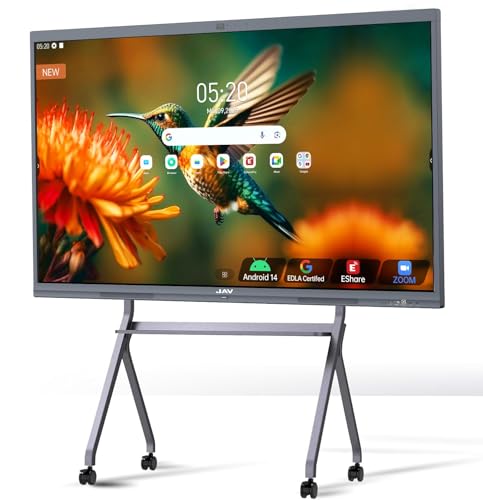
Best for hybrid environments needing Google integration and advanced collaboration features. This 65-inch board is Google EDLA certified and runs Android 14 with 8GB RAM and 128GB storage. It supports 20-point touch, AI camera features, built‑in microphone arrays, and wireless mirroring for Mac/Windows/iOS/Android. It also integrates with Zoom, Meet, and Teams for seamless meetings. Consider this if you require Google Play access and AI-assisted teaching tools.
Who this is for: teams that rely on Google Workspace and need robust audio-visual collaboration. Limitation: high feature set may require careful initial configuration to optimize privacy and app permissions.
NEWORK 75 Inch 4K Smart Board

Best for large rooms and education-to-enterprise scenarios. The NEWORK 75E uses Google EDLA certification, Android 14, 8GB RAM, and 64GB ROM, delivering a strong 4K experience with a wide 178° viewing angle and broad color coverage. Its wireless casting and enterprise-grade software support make it a solid choice for schools and hybrid offices that prioritize a large display footprint and smooth multitasking.
Who this is for: large classrooms and conference spaces needing a big, feature-rich panel. Limitation: higher price point and larger footprint may not fit smaller rooms.
Buying Guide: How To Choose The Right Interactive Whiteboard
What operating system do you need?
Most boards offer Android or Windows options, with some providing dual-system capabilities. Android is typically simpler for quick whiteboard tasks and app access, while Windows OPS or built-in Windows PC can improve compatibility with desktop software and enterprise tools. Consider what your team already uses and whether you need native Windows apps or Google/Apple ecosystem compatibility.
Is screen size and viewing angle important?
For larger rooms, 65″–75″ panels provide better visibility from the back rows. Look for 178° or wider viewing angles and high brightness to reduce reflections and eye strain in well-lit spaces.
How important is collaboration and sharing?
Prioritize boards with wireless screen sharing across multiple devices, 20-point touch for multiuser interaction, and features like annotation, timer, and voting. QR sharing and easy content export can save time during meetings.
What about app ecosystems and open platforms?
An open ecosystem lets you install preferred education or business apps without vendor lock-in. Check whether the board supports popular collaboration tools (Zoom, Teams, Google Meet) and whether it allows third-party app installation easily.
Is audio quality a consideration?
Large conference rooms benefit from integrated microphones and noise reduction. Boards with multiple mics and features such as voice pickup, echo cancellation, and speaker tracking can improve remote meeting experiences.
Mounting, stance, and future-proofing
Most products provide a wall mount; some offer optional stands. If you expect frequent reconfiguration, ensure the stand is included or easily acquired, and verify VESA compatibility and cable management options for a clean setup.
FAQ
-
What size interactive whiteboard is best for a medium conference room?
A 55″ to 65″ panel is typically ideal for medium rooms, balancing visibility and space without overwhelming the area.
-
Should I choose Android-only or Windows-enabled boards?
Android boards are usually easier to use for quick notes and annotations, while Windows-enabled boards offer stronger compatibility with desktop software and enterprise workflows.
-
Do I need 4K resolution?
4K provides sharper text and detailed visuals, which helps in presentations and teaching materials. It is especially beneficial for large rooms and documents with fine details.
-
Is dual-OS common and worth it?
Dual-OS boards offer flexibility, enabling native Windows apps alongside Android apps. This can be advantageous for mixed teams with diverse software needs.
-
What should I watch for in audio capabilities?
Look for multiple microphones, noise reduction, echo cancellation, and smart features like speaker tracking to improve clarity in hybrid meetings and remote collaborations.
-
Are there any common setup pitfalls?
Check mounting options, confirm stand availability if needed, verify compatibility with your network and display sources, and plan for software updates to maintain security and features.