Best iPad USB Adapters for Fast, Easy Data Transfers and USB Expandability
When shopping for an iPad USB adapter, the goal is simple: reliable data transfer, compatibility with your iPad model, and the right mix of ports for your needs. This guide highlights five top options that cater to photographers, students, and professionals who frequently move files between iPad and USB devices. Each pick is evaluated for its best use case, limitations, and what kind of buyer will benefit most.
| Product | Best For | Key Benefit | Limitations |
|---|---|---|---|
| CULGC USB C SD Card Reader | Photographers and hobbyists | SD/TF and USB ports with fast 5 Gbps transfer | Some readers read both cards and drives at once, but may be slower with very large transfers |
| Microwoo [Apple MFi Certified] Lightning to USB Camera Adapter | iPhone/iPad users needing quick transfer from camera | Plug-and-play with charging port | Lightning-only; limited to Lightning-equipped devices |
| Untvie [Apple MFi Certified] Lightning to USB 3.0 Camera Adapter | Power users needing charging while transferring | Lightning adapter with charging, robust data transfer | Complex setup for some non-camera accessories |
| Apple USB-C to USB Adapter | Mac, iPad with USB-C | Broad compatibility with USB devices | Basic adapter; not all USB-C devices provide full iPad reach |
| JOOPSHEE 5-in-1 Memory Card Reader | Multi-device users | SD, microSD, USB-C, USB-A, and charging in one | Integrated design may be bulkier for pockets |
Buyer type at a glance: 1) Creative professionals needing fast SD/memory card access from iPad, 2) iPhone/iPad users who want to copy photos from cameras quickly, 3) Multi-device users seeking a single hub for USB-C and USB-A connections, and 4) power users who want simultaneous charging and data transfer. This article explains why each product fits its intended audience and how to choose between them based on ports, compatibility, and practical limits.
CULGC USB C SD Card Reader For iPhone And iPad

The CULGC reader targets photographers and media creators who store footage on SD and Micro SD cards. It supports SD/TF cards and USB drives, and transfers data at speeds up to 5 Gbps. It can read two cards and a USB drive simultaneously, which can speed up workflow when importing photos or video to an iPad Pro, Air, or Mini, as well as to Mac devices. Best for: users who frequently offload media from cameras and want a compact, all-in-one reader. Caution: simultaneous multiple-device use can experience throttling on very large transfers.
[Apple MFi Certified] Lightning To USB Camera Adapter
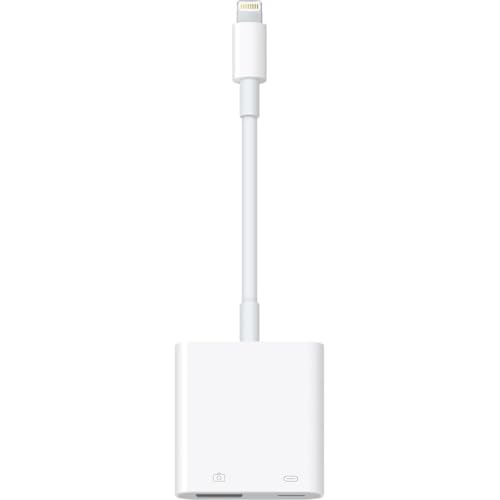
This adapter is designed for iPhone and iPad users who rely on the Lightning port. It offers a plug-and-play experience without requiring extra apps, enabling quick transfers from digital cameras to iOS devices. It also functions as an OTG hub to connect USB peripherals like keyboards, USB drives, and game controllers. Best for: travelers or students who need quick photo transfers and lightweight USB access on the go. Caution: Lightning-only devices may see limited compatibility with newer USB devices that expect USB-C or higher power delivery.
Untvie [Apple MFi Certified] Lightning To USB 3.0 Camera Adapter

Untvie’s adapter emphasizes durability and a reliable plug-and-play experience. It includes a reinforced Lightning connector, a robust cable, and copper wiring for data transfer, plus a charging port for simultaneous power. Best for: users who want reliable, high-speed transfers from cameras to iPad or iPhone while keeping the device charged. Limitation: some USB peripherals may require additional power or adaptors to function optimally.
Apple USB-C to USB Adapter

The Apple USB-C to USB Adapter is a straightforward option for users with USB-C iPads or Macs who need to connect standard USB devices like flash drives or cameras. It also allows connecting a Lightning to USB cable for syncing and charging. Best for: users needing broad compatibility with standard USB devices on USB-C devices. Caution: it’s a basic adapter without built-in SD card readers or multi-port hubs, so you may need separate accessories for bulk transfers.
JOOPSHEE 5-in-1 Memory Card Reader

JOOPSHEE combines multiple interfaces into a single accessory. It includes USB, USB-C, SD, Micro SD, and an iPhone/iPad charging port, plus support for USB-C and USB-A devices. Best for: users who need a compact all-in-one reader that supports multiple card formats and quick charging. Caution: the integrated design may be bulkier and less suitable for ultra-compact setups where space is at a premium.
Buying Guide: Key Considerations For iPad USB Adapters
What do you primarily need from an iPad USB adapter? Consider port type, device compatibility, and whether you need simultaneous charging. If you work with memory cards, ensure SD/ Micro SD support and expected transfer speeds. For on-the-go use, a compact Lightning-compatible adapter with charging can be invaluable. If you own a newer iPad with USB-C, prioritize USB-C to USB and USB-C hub options for broad USB compatibility. For photographers and videographers, multi-card readers that support SD and microSD alongside USB drives can simplify workflows.
Port Availability And Compatibility
Ensure your iPad model supports the adapter’s connection (Lightning vs USB-C). Check if the adapter is MFi certified for Lightning devices to ensure smooth operation. USB-C iPads benefit from USB-C to USB-A or USB-C to USB-C connections depending on the peripheral.
Power And Data Transfer
Some adapters offer pass-through charging, which is essential when using larger drives or long transfers. If you plan to connect USB devices that require more power, choose adapters designed with charging pass-through or robust copper wiring for reliable data transfer.
Port Variety And Future-Proofing
Multi-port options like the JOOPSHEE reader provide SD, Micro SD, USB, and charging. If you anticipate needing extra ports later, a compact hub with multiple types of connections may be worth the extra size.
Size, Build Quality, And Durability
Durable connectors and reinforced cables reduce the risk of wear in travel. Zinc alloy torsion housings and reinforced joints, as seen in some models, offer longevity for frequent use.
Ease Of Use
Plug-and-play functionality saves time and avoids software conflicts. MFi certification for Lightning devices ensures fewer “Accessory Not Supported” messages during transfers.
Frequently Asked Questions
- Do iPads support USB drives directly? Some iPads with USB-C ports can connect USB drives, but older Lightning-based iPads require an adapter.
- Is MFi certification important? Yes, for Lightning adapters, MFi certification reduces compatibility issues and ensures a stable connection with iOS devices.
- Can I charge my device while transferring data? Many adapters offer a pass-through charging port; use them if you need uninterrupted power during transfers.
- Will these adapters work with cameras? Yes, many adapters support SD cards from cameras and can transfer photos and videos to an iPad with the appropriate port.
- What’s the best option for a multi-device setup? A 5-in-1 reader provides the most versatility, especially if you frequently switch between USB-A, USB-C, SD, and microSD devices.
- Are these adapters future-proof? USB-C adapters tend to offer broader compatibility with newer devices, while Lightning adapters are best for older iPad and iPhone models.