Best iPad Holder for Drawing: Adjustable Stands for Sketching and Productivity
Answering the main buyer question: the best iPad holder for drawing are adjustable tablet stands that securely support your iPad or drawing tablet at the right angle, height, and stability for long drawing sessions. This guide highlights five practical options that suit different drawing styles, space needs, and budgets. Types include lightweight portable stands for on-the-go sketching, robust bamboo stands for home studios, and multi-angle designs with extra features like built-in pencil holders or charging slots. The following picks are chosen for reliability, ease of use, and clear benefits for artists, students, and professionals.
Summary table of recommended products
- MAX SMART Tablet Drawing Stand — Best overall for versatility and travel readiness
- Parblo PR 100 — Best for large, 10–16 inch drawing displays
- ELETIUO Upgraded Bamboo — Best for integrated accessories and ergonomic comfort
- ELETIUO Bamboo 9–11 inch — Best for compact iPad models and daily use
- Frunsi Drawing Tablet Stand — Best for multi-device use with heat dissipation
MAX SMART Tablet Drawing Stand

Best for: artists who need a lightweight, adjustable stand that travels well. The MAX SMART stand supports most tablets and lightweight laptops, making it ideal for on-the-go sketches, study sessions, and desk work. Its adjustable viewing angle ranges from 15° to 39°, helping users find a comfortable posture for drawing, reading, or watching content. The stand weighs only 360 g and is about 1 cm thick, which supports easy packing in bags or backpacks for travel or classroom use.
Why chosen: its universal compatibility, compact form, and flexible angle adjustment cover a wide set of drawing scenarios—from quick concept sketches to longer design sessions. The foldable design adds to portability, reducing desk clutter during setup or travel.
Caution: ensure your drawing tool’s weight is within the stand’s stability range; heavier tablets may require a more robust option for long sessions.
Parblo PR 100 Universal Drawing Tablet Stand
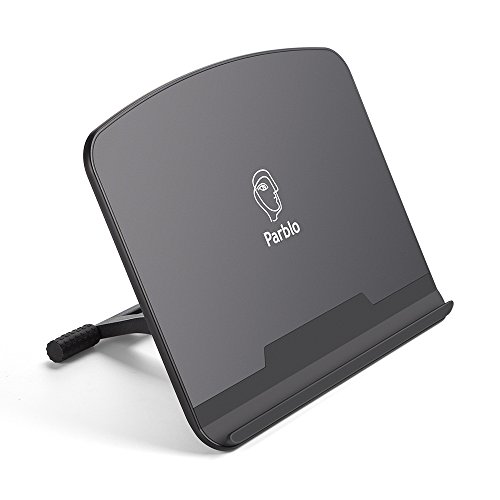
Best for: users with larger drawing devices in the 10 to 16 inch range who want a stable, adjustable tilt. The stand’s rubberized contact points help keep the tablet steady during drawing. Its aluminum/plastic construction emphasizes durability and a solid base, with tilt angles adjustable from 15° to 90° for portrait or landscape use. It supports a wide range of tablet sizes, making it suitable for artists who switch between monitors and traditional tablets.
Why chosen: it offers a broad size compatibility window and a wide tilt range, enabling precise ergonomic setups for both drawing and viewing references. The rubberized contact areas reduce slippage, which is valuable for fine-detail work.
Caution: for smaller iPad models, ensure the bottom support remains stable; the stand is optimized for larger tablets and may feel a bit bulkier for compact devices.
ELETIUO Adjustable Bamboo Stand (9.7–11″ Devices)

Best for: iPad models in the 9.7–11 inch range who want a premium wooden aesthetic with built-in pencil holder and charging cable slot. The stand uses bamboo wood with a sturdy ABS support structure and includes a pencil holder and charging cable route, enabling uninterrupted drawing sessions while charging. It supports multiple angles and is designed to reduce neck and eye strain during extended use.
Why chosen: the combination of natural bamboo, integrated Pencil Holder, and charging slot makes it a practical, all-in-one solution for a clean desk setup. This is particularly appealing to artists who value a premium look and thoughtful cable management.
Caution: larger iPad Pro models (12.9”) will not fit this specific stand; verify device dimensions before selecting.
ELETIUO Upgraded Bamboo for 12.9″ iPad Pro

Best for: users with larger iPad Pro devices who want a stable, multi-angle stand with a built-in Pencil Holder and wireless charging support. The stand accommodates 12.9 inch iPad Pro (3rd to 5th Gen) and provides a balanced support structure with four adjustable angles for ergonomic drawing and viewing. It emphasizes a robust, balanced setup for long sessions at a desk.
Why chosen: its higher-end compatibility for 12.9″ models and built-in charging options offer a streamlined workflow for professional creators who often draw while charging. The ergonomic design reduces strain during extended sessions.
Caution: heavier Pro variants or thick cases may require checking fit and clearance with the pencil charging slot.
Frunsi Drawing Tablet Stand
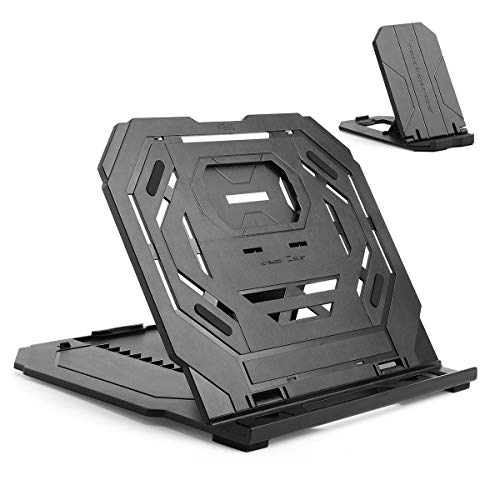
Best for: users seeking heat dissipation and a built-in phone holder for a two-device drawing setup. The stand features gaps that improve air flow to help dissipate heat during intense drawing sessions. It supports drawing tablets, laptops, and smartphones, enabling a dual-device workflow. The adjustable angles support comfortable, long-form creation and reduce wrist fatigue.
Why chosen: the heat-dissipation design is a practical benefit for workflow efficiency, especially for artists who render long sessions. The added smartphone holder increases multitasking convenience.
Caution: the dual-structure design may take up slightly more space on a crowded desk; ensure you have adequate surface space for both devices.
XPPen AC42 Graphics Tablet Stand

Best for: owners of XP-Pen devices or other 9–14 inch drawing tablets who need a portable, lightweight stand. The AC42 is made from ABS and glass fiber for a sturdy, low-profile support. It fits XP-Pen Artist 12 and Artist 13.3 models and similar-sized devices, offering a simple tilt to 90 degrees for stable drawing positions.
Why chosen: a compact, purpose-built stand for common drawing tablets, with straightforward setup and solid stability. It is well-suited for artists who value portability and ease of use when traveling between workspaces.
Caution: it’s best for devices within its size range; larger tablets or heavier devices may require a larger stand for better balance.
Buying Guide
What to look for when choosing an iPad holder for drawing
- Size compatibility: Determine the maximum screen size you own and choose a stand that securely supports that size without wobble.
- Adjustability: Look for multiple tilt angles and, if possible, height adjustments to reduce neck and eye strain during long sessions.
- Weight and portability: If you sketch on the go, prioritize lightweight stands that fold or compress into a bag.
- Stability and materials: Rubberized feet, non-slip pads, and a sturdy base prevent tipping during precise, detailed drawing.
- Accessory integration: Built-in pencil holders, charging slots, or phone holders can simplify your workflow and desk setup.
- Material preferences: Bamboo and wood offers a premium aesthetic; plastic and metal stands are often lighter and budget-friendlier.
Practical comparison at a glance
| Product | Best For | Key Feature | Notable Limitation |
|---|---|---|---|
| MAX SMART | Travel sketches | Lightweight, folds flat | May be lighter on stability with heavier devices |
| Parblo PR 100 | Large tablets | Wide tilt range 15–90° | Bulkier for small devices |
| ELETIUO Bamboo (9.7–11″) | Compact iPads | Pencil holder and cable slot | Not ideal for 12.9″ Pro |
| ELETIUO Bamboo (12.9″ Pro) | 12.9″ iPad Pro | Integrated pencil charging slot | May be heavier to adjust for some setups |
| Frunsi | Multi-device users | Heat dissipation gaps | Desk space required for two devices |
| XPPen AC42 | XP-Pen models | Lightweight and portable | Limited to 9–14″ devices |
Frequently asked questions
- What is the best stand for an iPad Pro 12.9″ for drawing? A: Stands designed for larger tablets, such as the ELETIUO Upgraded Bamboo for 12.9″ iPad Pro, offer sturdy support and ergonomic angles suitable for sketching.
- Should I choose wood or metal stands? A: Wood (bamboo) stands provide a premium look and integrated features; metal stands often emphasize lighter weight and portability.
- Do I need a stand with a pencil holder? A: If you frequently use an Apple Pencil, a stand with a built-in pencil holder or charging slot can improve workflow and reduce desk clutter.
- Are adjustable angles important for drawing? A: Yes. A wide tilt range (15°–90°) supports natural drawing posture and reduces wrist strain during long sessions.
- Is portability a priority? A: For travel or classroom use, favor lightweight, foldable stands that fit easily in a bag.
- Can I use these stands with other tablets or laptops? A: Most stands in this guide are designed for broad compatibility with 9–16 inch devices, but always verify weight limits and dimensions before purchasing.