Best Laptop Multi-Display Extenders for Portable Productivity
For professionals who need extra screen real estate on the go, portable laptop screen extenders offer a practical solution. This guide highlights five top options that balance lightweight design, ease of use, and solid image quality. Each product expands a single laptop into a multi-monitor setup, helping you manage windows, documents, and communications more efficiently without sacrificing mobility.
Overview of chosen products:
| Product | Brand | Key Benefit | Notes |
|---|---|---|---|
| KEFEYA Laptop Screen Extender 15.6″ | KEFEYA | Detachable triple display with 235° rotation | Lightweight, travel-friendly; 1080p FHD with 120% sRGB |
| QQH Laptop Screen Extender, 15.6” | QQH | Ultra-slim dual 15.6″ displays; plug-and-play | Solid aluminum design; simple setup |
| MAGICRAVEN Dual Laptop Screen Extender, 14″ | MAGICRAVEN | Triple-screen potential; plug-and-play | Great for mobility; compatible with Windows/macOS |
| KYY 15.6″ Laptop Screen Extender | KYY | One-cable USB-C triple monitor | Broad OS compatibility; driver required for some setups |
| POTTMACEE 14.2” Triple Laptop Extender | POTTMACEE | Ultra-light, ultra-slim triple display | Aluminum design; strong portability features |
KEFEYA Laptop Screen Extender
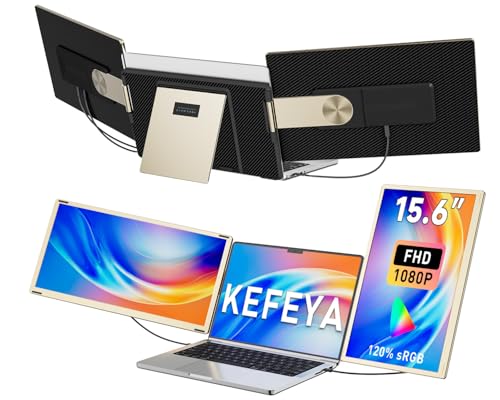
KEFEYA offers a detachable triple-monitor setup designed to turn a laptop into a portable workstation. The 15.6″ FHD display provides 1920×1080 resolution with 120% sRGB, delivering vibrant color accuracy. It supports mirror and extension modes, and rotates up to 235°, allowing landscape or portrait configurations. A leather bag is included for easy transport, making it suitable for travelers, remote workers, and field teams. This extender emphasizes flexibility and quick assembly, helping users switch between tasks without juggling screen switching on a single laptop.
QQH Laptop Screen Extender

QQH presents an ultra-slim 15.6” tri-screen extension built with aluminum alloy. It offers a 1920×1080 IPS display, 178° viewing angles, and a 360° rotation with a built-in stand. Its lightweight design fits smoothly behind a laptop, avoiding contact with the laptop screen itself. The one-cable plug-and-play setup simplifies connections after driver installation, making it a solid choice for users who want a sleek, portable multi-display solution without a lot of fiddling with cables.
MAGICRAVEN Dual Laptop Screen Extender

MagicRaven focuses on plug-and-play versatility with a 14″ FHD IPS display option. It supports Windows and macOS, with some macOS M-series chips limiting display extension to a single screen. The triple-monitor setup enables users to spread work across multiple windows, which can substantially boost productivity. A compact form factor and USB-C connectivity make it a practical travel companion for professionals who need to work across several programs at once.
KYY 15.6″ Laptop Screen Extender

KYY delivers a broad compatibility story with plug-and-play USB-C or USB-A connectivity, supporting Windows, macOS, Chrome OS, Android, and Linux. The two 15.6″ FHD IPS screens offer 178° viewing angles and a 1200:1 contrast ratio, delivering clear visuals and wide viewing angles for group meetings and collaborative work. A single USB-C connection simplifies setup, though some systems may require driver installation for full functionality, ensuring a relatively straightforward path to a larger desktop workspace on the go.
POTTMACEE 14.2” Triple Laptop Screen Extender
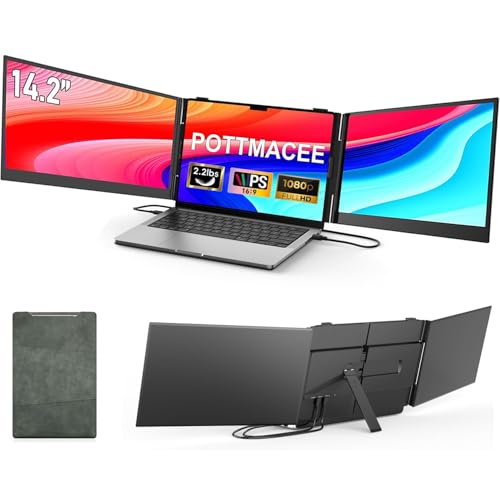
POTTMACEE emphasizes ultra-lightweight portability with each of the three screens at 0.17 inches thick and about 2.2 pounds per unit. The aluminum alloy design enhances heat dissipation and durability. The 14.2″ triple display uses a 1920×1080 IPS panel with 178° viewing angles, 300 nits brightness, and 72% NTSC color accuracy. It includes built-in controls and requires just a single USB-C connection to a laptop, making it a strong option for travelers and remote workers who need a flexible, high-clarity multi-screen setup.
Buying Guide: Key Considerations for Choosing a Laptop Display Extender
- Display count and configuration: Decide between dual, triple, or quad setups based on your workload. More screens can boost productivity but add weight and cable management considerations.
- Connectivity: Look for USB-C with power delivery, or USB-A/USB-C options that support plug-and-play. Confirm driver requirements for your operating system, especially on Macs with M1/M2/M3 chips or newer.
- Color and brightness: Choose IPS panels with high brightness (around 300 nits) and wide color gamut (100% sRGB or higher) for accurate visuals in varied lighting.
- Rotation and ergonomics: Adjustable rotation (0–330°, 235° etc.) helps tailor the viewing angle and reduces neck strain during long work sessions.
- Portability vs. performance: Ultra-slim builds improve portability but may trade off brightness or color depth. Consider your travel frequency and desk setup when selecting.
- Compatibility and drivers: Ensure compatibility with Windows, macOS, Chrome OS, or Linux. Some devices require driver installation or may have limited support on certain chipsets.
- Build quality and stability: Aluminum alloy frames tend to be sturdier and better at dissipating heat than plastic ones, especially for mobile use.
- Power considerations: Some setups require external PD power to drive multiple displays; verify if your laptop can source sufficient power to avoid dim displays or instability.
Across these options, the common thread is extending workspace while preserving mobility. If your workflow includes frequent spreadsheet editing, design tools, or multi-app multitasking, a triple or quad-monitor extender can deliver meaningful productivity gains. For travelers or remote workers, the best choice balances weight, setup simplicity, and reliable plug-and-play functionality with the level of display quality you require.