Best Laptop Screen Resolution Solutions for Multi-Display on the Go
Boost productivity and create a versatile mobile workstation with high-resolution laptop screen extenders. The following picks leverage Full HD (1080p) displays, wide color coverage, and plug-and-play connectivity to help you expand your screen real estate across Windows, Mac, Chrome OS, and more. Use the buying guide below to compare size, weight, color accuracy, and compatibility to find the best fit for travel, remote work, or classroom setups.
| Product | Brand | Screen Size & Type | Resolution | Highlight |
|---|---|---|---|---|
| KEFEYA Laptop Screen Extender 15.6″ Triple Monitor | KEFEYA | 15.6″ FHD IPS | 1920×1080 | 235° rotation; detachable, portable workstation |
| Wixzet Laptop Screen Extender 14″ | Wixzet | 14″ FHD IPS | 1920×1080 | Triple screen extender; auto width adjustment |
| KYY Portable Monitor 15.6″ | KYY | 15.6″ IPS | 1920×1080 | HDR, 178° viewing angle; USB-C/HDMI connectivity |
| KEFEYA Laptop Screen Extender 14″ | KEFEYA | 14″ FHD IPS | 1920×1080 | Dual screen; USB-C/HDMI; plug-n-play |
| CIDETTY Laptop Screen Extender 14″ | CIDETTY | 14″ FHD IPS | 1920×1080 | Ultra-thin; built-in speakers; portable case |
Note: The products above emphasize high-definition displays and flexible mounting to enlarge your workspace. The table helps you compare how each option supports extended or mirrored modes, color fidelity, and portability for frequent travelers and remote workers alike.
KEFEYA 15.6″ Triple Monitor Extender
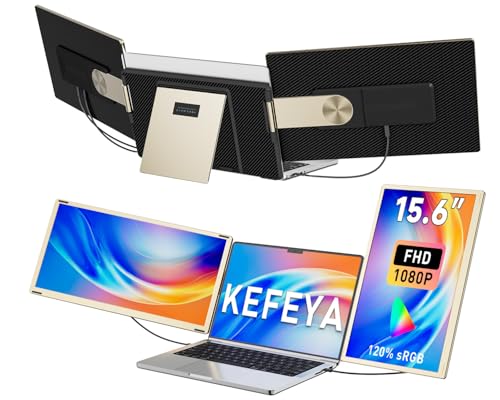
The KEFEYA 15.6″ triple monitor extender provides a detachable design with a leather carry bag for travel, enabling quick assembly into a portable workstation. It supports Mirror, Extension, and both landscape and portrait modes, with 235° rotation for flexible viewing. This arrangement helps reduce tab-switching and can support tasks across multiple displays, making it suitable for remote workers, developers, and professionals who need simultaneous access to documents, video conferencing, and media.
Wixzet 14″ Triple Screen Extender

The Wixzet 14″ extender transforms a laptop into a three-display setup with extended and mirrored modes. The device weighs about 4.1 pounds and uses a one-button auto-stretch back panel to fit laptops from 13″ to 17″. It also features a reinforced top hook and a stable back stand to adapt to different heights and angles, improving productivity for professionals, students, designers, and traders who rely on side-by-side data and visuals.
KYY 15.6″ Portable Monitor with HDR

The KYY 15.6″ monitor features a 1920×1080 IPS screen with HDR support and a wide 178° viewing angle. It includes two full-function USB-C ports and a Mini-HDMI port for versatile connectivity to laptops, phones, and game consoles. With built-in speakers and a slim profile, it provides an immersive extended display option for gaming, multimedia, or productivity tasks in a compact package.
KEFEYA 14″ Dual Screen Extender

The KEFEYA 14″ dual-screen extender boosts efficiency by up to 200%, enabling simultaneous viewing of spreadsheets, design tools, and chats. It supports extended, duplicate, and portrait modes, and uses USB-C/HDMI connectivity with included cables for a plug-and-play setup. The 1080p IPS panel delivers bright images and adjustable brightness, supporting a comfortable viewing experience for on-the-go professionals and students.
CIDETTY 14″ FHD Ultra-Thin Extender

The CIDETTY 14″ extender is an ultra-thin, plug-and-play portable monitor with built-in speakers and a protective case. It supports Windows, macOS, Linux, and gaming consoles, making it a versatile companion for dual or extended display setups. It includes blue light filtering and anti-glare features for long sessions and travel-friendly portability.
Funhill 14″ Dual Screen Extender

The Funhill 14″ extender provides dual screens with a 1080p IPS panel, 60Hz refresh, and 16:9 aspect ratio. It supports 0–280° rotation for customized viewing and includes all cables needed for plug-and-play operation. This option suits users who need quick access to multiple apps and documents while traveling or working remotely, with practical eye-care features to reduce fatigue.
Buying Guide: Key Purchase Considerations
- Display quality: Prioritize IPS panels with 1920×1080 resolution (Full HD) for sharp text and vivid colors, and look for wide viewing angles to share the screen with collaborators.
- Connectivity: Ensure USB-C, HDMI, and USB-A options are available and supported by your laptop. One-cable setups simplify packing and use fewer cables.
- Size and weight: A balance between portability and workspace is essential. 14″ to 15.6″ panels are common sweet spots for travel.
- Color accuracy and brightness: A higher brightness (around 300 nits) and color gamut (sRGB or better) improves visibility in bright environments and ensures usable color fidelity for design tasks.
- Rotation and mounting: 0–280° rotation and adjustable stands help achieve comfortable viewing angles. Detachable designs assist with travel setups and rapid packing.
- Compatibility: Check OS support and driver requirements. Some models say “driver needed” for full functionality, which may affect hot-swapping in different ecosystems.
- Eye comfort: Look for anti-glare, blue-light filtering, and low-flicker features for longer work sessions and reduced eye strain.
- Protection and portability: Built-in cases, protective sleeves, and robust hinges reduce the risk of damage while commuting.
- Use case: Consider whether you need two or three external panels, and whether you require touch support or built-in speakers for media consumption.
Overall, choosing a laptop screen extender hinges on how you value portability, screen space, color performance, and universal compatibility. The products above provide a range of options from dual to triple-screen setups, ensuring you can tailor your mobile workstation to match your workflow, whether you’re a software developer, financial trader, or creative professional.