Best Laser Printer and Engraver Options for Cups and Tumblers
Whether you’re personalizing ceramic mugs, stainless steel tumblers, or acrylic cups, a dedicated laser engraver or compatible decal media can deliver professional, durable results. This guide highlights five top products suited for cup customization, from powerful laser engravers to transfer papers that work with laser printers. It’s designed for makers, small business owners, and hobbyists who want reliable, repeatable results on cups and tumblers. A quick buying table is included below to help you compare at a glance.
| Product | Brand | Best For | Why It Stands Out |
|---|---|---|---|
| xTool S1 40W Laser Cutter and Engraver | xTool | Large projects and curved surfaces | High power, large bed, AutoPassthrough, precise pin-point positioning |
| PEKOKO L4Pro Handheld Laser Marking | PEKOKO | On-the-go marking and personalization | Portable, long battery life, versatile marking options |
| Koala Waterslide Decal Paper (Laser Printer) | KOALA PAPER | Clear, durable cup decals | Easy transfer on glass/ceramic surfaces, laser-friendly |
| Clear Sticker Paper for Laser Printer | Paper Plan | Colorful, label-ready cup graphics | Glossy finish, compatible with laser printers |
| Uinkit Premium Glossy Printable Vinyl Sticker Paper | Uinkit | Vibrant cup decals | Waterproof, fast-drying, tear-resistant |
Buyer notes: The top picks balance power, portability, and media versatility for cup decorating. If you need large-quantity production on curved cup surfaces, the xTool S1 is a strong choice. For on-the-go marking, the PEKOKO L4Pro offers portability with robust marking options. For decals and transfers on cups, the Koala Waterslide and sticker papers from Paper Plan and Uinkit provide easy-to-use media compatible with laser printers.
xTool S1 40W Laser Cutter and Engraver

The xTool S1 combines a powerful 40W laser with a large engraving bed (23.93″ x 15.16″), enabling fast cutting and engraving on cups with large volumes or curved surfaces. It supports auto passthrough for long items and features Pin-point Positioning for precise results. The included software and materials database aim to simplify setups for beginners while offering professional capabilities for advanced users. Best for serious cup customization projects that require speed and large bed space.
- Best for large tumbler batches and expansive designs on curved surfaces.
- Better for users who value precise control and automatic focus features.
Caution: This device is fairly large and requires a dedicated workspace with proper ventilation. Ensure you have appropriate safety practices for laser use around cups and materials.
PEKOKO L4Pro Handheld Laser Marking
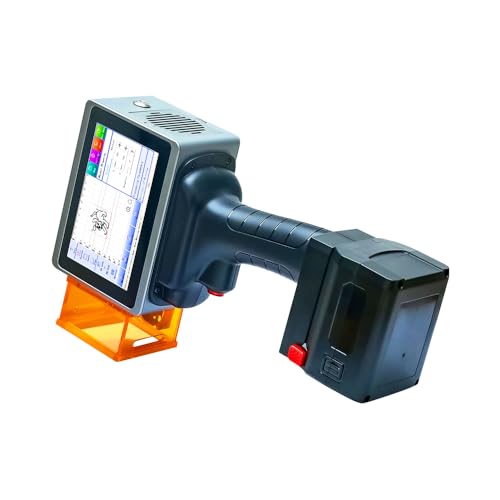
The L4Pro is a portable laser marking system ideal for quick, on-the-go personalization of cups and other small items. It features a color touchscreen and self-developed software with a user-friendly interface. It supports marking options such as QR codes, barcodes, logos, text, and dates. Best for small businesses or crafters who need mobility and rapid prototyping on cups and accessories.
- Best for rapid, on-site customization and quick turnaround.
- Better for personal prototypes and limited production runs.
Limitation: Battery-powered operation means performance can vary with charge; plan a recharge schedule for longer sessions.
Koala Waterslide Decal Paper for Laser Printer

Koala waterslide decal paper is designed for laser printing on light or clear surfaces, making it suitable for transferring detailed cup graphics onto glass, ceramic, or metal. It eliminates the spray coating step and is described as long-lasting and easy to use, with broad transfer possibilities for elegant cup designs. Best for users who want crisp designs with smooth color transfers on transparent cup surfaces.
- Best for high-clarity transfers on glass or ceramic cups.
- Better for users who want a simple, spray-free transfer method.
Caution: Transfer results can vary by laser printer model and cup material; test small samples before full production run.
Clear Sticker Paper for Laser Printer

This clear sticker paper is compatible with laser printers and yields vibrant, clean graphics—great for creating custom cup decals and labels that need to blend with the cup surface. It’s suitable for crafting labels, logos, and decorative elements on various cup materials. Best for projects requiring glossy, durable decals that adhere well to smooth surfaces.
- Best for vibrant, adhesive cup labels and decals.
- Better for flat or slightly curved surfaces where sticker adhesion is critical.
Limitation: Glossy finish may not fully conform to very curved surfaces without careful application and smoothing.
Uinkit Premium Glossy Printable Vinyl Sticker Paper

Uinkit’s glossy printable vinyl sticker paper is designed for inkjet and laser printers, offering waterproof, quick-drying, and tear-resistant decals. It’s ideal for high-contrast cup graphics and pet photos or kid-friendly designs. Best for durable cup decals that withstand washing and handling. A strong adhesive helps decals stay put on flat to gently curved cup surfaces.
- Best for durable, water-resistant cup decals with sharp color reproduction.
- Better for outdoor or frequently handled cups due to weather resistance.
Limitations: While water-resistant, very high-temperature washing or dishwashers may affect long-term adhesion; verify care instructions for specific cups.
Buying Guide: Cup-Centric Laser Printing and Engraving Considerations
What should you consider when picking tools for decorating cups and tumblers?
- Material compatibility: Cups vary from glass to ceramic to stainless steel. Choose a media or laser setting compatible with your primary cup materials (and always test on a sample).
- Surface curvature: Large-bed and auto-passthrough engravers handle curved surfaces better. For fixed-curvature cups, specialized jigs or templates help maintain consistency.
- Power vs. portability: A 40W laser offers speed and deeper engraving on thicker materials, but handheld devices excel in mobility for on-site customization.
- Media type and finish: Waterslide decals, clear sticker papers, and printable vinyl each suit different aesthetic goals and durability needs. Consider UV resistance and dishwasher safety.
- Software and workflow: Look for intuitive software with preset parameters for common cup materials and a library of cup-related design templates or AI-assisted design features.
FAQs
- Do I need a protective enclosure for cup engraving? Yes, use appropriate safety enclosures and ventilation when using laser devices around cups and materials.
- Can waterslide decals be applied to metal tumblers? Yes, with proper preparation and transfer techniques, but test adherence on your specific cup finish.
- Are sticker papers safe for dishwasher use? Some are, but many decals are best hand-washed to preserve adhesion and colors over time.
- Is a large-bed laser necessary for tumbler projects? It depends on batch size. Larger beds help with bulk projects, while handheld options suit quick, on-site work.
- Can I use any laser printer with decal paper? Not all media are compatible with every laser printer. Check media compatibility and run a test print.