Best Logitech Mice for Work: Comfortable, Efficient Tools for the Desk
Finding the right office mouse can boost productivity, reduce strain, and streamline daily tasks. This guide highlights five Logitech mice that excel for work—from precise scrolling on documents to multi-device workflows and all-day comfort. Each model balances battery life, connectivity, and ergonomic design to suit different work styles and setups.
| Product | Connection | Key Benefit |
|---|---|---|
| Logitech M510 Wireless Mouse | USB Unifying Receiver | Long battery life, reliable for daily work |
| Logitech MX Master 3S | Logi Bolt USB Receiver, Bluetooth | 8K DPI, precise scrolling, multi-surface tracking |
| Logitech Signature M650 L | Bluetooth / USB receiver | Large-hand comfort with customizable buttons |
| Logitech M720 Triathlon | Bluetooth / Unifying Receiver | Multi-device workflow, long battery life |
| Logitech Marathon M705 | USB Unifying Receiver | Ultra-long battery life for heavy use |
Logitech M510: Everyday Workhorse

The M510 is built for reliable daily use with extended battery life. It runs for up to two years on typical batteries, helping reduce maintenance interruptions. An On/Off switch and smart sleep mode conserve power, while a compact, ambidextrous design supports everyday productivity on laptops and desktops. The tiny Unifying receiver stays plugged in, enabling easy connection to any compatible Logitech peripherals without clutter. A battery indicator light helps monitor power status to avoid unexpected shutdowns.
Logitech MX Master 3S: Precision and Speed

The MX Master 3S is designed for power users who manage lots of documents or design tasks. It features an 8K DPI sensor for precise tracking on various surfaces and a highly configurable button layout. The Logi Bolt USB receiver option ensures a secure connection, while USB-C charging supports quick top-ups. This model excels in multi-task workflows, with smooth scrolling and customizable features through the supported software, enabling tailored shortcuts and efficient navigation across applications and windows.
Logitech Signature M650 L: Large-Hand Comfort

The Signature M650 L is crafted for larger hands, offering a comfortable, contoured grip for extended work sessions. It supports Bluetooth and USB receiver connectivity for flexible setup across devices. Its SmartWheel offers line-by-line precision for documents or rapid pages scrolling, and the side buttons can be customized via Logitech Options on Windows or macOS. The overall feel prioritizes natural hand placement and steady control during long days of coding, editing, or research.
Logitech M720 Triathlon: Multi-Device Excellence

The M720 Triathlon is designed for users who switch between multiple computers. It supports Logitech FLOW to move text, images, and files across up to three devices with a single mouse. Dual connectivity enables use via Bluetooth or the Unifying Receiver, providing flexibility in workstation layouts. A long-lasting battery complements the multi-device capability, ensuring consistent performance across devices without frequent recharges. Precision laser tracking ensures stable cursor control on varied desk surfaces, supporting everyday tasks and productivity workflows.
Logitech Marathon M705: Ultra-Long Battery Life
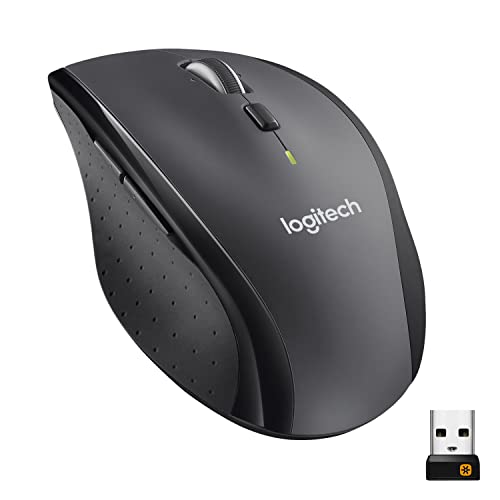
The M705 Marathon focuses on battery longevity, offering up to three years of use on standard batteries. It uses the Unifying Receiver for a compact, reliable connection with other Logitech devices. The lightweight yet durable design suits long work sessions, and the laser-grade tracking provides consistent cursor control on diverse surfaces. Aimed at heavy daily use, this model is well-suited for users who value minimal maintenance and dependable wireless performance.
Buying Guide: What to Consider When Choosing a Logitech Work Mouse
- Ergonomics and hand size: Larger hands may benefit from models like M650 L or M720, which offer comfortable grips and contoured shapes for extended sessions.
- Connectivity: Decide between Bluetooth, USB receiver (Unifying), or both. Some models support multiple devices, increasing productivity across setups.
- Battery life: If you want less maintenance, prioritize long-life options such as M510, M705, or M720. Consider rechargeable options if available.
- Buttons and customization: Models like MX Master 3S and M650 L offer programmable buttons for shortcuts, which can speed up common tasks.
- Scroll and navigation: For heavy document work, a precise scroll wheel or SmartWheel (as in M650 L) can improve efficiency on long pages.
- Surface compatibility: High-DPI mice like MX Master 3S perform well on varied surfaces. If you work on glass or unusual surfaces, sensor performance matters.
- Portability: If you travel or work across locations, lighter designs with secure receivers help prevent loss and fatigue.
- Software ecosystem: Logitech Options+ or Logi Choices software enables deeper customization and profile management across devices.
Across these options, users can balance comfort, power efficiency, and multi-device workflows to suit most office environments. The selection offers both traditional ergonomic shapes and modern multi-device capabilities, ensuring a fit for diverse workstyles and desk setups.