Best Low Latency Earbuds for Gaming: Crisp Sound, Real-Time Sync
Answering the need for responsive audio, these best low latency gaming earbuds are designed to minimize delay between action and sound. They’re ideal for competitive players, VR enthusiasts, and anyone who wants synchronized audio during fast-paced gameplay. The top picks below emphasize ultra-low latency, multi‑platform compatibility, clear microphones, and long battery life. Each product is best for a slightly different scenario—choose based on platform, preferred connection, and whether you prioritize in-game cues, voice chat, or lightweight comfort. The quick table below highlights the strongest use-cases for each model.
| Product | Best For | Key Latency Feature |
|---|---|---|
| RYR Neo100 | Meta Quest, PS5, PC, VR setups | Under 20 ms via 2.4G dongle |
| Razer Hammerhead V3 HyperSpeed | Multi‑platform with ANC | Ultra-low latency through 2.4 GHz HyperSpeed |
| Middle Rabbit SW4 Pro | VR and console gaming | Ultra-low 20 ms with LC3 codec |
| AOC ACT3512 | PC, PS5, Switch, VR | 20 ms via 2.4 GHz dongle |
| Lenovo GM2 Pro | Phones, consoles, casual gaming | Bluetooth 5.3 with low latency |
RYR Neo100 Wireless Gaming Earbuds
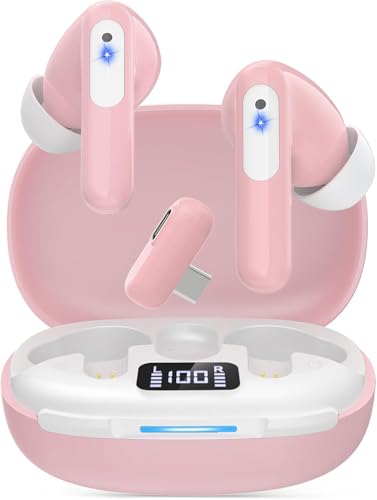
The RYR Neo100 model targets gamers who need ultra‑low latency across multiple platforms. It offers a sub-20 ms latency via a 2.4G dongle, plus Bluetooth for dual‑connection versatility. This makes it well suited for Meta Quest 3/2, PS5, PC, and Switch users who value real-time audio with minimal lag. The earbuds include 12 mm drivers for balanced sound and noise‑reduction microphones for clearer voice chat. Best for players who want seamless cross‑platform use and immediate in‑game cues, with a practical emphasis on VR and console gameplay.
Caution: The dual‑connection setup may require occasional pairing management when switching between devices during long sessions.
Razer Hammerhead V3 HyperSpeed Wireless
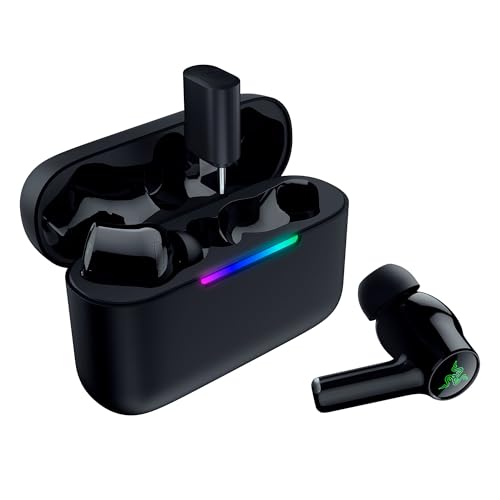
Razer’s V3 HyperSpeed earphones emphasize multi‑platform freedom with 2.4 GHz HyperSpeed wireless and Bluetooth 6.0. They’re designed for gaming with hybrid ANC to block distractions, making them a strong pick for competitive play and commuting. The compact charging case supports easy on‑the‑go use and rapid switching between devices. Best for players who want a dedicated gaming mode plus everyday listening with a reliable battery life. A caveat: some users may experience minor switching latency when alternating between 2.4 GHz and Bluetooth on certain devices.
Middle Rabbit SW4 Pro Gaming Earbuds

Middle Rabbit SW4 Pro delivers ultra‑low 20 ms latency through LC3 codec over a 2.4G wireless connection. It supports VR and major consoles, including Meta Quest 3/2, PS5, PS4, Steam Deck, and Switch, while offering a practical two‑device setup: use the 2.4G dongle for gaming and Bluetooth for calls. Best for gamers who want near‑zero lag in VR or console titles and appreciate true plug‑and‑play simplicity. Limitation: Xbox compatibility is not listed, so verify device support if Xbox is a primary platform.
AOC ACT3512 Wireless Gaming Earbuds

AOC ACT3512 combines 2.4 GHz and Bluetooth 5.3 in a dual‑mode design. It emphasizes 20 ms ultra‑low latency for competitive gaming and includes a hardware amplifier to boost audio fidelity. The dongle enables reliable PC, PS5, Switch, and VR use, while Bluetooth handles mobile devices. Best for players who want a broad compatibility range and strong in‑game audio cues. Note: Xbox series consoles are not supported, so check console compatibility if you use an Xbox platform.
Lenovo GM2 Pro Bluetooth 5.3 Earbuds

Lenovo GM2 Pro pairs Bluetooth 5.3 with low latency to support gaming, music, and calls. Its dual‑mode approach makes it versatile for phones, tablets, and consoles. Best for general gaming setups that don’t require dedicated dongles. The model is noted for delivering stable connections with clear voice capture, though Bluetooth latency can vary by device and environment. Suitable for budget‑conscious gamers who want reliable wireless performance across multiple platforms.
YOVDA Wireless Gaming Earbuds

YOVDA targets long play sessions with up to 25 hours total playtime in dual mode. A 12 mm driver enhances bass and overall sound for a balanced gaming soundtrack. They’re positioned for Call of Duty and similar titles where extended use and strong positional audio help competitive play. Best for gamers who need long battery life and vivid sound, with a caveat that latency and device compatibility may vary across ecosystems.
Razer Hammerhead V3 X HyperSpeed
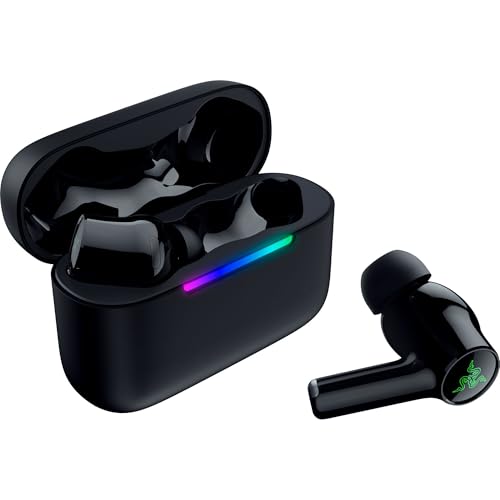
This model emphasizes a combination of 2.4 GHz HyperSpeed and Bluetooth 5.3, delivering up to 35 hours of total battery life. It’s designed for multi‑platform gaming with a focus on keeping you in the game longer without frequent recharging. Best for players who want a long‑lasting option with robust switching between PC, console, and mobile. Note that true gaming latency specifics may depend on device pairing and dongle use.
Buying Guide
What should you consider when buying low latency gaming earbuds?
- Latency method: Is the primary connection through a 2.4 GHz dongle or Bluetooth? 2.4 GHz typically offers lower latency for gaming.
- Platform compatibility: Check if the model supports your main devices (PC, PS5/PS4, Quest, Switch, Steam Deck, etc.).
- Battery life: Look for total playtime under mixed use (gaming plus calls) and whether the case supports quick charging.
- Microphones: Dual or noise‑reduction mics improve in‑game voice chat and calls.
- Sound quality vs. latency: Some models trade a bit of audio fidelity for ultra‑low latency; consider your priorities.
- Comfort and fit: Try models with multiple ear tip sizes and lightweight designs if you game for hours.
FAQ
- Do all of these earbuds support gaming with consoles?
Some do via 2.4 GHz dongles; verify specific console compatibility per model. - Is Bluetooth always slower than a dongle for latency?
Usually yes, but modern Bluetooth codecs can reduce delay; the dongle generally remains lowest latency option. - Can I use earbuds for voice chat and still have low latency gameplay?
Yes, many models support dual‑mode connections, but performance depends on device switching. - Will these work with VR headsets?
Several listed models advertise VR compatibility; check the dongle and platform support for your headset. - Do these require drivers on PC?
Most are plug‑and‑play with a dongle; some may require driver updates on certain systems.