Best Mesh System for Wifi: Top Whole-Home Solutions for Reliable Coverage
Answering the need for strong, seamless wifi across every room, these mesh systems are designed to replace traditional routers and extenders. They’re best for households with multiple devices, smart home setups, or spaces where signal drops are common. The following five options stand out for performance, coverage, and ease of use across typical American homes. The quick reference table after the intro highlights each product’s core strength.
| Product | Best For | Approximate Coverage | Backhaul |
|---|---|---|---|
| TP-Link Deco X55 3‑Pack | Large homes with many devices | Up to 6500 sq ft | Ethernet backhaul supported |
| TP-Link Deco S4 3‑Pack | Budget-friendly whole-home wifi | Up to 5500 sq ft | Wireless backhaul; single network |
| TP-Link Deco XE75 3‑Pack | Performance-focused, 6E capable | Up to 7200 sq ft | Tri-band with 6 GHz backhaul |
| TP-Link Deco 7 Pro BE63 3‑Pack | Future-ready, strong wired options | Up to 7600 sq ft | Wired backhaul with 10G port option |
| eero 6 3‑Pack | Ease of setup and reliable coverage | Up to 4500 sq ft | Wi‑Fi 6 with mesh roaming |
TP-Link Deco X55 AX3000 3‑Pack Review

Product highlights: Wi‑Fi 6 mesh with AX3000 performance, covers up to 6500 sq ft, supports Ethernet backhaul, and handles up to 150 devices. This makes it a strong pick for large homes with many smart devices and streaming needs. Best for households seeking robust coverage and future-proof speed in one bundled unit.
Who it’s best for: large houses, multi-device families, and users who want reliable mesh without frequent signal drops. Why selected: excellent overall coverage and simple management with mesh roaming. Limitation: performance can vary by wall materials and device placement; set up near central locations for best results.
TP-Link Deco 7 BE25 3‑Pack Review

Product highlights: Wi‑Fi 7 with a 4‑stream BE5000 dual‑band setup and 6,600 sq ft coverage for over 150 devices. It supports versatile backhaul options and impressive speeds for 4K/8K streaming and gaming. Best for: homes with heavy streaming, smart devices, and wired backhaul ambitions. Caution: data sheet emphasizes performance varies by distance and obstacles; optimal placement matters.
TP-Link Deco S4 3‑Pack Review

Product highlights: A budget-friendly mesh trio designed to replace traditional routers, covers up to 5,500 sq ft, and provides a single network with seamless roaming. Best for: smaller to mid-size homes seeking reliable whole-home wifi without extra management complexity. Limitation: does not include high-end 6E or 7 features; performance may be lower on very busy networks or through thick walls.
TP-Link Deco XE75 AXE5400 3‑Pack

Product highlights: Wi‑Fi 6E tri‑band mesh with 7,200 sq ft coverage and a true 6 GHz backhaul. It achieves up to 5,400 Mbps total theoretical speeds for many connected devices and supports up to 200 devices. Best for: tech enthusiasts and households with many 6E‑compatible devices seeking minimal interference. Caution: 6E benefits depend on device compatibility and router location; not all devices will use the 6 GHz band.
TP-Link Deco 7 Pro BE63 3‑Pack Review

Product highlights: Wi‑Fi 7 with 10G wired backhaul capabilities, 7‑pack mesh coverage of up to 7,600 sq ft, and 4×2.5G ports for wired backhaul. Best for: users who want future-ready connectivity with robust wired options. Limitation: true performance depends on line‑rate devices and backhaul configuration; plan wired backhaul if possible to maximize speeds.
eero 6 Mesh Wi‑Fi System 3‑Pack Review
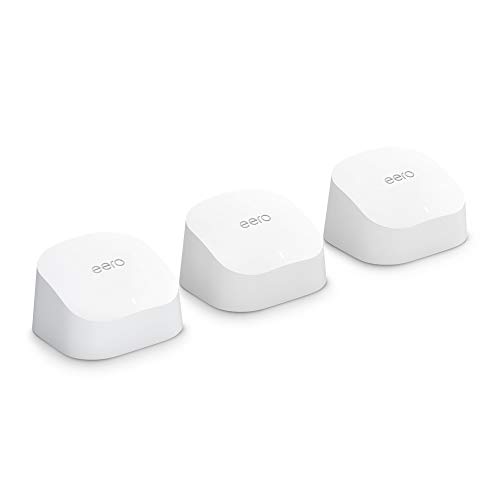
Product highlights: Whole-home coverage up to 4,500 sq ft with Wi‑Fi 6, supporting 75+ connected devices. Best for: users who value a straightforward setup, reliable roaming, and broad compatibility with various networks and devices. Caution: performance may vary with very high traffic or thick walls; consider a single flagship unit for central coverage and add extenders if needed.
Buying Guide
- Coverage needs: For large homes, prioritize models advertising 6,000+ sq ft coverage and robust backhaul options (Ethernet or 6E backhaul). If you have a smaller space, 5,000 sq ft or less mesh systems can still deliver strong reliability.
- Backhaul type: Ethernet backhaul typically yields the most stable performance. Wireless backhaul is convenient but can reduce network speed if many nodes share a congested wireless path.
- Device compatibility and future readiness: For households with many smart devices, look for systems that claim high device support and stable performance at scale. Wi‑Fi 7 and 6E options are future-friendly but depend on device availability.
- Wired ports and expansion: Some models offer 2.5G or 10G ports for high-speed wired backhaul. Plan cable routes and port availability if you expect heavy wired devices.
- Setup and management: Consider systems with intuitive apps, automatic channel selection, and guest network features for easy management and security.
Frequently Asked Questions
- What is a mesh wifi system?
A mesh wifi system uses multiple nodes to create a single, seamless wifi network with roaming between nodes, reducing dead zones and buffering.
- Do mesh systems require a lot of setup?
Most are straightforward to install with a mobile app, guiding you through placement and optimization.
- Is Wi‑Fi 6E worth it for everyone?
Wi‑Fi 6E offers more channels and less interference, but benefits depend on compatible devices and real-world use cases.
- Can mesh systems replace my existing router?
Yes, mesh kits are designed to replace a traditional router and extend coverage across the home.
- What is backhaul, and why does it matter?
Backhaul links carry data between mesh nodes. Ethernet or wired backhaul generally provides the best stability and speed.
- How many devices can a mesh system support?
Most systems claim support for 100–200+ devices depending on network usage and bandwidth needs.