Best Micro SD Cards for Switch: Fast, Compatible Storage for Gaming
Answering your storage needs for Nintendo Switch and Switch 2, these microSD cards are chosen for compatibility, speed, and value. The top picks cover both Switch 1 and Switch 2 ecosystems, helping gamers avoid slow load times and storage shortages. This guide highlights who each option is best for and why, with practical notes on limits and compatibility.
Summary table of selected products
| Product | Best For | Notes |
|---|---|---|
| Samsung microSD Express Card – 256GB for Nintendo Switch 2 | Switch 2 owners needing microSD Express | Officially supports the Switch 2’s new standard |
| SanDisk 256GB microSDXC Licensed for Nintendo Switch | Switch 1, OLED, Lite users | Not compatible with Switch 2 |
| TEKNOSTONE Gaming 128GB MicroSDXC | Budget gamers on Switch 1 or similar devices | Not Switch 2 compatible |
| SANDISK 256GB Ultra microSDXC | General use across devices | Not Switch 2 compatible |
| SanDisk 512GB microSD Express for Switch 2 | High-capacity Switch 2 storage | High speeds via Express standard |
Samsung microSD Express Card – 256GB for Nintendo Switch 2

Best For: Switch 2 owners who need the official microSD Express standard for accelerated loading and game access. This card is designed to meet Nintendo’s Switch 2 requirements for newer games and faster game data access. It is the right choice when performance tied to the new standard matters most.
Why it’s selected: The card is marketed specifically for Nintendo Switch 2 and emphasizes compatibility with the Switch 2’s memory standard, ensuring that faster access speeds support smooth gameplay. It’s a straightforward option for users who want to minimize compatibility questions.
Limitations: If you’re still using Switch 1 or older models, this card may not be compatible. Confirm that your hardware supports microSD Express before purchase.
SanDisk 256GB microSDXC-Card, Licensed for Nintendo-Switch

Best For: Switch 1, OLED, and Lite systems needing reliable licensed storage with solid speeds. This option is widely compatible with current Switch 1 family devices and offers dependable read/write performance for everyday gaming.
Why it’s selected: Officially licensed for Nintendo Switch, this card balances capacity and speed for typical gameplay, app launches, and save data on Switch 1-family consoles. It’s a strong general-purpose pick when upgrading storage on non-Switch 2 models.
Limitations: It does not support Switch 2. If you own a Switch 2, choose a microSD Express card instead to ensure compatibility and maximum performance.
TEKNOSTONE Gaming 128GB MicroSDXC
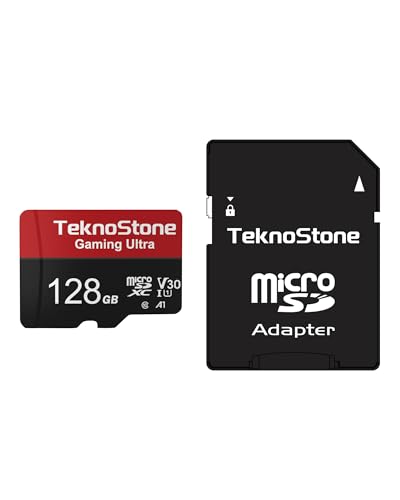
Best For: Switch 1 users and other handheld gaming devices seeking good value with ready-to-use performance. The card is tuned for gaming devices and includes an adapter for laptop and handheld use.
Why it’s selected: Teknostone emphasizes gaming-grade speeds (up to about 100 MB/s read) and A1-rated performance for quicker app launches and reduced in-game lag. The included full-size SD adapter adds versatility for other devices.
Limitations: Not compatible with Nintendo Switch 2. If you’re aiming for Switch 2, this is not the best match due to the lack of microSD Express support.
SANDISK 256GB Ultra microSDXC UHS-I Memory Card

Best For: Switch 1 users and general multi-device storage needs, including Android devices and laptops. This card is a practical, all-around solution for expanding memory across platforms.
Why it’s selected: The Ultra line provides broad compatibility and straightforward performance for everyday use. It’s a reliable choice when upgrading storage on non-Switch 2 hardware and other devices that support microSDXC.
Limitations: It is not compatible with Nintendo Switch 2. If you plan to use a microSD card specifically for Switch 2, pick an Express card instead for compatibility and speed advantages.
SanDisk 512GB microSD Express Card For Switch 2

Best For: Switch 2 players needing very large storage with Express speeds. This option is designed to deliver high read/write rates suitable for larger game libraries and faster transfers when used with a compatible reader.
Why it’s selected: The Express card format aligns with Switch 2’s newer storage expectations, offering significantly faster speeds (up to 880 MB/s read and 650 MB/s write in marketing materials) that help reduce load times and support big game collections.
Limitations: Express cards are not ideal for Switch 1 systems. If you own Switch 2, this card is a strong pick; otherwise, consider non-Express options for Switch 1.
Buying Guide: Key Considerations For Micro SD Cards For Switch
- Compatibility: Confirm your Switch model (Switch 1 vs Switch 2). Switch 2 requires microSD Express cards; Switch 1 supports microSD and some UHS-I classes, but not all Express formats.
- Capacity: Estimate your library size. Games, updates, and save data can accumulate quickly. Larger capacities reduce the need for frequent swaps.
- Speed Class: For gaming, look for UHS-I with high read/write speeds. Express cards on Switch 2 deliver the best performance for future titles.
- Adapter Availability: Some cards come with full-size SD adapters. Keep adapters handy if you frequently transfer data to a PC or laptop.
- Licensing and Brand Trust: Licensed options for Nintendo Switch often ensure compatibility with official device requirements and firmware updates.
- Budget vs. Performance: Non-Express cards can be cheaper but may limit future-proofing on Switch 2. Weigh your current device needs against potential upgrades.
- Data Transfer Scenarios: If you plan to capture gameplay or store large video files, higher sustained write speeds are beneficial for minimizing lag and ensuring smooth recording.
FAQ
- Q: Do I need microSD Express for Switch 2? A: Yes, Switch 2 requires microSD Express cards to meet its memory standard and performance expectations.
- Q: Can I use Switch 1 microSD cards on Switch 2? A: Not all; Switch 2 requires Express cards. Verify compatibility before using non-Express cards.
- Q: Is a larger capacity always better? A: More capacity reduces the need to swap cards but costs more upfront. Choose based on your library size and budget.
- Q: Do licensed Nintendo cards perform better? A: Licensed cards are designed for optimal compatibility with Nintendo systems and can reduce compatibility questions.
- Q: Can I use these cards in other devices? A: Many are compatible with other devices like Android devices, cameras, and PCs, but always check device-specific requirements.
- Q: Should I buy a card with an adapter included? A: An adapter adds flexibility for use with laptops or desktop readers, which can aid data transfer and backups.