Best Microphones for Virtual Meetings and Clear Online Calls
Answer: For reliable virtual meetings, choose USB desktop mics that offer easy plug-and-play setup, clear voice capture, and good noise reduction. This guide highlights five top options suited for remote workers, students, and presenters who want crisp, listenable audio. The top picks include compact desk mics, a wireless lavalier for mobility, and webcams with built-in mics for all-in-one setups. Below is a quick buying table for fast comparisons.
| Product | Key Benefit |
|---|---|
| FIFINE K669S | Full, rich voice with gain control; plug-and-play |
| DUNGZDUZ Mini USB Microphone | Ultra-portable, high-sensitivity voice capture |
| CMTECK USB Computer Microphone | Omnidirectional pickup with adjustable gooseneck |
| Lavsoul 4K Webcam | 4K video with dual noise-canceling mics |
| Galyimage 4K Webcam | 4K video, TOF autofocus, built-in dual mics |
FIFINE K669S USB Microphone

Best for: Zoom meetings, webinars, and online classes where clear voice with minimal background noise matters. The K669S provides fuller, richer sound with simple gain control, reducing the need for post-processing. Its plug-and-play design makes it a solid choice for Windows and Mac users who want quick setup without extra software.
Why selected: It directly addresses common meeting pain points—sound clarity and ease of use. The front knob lets you adjust presence in real time, enabling comfortable speaking during long sessions. The compact form helps maintain desk space while remaining easily portable.
Caution: Not compatible with Xbox. In loud environments, you may still need environmental controls or a dedicated noise-reduction setup for extremely noisy rooms.
Mini USB Microphone For Laptop & Desktop

Best for: Travelers and remote workers who need a compact mic that travels easily and delivers reliable call audio on distraction‑rich commutes or small home offices. This mic emphasizes high sensitivity and straightforward USB plug‑and‑play setup for Windows, Mac, and other common platforms.
Why selected: Its compact size and 6×10 mm condenser element provide clear voice capture at moderate distances. The user can expect immediate compatibility with common conferencing tools and minimal setup time.
Caution: While small and portable, it may pick up more ambient noise in very noisy rooms. Consider a quiet space or a small portable reflection shield if needed.
MuteMe Mute Button
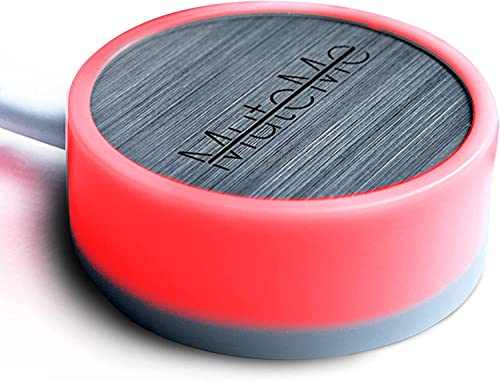
Best for: Users who need immediate, tactile control over muting during meetings without interrupting the flow of conversation. This device adds a physical mute button to streamline conferencing workflows.
Why selected: It complements microphone setups by reducing the time spent searching for the mute control on screen, which can improve meeting efficiency. It works with common Windows and macOS software when used with the appropriate Muteme software.
Caution: Requires Muteme software to function. Verify software compatibility with your system before purchase.
CMTECK USB Computer Microphone

Best for: Desktop setups that require flexible mic positioning and reliable noise suppression for video calls and streaming. The CMTECK mic uses a smart chip to reduce background noise and a 6-foot USB cable for convenient placement.
Why selected: The adjustable gooseneck lets you target voice precisely, which helps in busy home environments. It is compatible with Windows, macOS, and PS4/5, supporting a wide range of usage scenarios.
Caution: Not compatible with Raspberry Pi or Xbox in some configurations; test with your system if you rely on unconventional hardware.
Lavsoul 4K Webcam

Best for: Remote workers who want an all-in-one solution for meetings, streaming, or online teaching. The Lavsoul webcam delivers Ultra HD 4K video, PDAF autofocus, and dual noise-canceling mics to capture clear audio with less background noise.
Why selected: The combination of high-resolution video with built-in microphones helps reduce clutter on the desk by consolidating gear. The smart light correction ensures you look your best in varied lighting conditions.
Caution: 4K streaming requires sufficient bandwidth and a compatible computer; in constrained networks, 1080p may be a more stable choice.
Galyimage 4K Webcam With Ring Light

Best for: Presenters who need consistent lighting and reliable audio during virtual meetings. This camera offers 4K video with TOF autofocus and built-in privacy features, plus a ring light with three color temperatures for adaptable lighting.
Why selected: The integrated lighting can improve skin tone and clarity in dim rooms, while the dual microphones reduce ambient noise. It’s well-suited for formal calls and online classes where lighting is variable.
Caution: Ring light brightness may require periodic adjustments during long sessions; consider a static lighting setup if you sit still for long periods.
Buying Guide: Key Considerations For Virtual Meeting Mics
- Compatibility and setup: Look for USB plug-and-play devices that work with Windows and Mac without extra drivers.
- Voice pickup pattern: Cardioid mics focus on voice in front of the mic, while omnidirectional mics pick up sound from all directions. Choose based on your desk setup and typical speaking style.
- Noise reduction: Built-in noise suppression helps in busy home offices. Pair with a quiet environment for best results.
- Gain control and monitoring: If you participate in long meetings, gain control allows you to adjust mic sensitivity to avoid clipping or background hiss.
- Mobility vs. stability: Compact mics travel well; larger mics may offer steadier positioning but require a dedicated space.
- Bundled features: Webcams with mics provide convenience, but separate mics often deliver better audio quality than webcam mics.
- Privacy and physical controls: Privacy shutters on cameras reduce worry about on-screen exposure; physical mute controls speed up meeting flow.
Frequently Asked Questions
What type of microphone is best for virtual meetings?
USB desktop condensers with cardioid pickup patterns are commonly recommended for their clear voice capture and ease of use. They minimize background noise while keeping your voice front and center.
Do I need a separate webcam if I already have a microphone?
Not always. If you need video, a webcam with a built-in mic can serve as an all-in-one solution. For higher audio quality, separate mic plus webcam can be a better setup.
Is omnidirectional better for meetings?
Omnidirectional mics pick up sound from all directions, which can be useful in group settings but may capture more background noise. Use cardioid patterns for solo speaking at a desk.
Can these mics work with software like Zoom and Teams?
Yes. All listed models are designed for common conferencing software and offer straightforward plug-and-play compatibility on Windows and Mac.
What should I consider when choosing a mic for a small home office?
Consider desk space, noise levels, and whether you value portability. A compact USB mic with gain control is typically ideal for tight spaces, while a webcam with built-in mics is useful for all-in-one setups.