Best Mobile Time Clocks for Employees: Top 5 Solutions for Small Businesses
Answering the need for accurate, punch-free attendance, these mobile-enabled time clocks are suited for small teams, remote work, and multi-location offices. Each option supports flexible shifts, real-time reporting, and cloud access. The top picks emphasize ease of use, strong security, and payroll compatibility to help prevent buddy punching and payroll errors.
Buyer profiles:
– Small businesses seeking cloud access and remote management.
– Teams needing flexible shifts or multiple locations.
– Businesses prioritizing fast, contactless or biometric punch methods.
– Administrators who want straightforward mobile app control and export options.
| Product | Best For | Key Benefit |
|---|---|---|
| NGTeco Time Clock (4-in-1) | Small teams needing multiple verification modes | Facial, fingerprint, RFID, and PIN with mobile app control |
| uPunch FN1000 | Payroll-focused SMBs | Auto Align Time Clock with mobile app for digital time cards |
| NGTeco Cloud Time Clock (4-in-1) | Remote managers | Cloud access with touchscreen and multiple punch methods |
NGTeco 4-in-1 Time Clock for Small Business
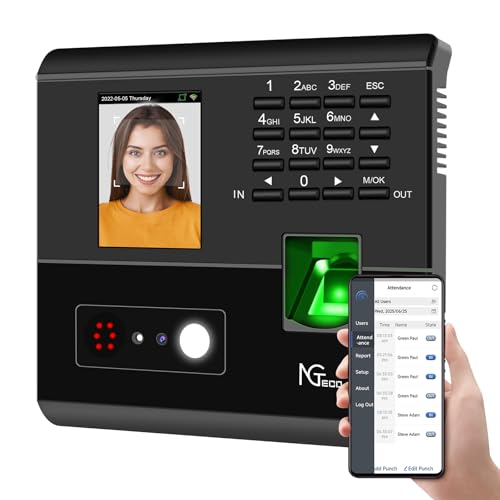
The NGTeco 4-in-1 time clock offers facial recognition, fingerprint, RFID card, and PIN verification. This multi-method approach helps reduce buddy punching and attendance disputes. It automatically calculates work hours and supports remote management via the free NGTeco App, improving payroll accuracy and reducing administrative tasks.
Best for: small teams needing flexible verification options and remote monitoring. The device is well suited for workplaces where users have different verification preferences or where security is a priority. Caution: ensure network availability for optimal mobile app control.
uPunch FN1000 Smart Time Clock System

The FN1000 system provides a complete digital time card solution with the Auto Align Time Clock, 100 time cards, keys, and ink ribbon. It integrates with the exclusive Punch to Pay app for mobile time card scanning, streamlining payroll and on-the-go calculations.
Best for: payroll-focused SMBs seeking a straightforward digital time card workflow. Choose this if you value integrated mobile app punching. Caution: data export relies on the app; plan for regular mobile access to keep records in sync.
NGTeco Cloud-Based Time Clock with Touch Screen
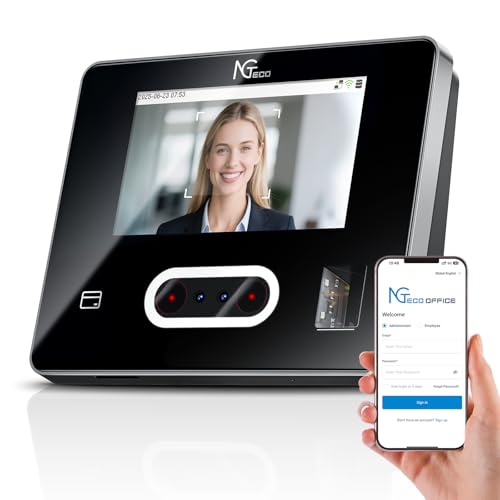
This cloud-based unit provides a 4-in-1 punch method suite (face, fingerprint, RFID, PIN) plus a 3.5-inch or 4.3-inch touchscreen for easy clock-in. It supports remote access via web or mobile apps, with real-time monitoring and flexible shift configurations.
Best for: managers who need on-site and remote oversight with a touchscreen interface. Caution: cloud features require internet access for real-time updates.
NGTeco App Time Clock with Biometric and PIN
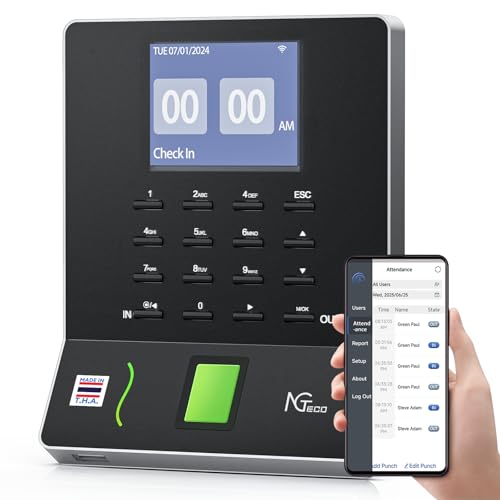
This model emphasizes streamlined scheduling and auto time tracking. It uses fingerprint or PIN for clock-ins and supports real-time punch detection. Payroll exports are available via email or USB, aiding quick and accurate payroll processing.
Best for: teams needing reliable biometric clock-ins with easy payroll export. Limitations: ensure fingerprint sensors operate smoothly in environments with moisture or dirt affecting touch sensors.
NGTeco Cloud Time Clock with Custom Rules

This cloud-based unit offers cloud access with real-time sync, 2.4G WiFi, and custom attendance rules. You can tailor breaks, overtime, and shifts for diverse teams while keeping data securely stored in cloud servers.
Best for: multi-department operations needing tailored rules and cloud-accessible data. Caution: verify compatibility with existing payroll software to ensure smooth data transfer.
Buying Guide
What to consider when choosing a mobile time clock:
- Verification methods: Do you need biometric, card-based, PIN, or facial recognition? Multimodal devices reduce buddy punching but may be pricier.
- Connectivity: Cloud-based systems require reliable internet, while local-network options work offline for short periods.
- Shifts and scheduling: Are you handling fixed, rotating, or flexible shifts? Look for customizable rules and night-shift support.
- Payroll integration: Ensure the device exports timesheets in formats compatible with your payroll software or service.
- Admin accessibility: Consider mobile app depth, remote management, and real-time reporting capabilities.
- Security and compliance: Cloud solutions should offer encryption and secure data storage. Local data should be protected and regularly backed up.
FAQ
- What is a mobile time clock?
A mobile time clock lets employees punch in using wireless devices or apps, often via facial recognition, fingerprint, card, or PIN, with real-time or cloud-based data access for managers.
- Which verification method is best?
Biometric options (fingerprint or facial recognition) reduce buddy punching, while RFID or PIN may be simpler and cost-effective for smaller teams.
- Is cloud access necessary?
Cloud access enables remote monitoring and real-time reporting but requires internet reliability; offline-capable devices can operate on local networks.
- Can these systems export to payroll?
Yes. Look for export options via email, USB, or direct integration with payroll software.
- Do these devices support night shifts?
Many models offer night-shift rules and flexible scheduling to accommodate nonstandard hours.
- Is there a monthly fee?
Some vendors offer no monthly fees with cloud features; verify what is included in the base price and if any optional services carry recurring costs.