Best Nas Server for Plex: Top 5 High-Performance Solutions for Smooth Media Streaming
Plex users seek fast, reliable NAS devices that handle large libraries, transcoding, and multi-user access without bottlenecks. The following picks focus on high performance, solid reliability, and ample expansion options to ensure seamless streaming across devices. Below, five NAS-optimized products from trusted brands deliver versatile storage, strong processors, and ample RAM for Plex duties in both home and small-office setups.
Overview of chosen products:
| Product | Brand | Key Strengths |
|---|---|---|
| TERRAMASTER F4 SSD NAS Storage | TERRAMASTER | Full SSD storage, 4 bays, 5GbE, compact |
| TERRAMASTER F8 SSD NAS Storage | TERRAMASTER | Full SSD storage, 8 bays, 10GbE, high throughput |
| White Label 4TB Enterprise HDD | White Label | High reliability, enterprise-grade HDD, large capacity |
| Synology DiskStation DS723+ | Synology | Ryzen CPU, ample RAM, DSM ecosystem |
| ZimaBoard 2 1664 | zimaboard | Mini server/NAS expansion with dual 2.5GbE |
When evaluating Plex-capable NAS options, consider CPU transcoding capabilities, RAM size, network interfaces, drive bays, and expansion options. The following sections spotlight each product’s standout features and how they translate to Plex performance and reliability for American home networks and small offices.
Terramaster F4 SSD NAS Storage (4-Bay)

The Terramaster F4 SSD NAS Storage is designed for high-speed Plex streaming with full SSD storage across four bays. Powered by an N95 quad-core processor and 8GB of DDR5 RAM, it delivers robust transcoding and file serving. A 5GbE network port provides faster-than-gigabit throughput, helping Plex handle multiple streams and larger media libraries without stuttering. The tool-free design simplifies install and memory upgrades, and the compact form factor makes it easy to fit in tight spaces while preserving strong performance under load.
Key considerations for Plex users include the need for steady CPU utilization and quiet operation. The F4 SSD’s convection cooling and silent fans help keep temperatures stable during long Plex sessions. Its 32TB total M.2 NVMe capacity, via four drives, supports large catalogs and rapid cache performance for frequently accessed media. For households prioritizing quiet, compact NAS with solid SSD performance, this model is a strong contender.
Terramaster F8 SSD NAS Storage (8-Bay)

The Terramaster F8 SSD NAS Storage is built for serious Plex workloads with eight bays and four-core, quad-thread processing at speeds up to 3.4GHz. It incorporates 8GB of DDR5 RAM and a 10Gbps Ethernet port, delivering up to 1024MB/s transfer rates. This combination enables multiple Plex streams to run smoothly even when transcoding is required. The palm-sized footprint, paired with eight M.2 2280 NVMe slots (each up to 8TB), supports substantial total capacity while maintaining a compact design. Its cooling system and heat sinks help maintain performance under sustained use.
With dual 2.5GbE or 10GbE networking capabilities and a low-noise profile, the F8 SSD NAS is well-suited for media-heavy homes and small offices. The compact design does not sacrifice expandability, and the SSD-centric storage minimizes latency and improves random I/O—both beneficial for Plex libraries with many small files or frequent transcoding tasks.
White Label 4TB Enterprise HDD for NAS
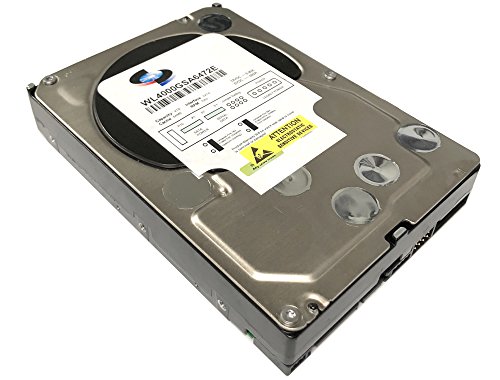
For users who prefer traditional hard drives in a Plex system, the White Label 4TB Enterprise HDD offers reliability and high sequential performance with 6.0Gb/s SATA interfaces. Although not as fast as SSDs for random reads, enterprise-grade spec drives provide steady throughput for bulk media storage and streaming. With MTBF specifications designed for 24×7 operation, these drives are built for constant access and long service life in NAS environments. They’re suitable when budget or heat constraints make full SSD arrays impractical, while still offering dependable Plex serving for large libraries.
Considerations for HDD-based Plex setups include ensuring adequate drive cooling, potential noise, and the need for larger fan-assisted NAS enclosures to manage heat during round-the-clock usage. For users prioritizing capacity and endurance over raw speed, these drives deliver solid value and reliability in NAS configurations.
Synology DiskStation DS723+ NAS Server

The Synology DS723+ is a versatile NAS server that pairs a Ryzen-based CPU with 32GB of DDR4 ECC memory across two RAM slots, offering a robust platform for Plex transcoding and concurrent user access. Its support for a substantial mix of HDDs and NVMe SSDs, plus DSM software, provides a mature ecosystem for media management, backups, and app integrations. With two 1GbE LAN ports and potential link aggregation, this NAS can handle streaming demands from multiple clients and background tasks such as backups and media indexing.
Plex users benefit from Synology’s efficient DSM media indexing, thumbnail generation, and user management. The DS723+ supports Btrfs file system features for data protection and flexible LUN/ISCSI options, which can help with organized media libraries and reliable backups. Overall, it’s a well-rounded choice for users who value software maturity, strong official support, and a user-friendly interface in a Plex-first setup.
ZimaBoard 2 1664 Single Board NAS/Server

ZimaBoard 2 1664 is a compact, expandable single-board server ideal for DIY NAS and mini-Plex servers. With an Intel N150 quad-core foundation, 16GB LPDDR5 RAM, and 64GB eMMC storage, this board supports PCIe 3.0×4, dual 2.5GbE ports, and dual SATA3 connections. Its PCIe interface opens opportunities for additional NICs or NVMe caching to boost Plex performance in smaller setups. The kit includes ZimaOS Private Cloud features and a local app ecosystem for back-end media management, backups, and lightweight server tasks.
For users who want a high degree of customization and a compact footprint, ZimaBoard provides flexibility to tailor Plex serving around specific network topologies or multi-device environments. While it may require more hands-on setup than turnkey NAS units, it enables enthusiasts to optimize transcoding paths, caching, and network isolation to suit particular streaming patterns.
Buying Guide: Key Purchase Considerations For Plex-Nas Setups
- Transcoding capability: Look for CPUs with hardware-accelerated transcoding or sufficient CPU cores to handle multiple streams simultaneously. Higher core counts and faster turbo frequencies improve plexing multiple devices at once.
- RAM availability: Plex performance benefits from ample memory, especially if you host libraries with many users or enable multiple concurrent transcodes. Aim for 8GB at minimum; 16GB or more is advantageous for large libraries or multiple streams.
- Network interface: A 2.5GbE or 10GbE port enhances streaming performance, reducing bottlenecks when multiple clients access media. Ensure your switch and router support the selected speeds.
- Storage mix: SSDs deliver fast transcoding and responsive media access, while HDDs provide capacity and cost efficiency for large libraries. A hybrid approach can balance speed and space.
- Drive bays and expansion: More bays support larger libraries and future growth. Consider tool-less designs for easier upgrades and reliability features like RAID support or Btrfs protection.
- Software ecosystem: A mature NAS OS with strong Plex integration, media indexing, and reliable backups (e.g., Synology DSM) reduces setup complexity and ongoing maintenance.
- Noise and cooling: For home deployments, quieter systems with efficient cooling help maintain a comfortable living environment during long Plex sessions.
- Form factor: Space constraints influence the choice between compact 4-bay, 8-bay, or single-board solutions. Smaller devices excel in deskshelves or closets, while larger setups suit dedicated media rooms.
- Power efficiency: Consider idle and peak power, especially for 24/7 Plex servers. Energy-efficient models help manage electricity costs over time.
- Future-proofing: Plan for upgrades in RAM, storage, and network interfaces to accommodate expanding libraries and growing user baselines.
Overall, a Plex-focused NAS should balance CPU power, memory, fast networking, and scalable storage. The products above offer varied approaches—from SSD-optimized, high-throughput enclosures to flexible DIY boards—allowing you to pick a setup aligned with your library size, streaming needs, and technical comfort level.