Best Pen for HP Envy X360: Precision Styluses for Seamless Note Taking and Drawing
The HP Envy X360 and similar HP 2-in-1 laptops thrive with a compatible active pen that supports MPP technology, pressure sensitivity, tilt, and palm rejection. This guide highlights five top styluses designed for HP Envy X360 and comparable HP 2-in-1 models, helping you choose the right tool for writing, sketching, and design on a touchscreen. Each pick prioritizes precision, responsiveness, and reliable compatibility to ensure smooth on-screen interaction.
Product Spotlight Summary
- HP Genuine Digital Stylus Pen for HP Envy x360 / Pavilion x360 / Spectre x360 (MPP, pressure-sensitive, customizable clicks)
- Stylus Pen by SSS·GRGB (MPP 2.0, 4096 pressure levels, tilt, palm rejection)
- Stylus Pen by hacey (300-day battery life, tilt support, palm rejection)
- Stylus Pen by SSS·GRGB (another HP-compatible model with 4096 levels and tilt)
- EVACH Rechargeable MPP 2.0 Tilt Pen (4096 levels, palm rejection, USB-C fast charging)
HP Genuine Digital Stylus Pen for HP Envy X360

The HP Genuine Digital Stylus is built specifically for HP Envy x360, Pavilion x360, and Spectre x360 lines. It delivers a true-to-life pen experience with a precision pen tip designed for accurate edits, drawings, and handwritten notes. The pen leverages pressure sensitivity so handwriting can be converted to text instantly, aiding in quick note-taking and transcription tasks. Customizable buttons add convenience, letting you switch functions without interrupting your workflow. This pen offers tight integration with HP devices, ensuring reliable performance for students, professionals, and creators who rely on accurate input during meetings or sketch sessions.
Key Features
- Precision pen tip for accurate input
- Pressure-sensitive ink-to-text conversion
- Customizable button clicks for quick access to functions
Stylus Pen by SSS·GRGB (Tilt, 4096 Pressure)

This SSS·GRGB stylus supports a broad range of HP devices, including Envy x360 series and Spectre x2. It pairs tilt sensitivity with 4,096 pressure levels to deliver nuanced shading and line thickness, making it suitable for drawing, sketching, and precise digital painting. Palm rejection ensures comfortable writing with the hand resting on the screen. The pen is designed with MPP 2.0 compatibility and carries a robust feature set for creative tasks across multiple HP 2-in-1 models. The vendor offers standard after-sales service, including assistance via customer support within 24 hours.
Key Features
- Compatible with HP Envy x360, Pavilion x360, Spectre x360, and more
- 4096 pressure levels and tilt support for shading
- Palm rejection for comfortable writing
Stylus Pen by hacey (300-Day Battery Life, MPP Tilt)
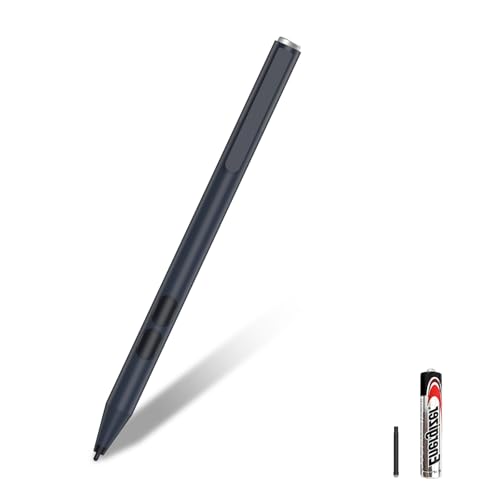
The hacey stylus models emphasize long battery life with a claim of up to 300 days on typical use, depending on charging and idle times. They support MPP 2.0 tilt technology and 4,096 levels of pressure sensitivity, enabling precise line work and shading. Palm rejection helps you rest your hand on the screen while writing or drawing, and the pen typically ships with practical charging options and a comfortable grip for extended sessions. This option is well-suited for students and professionals who want a reliable pen with extended power on HP 2-in-1 devices.
Key Features
- MPP 2.0 with 4096 pressure sensitivity
- Tilt support and palm rejection
- Long battery life with practical charging options
Stylus Pen by SSS·GRGB (Compatibility Wide, 4096 Levels)

This SSS·GRGB model specializes in compatibility across HP Envy x360, Pavilion x360, Spectre x360, and Omnibook series. It provides expansive pressure sensitivity (4096 levels) and tilt functionality, allowing for expressive drawing and precise shading. The pen’s compatibility range makes it a versatile choice for users who alternate between several HP 2-in-1 devices. It also includes practical notes about tilt sensitivity depending on applications, and user guidance for customer support and replacements if needed.
Key Features
- Broad HP compatibility including Envy, Pavilion, Spectre
- 4096 pressure levels with tilt for dynamic lines
- Palm rejection for comfortable writing
EVACH Rechargeable MPP 2.0 Tilt Pen

The EVACH stylus emphasizes USB-C fast charging and an MPP 2.0 tilt-enabled design with 4,096 pressure levels. Its palm rejection and compatible 2-in-1 HP laptops help ensure natural handwriting and smooth drawing experiences. The pen is designed to minimize delays and deliver quicker color transitions, making it suitable for artists and note-takers who demand responsive performance. A compact design and included extra tips add value for ongoing creative work on HP touchscreens.
Key Features
- 4096 pressure levels with tilt
- USB-C fast charging and power management
- Palm rejection for comfortable use
Buying Guide: How To Choose The Right HP Envy X360 Stylus
Choosing the best stylus for your HP Envy X360 depends on several practical factors. Consider the following perspectives to ensure you pick a pen that matches your workflow and device compatibility.
- Compatibility and ecosystem: Confirm that the pen is explicitly compatible with your HP model (Envy X360, Pavilion X360, Spectre X360, etc.). Some models offer broad compatibility across multiple HP series, while others are tailored to specific lines.
- Pressure sensitivity: Higher pressure levels (e.g., 4096) allow finer control for drawing, shading, and precision editing. If you do graphic work or detailed note-taking, prioritize 4096-level styluses.
- Tilt support: Tilt capability enables shading and line variation akin to using a real pencil. This is essential for artists and designers who rely on accurate brush and pen effects.
- Palm rejection: If you rest your hand on the screen while writing, palm rejection helps prevent stray marks. This feature improves comfort and reduces frustration during long sessions.
- Battery life and charging: For wireless styluses, battery life and charging speed matter. USB-C charging or long-lasting batteries reduce downtime during projects or classes.
- Number and placement of customizable buttons: Quick access to commonly used functions (eraser, undo, pen, highlighter) can streamline workflows. Check whether the pen allows button customization.
- Build quality and grip: A comfortable, balanced grip reduces fatigue during extended drawing or note-taking sessions.
- Support and warranty: A reliable after-sales policy and responsive customer support can be helpful if you encounter compatibility issues or need replacements.
Additional Notes on Use Case Scenarios
For students, a precise pen with palm rejection and quick response helps in annotating PDFs, taking lecture notes, and solving math problems with diagrams. For designers and artists, tilt sensitivity and high pressure levels enable nuanced shading and line work. For professionals, you may rely on ink-to-text conversion for meeting notes, quick markup of documents, and handwritten drafts. Depending on your primary activity, prioritize a pen that aligns with your most frequent tasks: note-taking, drawing, or quick editing on the go.
Conclusion-Free Section: Quick Reference
All five options provide reliable input for the HP Envy X360 and similar HP 2-in-1 laptops. When choosing, weigh compatibility, pressure sensitivity, tilt, palm rejection, and battery life to match your daily tasks. The right stylus can enhance productivity, creativity, and overall screen interaction on your HP device.
Buying Guide Recap: Quick Comparisons
- HP Genuine Digital Stylus Pen: Best for seamless HP integration and text conversion.
- SSS·GRGB (4096/tilt): Strong all-around performance with broad HP compatibility.
- hacey (300-day): Excellent battery endurance and reliable tilt support.
- SSS·GRGB (second model): Similar capabilities; good for users who want a second HP-compatible option.
- EVACH (Rechargeable, USB-C): Modern charging and robust response for diverse tasks.