Best Phones for Texting and Calling Only: Simple Devices for Clear Communication
Answering the need for straightforward calling and texting, these devices prioritize essential communication without extra distractions. This guide highlights five practical options, useful for seniors, kids, or anyone who prefers a basic phone. Each choice includes who it’s best for, plus practical trade-offs to consider before buying. The summary table below helps compare key points at a glance.
| Product | Best For | Key Benefit | Limitations |
|---|---|---|---|
| Easyfone T200 | Users who want a simple, loud feature phone | Classic design with clear sound and no internet | No camera or data |
| Tracfone TCL Flip 3 | People who prefer a traditional flip phone | Dual displays and long battery life | Limited smart features |
| AGM M9 Rugged Feature Phone | Durable, basic phone on T-Mobile network | Waterproof, rugged with physical buttons | Network compatibility region dependent |
| LIVELY Jitterbug Smart4 | Seniors needing simple smartphone with help | Easy navigation and urgent assistance features | Requires Lively service |
| Bark Phone | Parents seeking monitoring and safety features | Text and app monitoring plus GPS | Monthly data plans required |
Bark Phone — Safest Phone For Kids & Teens

Best for parents who want ongoing monitoring of texts, emails, and social media across 30+ platforms. Bark emphasizes safety alerts for potential online risks, making it suitable for families prioritizing digital wellness. It also allows parents to approve apps and contacts, helping control who can text and call your child. The service requires activation with a monthly data plan, which may be a consideration for budget-minded buyers. This option is best for guardians seeking proactive safety features rather than a purely no-frills phone.
Tracfone TCL Flip 3 — Classic Flip Phone

Best for users who want a traditional flip phone experience with modern reliability. The TCL Flip 3 offers intuitive dual displays and a long-lasting 1850 mAh battery, supporting up to 14 hours of talk time. It’s better for those who value physical buttons and straightforward calling/texting without internet access. A potential limitation is the absence of smartphone features, which may not suit those who occasionally need app-based tools or data services.
AGM M9 Rugged Feature Phone

Best for users needing a tough, outdoor-ready device with large buttons and a straightforward call/text workflow. The M9 is designed for use with T-Mobile networks and emphasizes durability, with a tough build and simple SIM handling tips. It’s ideal for rugged jobs, outdoor activities, or budgeting scenarios where a basic, reliable line is essential. Limitations include carrier exclusivity and careful SIM management to ensure proper recognition and connectivity.
Teracube Thrive Kids Smart Phone
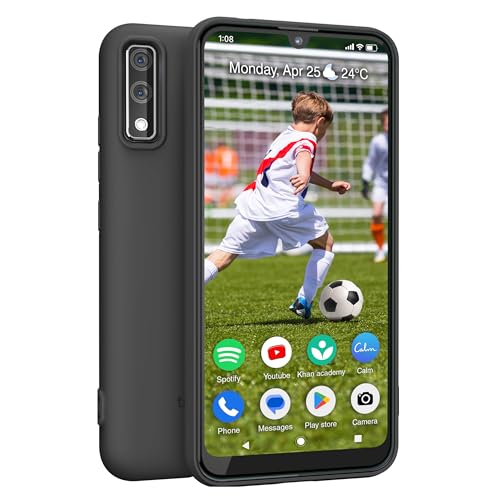
Best for families seeking a kid-friendly entry into smartphones with built-in parental controls. The Thrive includes remote monitoring, screen time controls, and the ability to block or limit apps and online activity. It runs Android with 64GB storage, which supports a gradual smartphone experience while staying focused on safety. Choose this if you want consolidated device management through a single app, but be aware of monthly plan requirements and network compatibility.
Easyfone T200 4G Unlocked Feature Phone

Best for users who want a simple, loud, no-frills device with a classic bar-style design. The T200 focuses on calls and texts, provides a clear sound experience, and offers long standby time with a 1050mAh battery. It does not include internet access or a camera, making it a strong choice for minimal distraction. A limitation is the absence of modern smartphone features that some users might want in the future.
Buying Guide: Key Purchase Considerations
- Purpose: Decide between a basic feature phone and a safety-focused or senior-friendly phone with added services.
- Network compatibility: Check carrier support and whether the device is locked or unlocked in your region.
- Parental controls and safety: If monitoring or content controls are important, evaluate how features are implemented and who can access them.
- Battery life and durability: For outdoor use or long days away from chargers, prioritize long talk time and rugged builds where needed.
- Plans and cost: Consider activation fees and monthly plan pricing, and whether unlimited data is necessary for your use case.
FAQ
- What’s the main difference between a basic feature phone and a smartphone with safety features? Basic phones focus on calls and texts with limited apps, while safety features add monitoring, location tracking, and parental controls.
- Are flip phones still a good option for texting? Yes, flip phones offer physical keyboards and intuitive texting, with long battery life and simple interfaces.
- Do monitoring phones require a monthly subscription? Many safety-focused options require a monthly plan or service tier to enable monitoring and alerts.
- Can these phones work on multiple carriers? Some devices are carrier-specific or locked; verify compatibility before purchasing.
- Is there a risk with GPS tracking on kids’ devices? Ensure privacy settings and consent align with local regulations and family policies.
- Which option is best for seniors? Phones with large buttons, loud audio, simple menus, and urgent assistance features are typically best for seniors.