Best Phone Stands for Video Calls
Answer: A versatile phone stand designed for desk-based video calls offers ergonomic positioning, stable support, and easy adjustability. The top picks below cater to different user needs—office workers, content creators, students, and livestreamers. Best for daytime video calls, best for hands-free recording, and best for compact desks. The buyer’s guide at the end highlights how to choose the right stand for your setup.
| Product | Best For | Why It Stands Out |
|---|---|---|
| COOPER ChatStand | FaceTime, Zoom, recordings on a desk | Wide, stable base; adjustable height and angle; non-slip design for reliable shots |
| LISEN Desk Stand | Office desks and streaming setup | Height and angle adjustability; built-in cable management; fits many cases |
| Lamicall Desk Stand | General hands-free viewing and classes | Compact and foldable; thick-case friendly; smooth tilt adjustment |
| COOPER MagStand | MagSafe iPhone setups and filming | MagSafe compatibility; 360° rotation; stable weighted base |
| OCYCLONE Phone Stand | Versatile angles for calls and streaming | 4-point adjustable, foldable, anti-slip protection |
COOPER ChatStand – Adjustable Desk Phone Stand

Features: Universal desk holder for face-level video calls and recording. Height adjustable from 9 to 13 inches. Non-slip, weighted base and extra-wide holders prevent dropping. Ideal for FaceTime, Zoom, and content creation.
Best for: Professionals or creators who want a stable, ergonomic angle for long video calls or filming sessions at a fixed desk. Choose this if you prioritize a low risk of device tipping and a fixed height range.
Caution: The stand height is fixed within its range; users needing extreme low angles may consider other models with broader tilt ranges.
LISEN Desk Phone Stand
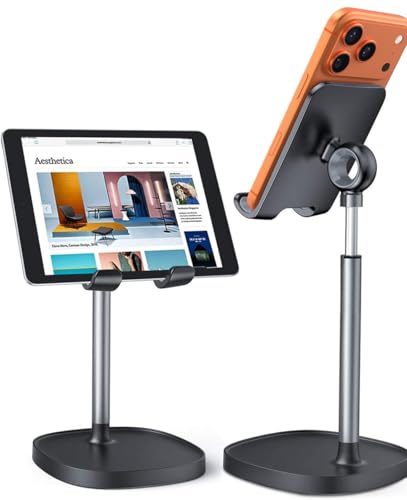
Features: Ergonomic and adjustable design with height from 7.1 to 8.5 inches and tilt from 5° to 85°. Built-in charging hole and smart cable management; sleek, stable design fits OtterBox cases and reduces neck strain.
Best for: Office workers and students who want a compact, stylish stand with integrated cable management and case compatibility. Pick this if you need a tidy workspace and easy accessibility for charging.
Caution: The stand height is relatively short; taller users may prefer a model with a broader height range for eye level alignment.
Lamicall Desk Stand – Height Adjustable
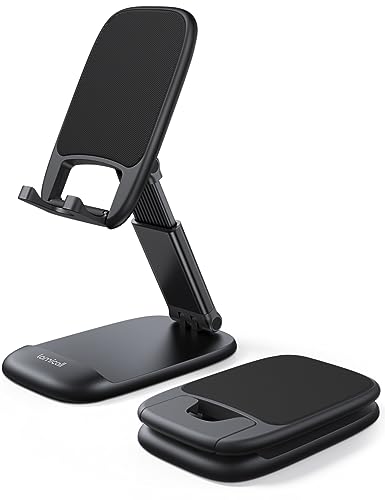
Features: Height adjustable up to 3.2 inches; vertical tilt and foldable design for portability. Thick case friendly up to 0.71 inches, with anti-slip silicone surfaces for stability.
Best for: Students and travelers who need a foldable, portable stand that supports varied viewing angles and thick protective cases. Choose this if you value portability and case flexibility.
Caution: Maximum height is modest; users seeking very tall mounting may want a larger stand with extended reach.
COOPER MagStand – MagSafe Desk Stand

Features: MagSafe-compatible desk stand with adjustable height (9 to 13″), 360° rotation, and 55° tilt. Wide weighted base and EVA padding reduce tipping and enhance stability.
Best for: iPhone users with MagSafe cases who want flexible angles for videos, FaceTime, or live streaming. Choose this if you want easy magnetic mounting and robust angle control.
Caution: Magnetic mounts rely on MagSafe compatibility; non-MagSafe cases may require a different mount or adapter.
OCYCLONE Phone Stand – Foldable and Stable
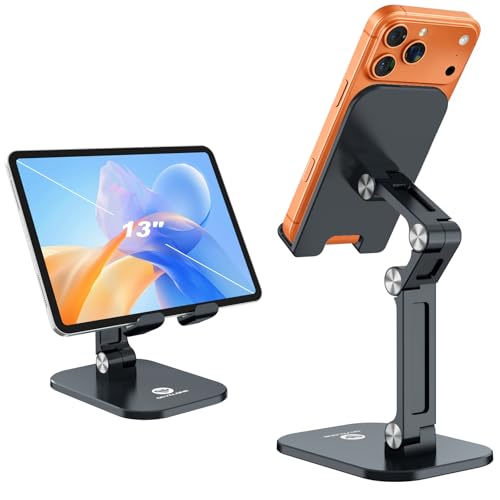
Features: 4-point adjustable design for height and angle; reinforced base with anti-slip pads; foldable, portable, and easy to carry.
Best for: Busy creators who need quick setup and breakdown for live streams, video calls, or on-the-go shoots. Opt for this if you value foldability and stability in one package.
Caution: Folding joints may loosen slightly with heavy tablet use; ensure tightness after setup for long sessions.
Buying Guide
- Adjustability: Look for stands with height and angle ranges that fit your typical video call posture and desk height.
- Stability: A weighted, non-slip base reduces tipping on busy work desks or during typing and gesturing.
- Device compatibility: Check case thickness and whether the stand supports MagSafe or thicker phone cases.
- Portability: If you travel or move workspaces, consider a foldable or compact design.
- Cable management: Built-in cable routing helps keep your area neat during calls and recordings.
- Rotation and tilt: 360° rotation and wide tilt ranges improve framing for face level and full-body captures.
FAQ
- What height should my phone be for video calls? Aim for eye level to reduce neck strain; many stands offer 9–13 inches adjustable height.
- Do these stands support thick phone cases? Several models list thick-case compatibility; check the maximum case thickness before purchase.
- Is a foldable stand better for travel? Yes, foldable designs save space and are ideal for on-the-go use.
- Can I use these stands for streaming? Yes, most stands support steady framing for live streams and short recordings.
- Do magnetic stands require MagSafe? Magnetic stands work best with MagSafe-compatible devices and cases; non-MagSafe devices may need a standard clamp.
- Are these stands safe on wooden desks? Anti-slip bases reduce risk of slipping; place on flat, level surfaces for best stability.