Best Portable Sticker Printer for On‑The‑Go Labeling and Notes
In today’s fast-paced environments, a portable sticker printer can turn handwritten notes, study aids, and quick labels into polished, on‑the‑spot prints. The following five models stand out for portability, ease of use, and compatibility with iOS and Android devices. Each option supports inkless or thermal printing, making them ideal for students, teachers, and professionals who value quick, handy labeling and note‑taking on the fly.
| Product | Brand | Type | Connectivity | Notes |
|---|---|---|---|---|
| ETIKEZ PM290C | ETIKEZ | Sticker Printer | Bluetooth | 3 rolls included; black & white only |
| Phomemo M02 | Phomemo | Sticker Printer | Bluetooth | Inkless; wide app support |
| KODAK Step | KODAK | Photo Printer | Bluetooth/NFC | Zero‑ink via ZINK paper |
| Liene 2×3” Printer | Liene | Photo Printer | Bluetooth | Inkless; compact; prints mono/color with paper |
| TYPONOS PM290 (Purple) | TYPONOS | Sticker Printer | Bluetooth | 3 rolls; PM290 black & white only |
ETIKEZ PM290C Portable Sticker Printer

The ETIKEZ PM290C is a compact, battery‑friendly sticker printer designed for quick label creation in school, home, or office settings. It ships with three rolls of 54mm×3.2m white adhesive thermal paper. The device operates in black and white and connects via Bluetooth to iOS or Android devices using the Labelnize app. A straightforward setup involves loading the roll, pairing in Bluetooth, and printing through the app’s templates and tools. Suitable for study notes, memos, and basic labeling tasks, this model emphasizes portability and a simple user experience.
Phomemo M02 Mini Sticker Printer
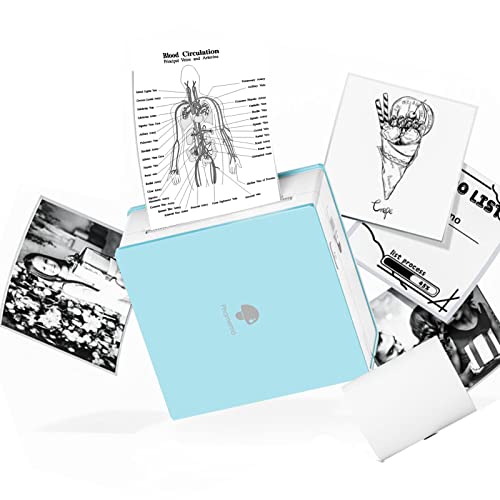
The Phomemo M02 is a pocketable inkless printer designed for DIY projects, study notes, labels, and gifts. It supports Bluetooth printing from Android 7.0+/iOS 13+. The M02 emphasizes convenience and app integration, offering a robust library of fonts, templates, and patterns within the Phomemo app. Its small footprint (roughly 3.3 × 3.2 × 1.6 inches) makes it easy to carry in a bag or backpack, and users can print photos, text, and simple graphics in black or white depending on the media used. Ideal for quick classroom and home organization tasks.
KODAK Step Instant Printer

The KODAK Step Instant Printer uses ZINK zero‑ink technology to deliver 2″ × 3″ sticky‑back photos without ink cartridges or ribbons. It pairs with iOS and Android devices via Bluetooth or NFC and includes a starter pack of ZINK paper. The app provides full editing capabilities, including filters, borders, and stickers, enabling users to craft personalized photos and quick notes that resist moisture and tears. This option is well suited for creating tangible photo memories and quick project graphics on the go.
Liene 2×3” Photo Printer

The Liene 2×3” photo printer is a portable, inkless option that can print mono or color photos on Zink‑type paper. It features Bluetooth 5.0 connectivity for direct printing from iOS and Android devices without Wi‑Fi. The battery life supports on‑the‑go use, and its compact form factor fits easily into bags for travel, parties, or outdoor activities. The device emphasizes durable, water‑ and dust‑resistant prints with quick one‑tap operation and straightforward loading via a sliding paper cover.
TYPONOS PM290 Mini Printer (Purple)

The TYPONOS PM290 Mini Printer in purple offers the same PM290‑class portability with three included rolls of adhesive paper. It supports Bluetooth for connection to iOS and Android devices via the Labelnize app. Like other PM290 models, it focuses on black‑and‑white outputs and is well suited for school projects, journaling, and lightweight labeling tasks. The included rolls enable immediate use for classroom activities, planning, and DIY gifts, making it a practical choice for portability and ease of setup.
Buying Guide: Key Purchase Considerations
- Print type and color options: Most pocket printers for stickers rely on black‑and‑white output or color variants through specific paper media. Consider whether you need color photos or simple monochrome notes.
- Media compatibility: Check the available rolls and sizes. All five options here use 54mm×3.2m or 2×3″ formats, which suits small labels and notes but may limit larger projects.
- Connectivity: Bluetooth is standard, with most models supporting iOS and Android. Some may allow quick app integrations for templates, OCR, or design features.
- App ecosystem and templates: A strong companion app with templates, fonts, and easy printing workflows can save time and expand printing capabilities for study notes and DIY projects.
- Portability and battery life: For daily carry, prioritize compact form factors and battery life adequate for a full day of use without frequent recharges.
- Loading and maintenance: Look for easy paper loading, clear instructions, and whether the device requires specific app permissions or ongoing subscription features for templates.
- Intended use cases: Students and planners may benefit from templates and OCR features, while photos and crafts may require more robust photo paper support and color capabilities.
Additional Considerations
- Durability: Portable printers should withstand light travel and occasional drops; consider build quality and protective cases if you plan to carry them in bags.
- Brand ecosystem: Some brands offer broader paper ecosystems and frequent updates to their mobile apps, which can enhance long‑term usefulness.
- Reuse and sustainability: Inkless thermal papers minimize waste and ongoing cost, but confirm the availability and disposal guidelines for the specific media you choose.
- Privacy and data handling: When printing from mobile apps, review permissions and any data sharing policies, especially in school or work environments.