Best POS Systems for Grocery Stores and Small Grocers in 2026
If you operate a grocery, convenience store, or small market, a reliable POS system speeds up checkout, improves inventory control, and enhances customer experience. This guide presents five top Amazon-listed POS solutions suited for grocery environments, highlighting who each product is best for, and practical considerations for choosing between them.
Buyer: Retailers seeking an all-in-one countertop solution for groceries, with fast checkout, easy setup, and hardware compatibility. Ideal for small grocers, convenience stores, or market stalls needing reliable cash handling and basic analytics.
Summary of chosen products:
| Product | Best For | Key Strength |
|---|---|---|
| SET04 — (Ship from USA) Smart POS System | Small Grocers and Retailers | 15″ touch screen with 11.6″ customer display and integrated printer |
| SmartPOS-129 — All-in-One POS Bundle | Multi-Function Checkout | Includes cashier and customer displays, cash drawer, printer, scanner |
| NRS POS System for Small Businesses | High-Volume Retail | Dual monitor option and comprehensive accessories |
| POS STORE M8W — All-in-One POS Terminal | Retail and Food Service | Windows 11, 15.6″ touchscreen, robust processor |
| Multzo Q2i Mobile POS Terminal | Mobile or Pop-Up Retail | Android 11, built-in printer and scanner |
SET04 Smart POS System for Grocery

The SET04 is a compact, all-in-one solution designed for small retailers and grocery setups. It features a 15″ touch screen with an 11.6″ customer display, an 80mm thermal receipt printer, and a cash drawer. The system ships with a keyboard, mouse, desktop scanner, and Windows 10, making it a straightforward plug-and-play option for checkout workflows. It includes multiple interfaces (6 USB, HDMI, VGA, LAN, and audio) to support peripherals and software. Best for: small grocery stores needing a robust, ready-to-use hardware stack with strong compatibility. Limitation: software activation may require separate purchase or licensing, depending on the package. Caution: ensure your network and peripheral devices are compatible with the included ports before purchase.
SmartPOS-129 All-in-One POS Bundle

The SmartPOS 129 bundle provides a complete checkout ecosystem with a 15″ cashier touchscreen, a matching 15″ customer-facing display, a cash drawer, a handheld scanner, and a thermal printer. It emphasizes a broad compatibility model, including over 50 card processor integrations, which is advantageous for grocers seeking flexible payment options and a seamless checkout flow. Best for: grocery stores seeking a turnkey POS with strong payment processor flexibility. Limitation: explicit details on software licensing are not provided in the feature list; verify included features at purchase. Caution: verify long-term availability of card processor integrations you depend on.
Generic NRS POS for Grocery Stores

The Generic NRS POS is presented as a user-friendly option for grocery stores, noting that it requires an NRS Pay merchant account prior to shipping. It supports dual or detachable customer screens and includes user-friendly software. Best for: stores that want a straightforward, American-available system with clear payment setup requirements. Limitation: the requirement for NRS Pay before shipping can delay deployment. Caution: confirm merchant account activation timelines and regional availability in the United States before ordering.
POS STORE M8W All-in-One POS Terminal

The M8W offers a 15.6″ touchscreen with Windows 11 and an Intel Core i5 processor, designed for demanding environments like retail and food service. It combines a large display with fast performance and robust storage, making it suitable for inventory management and rapid checkout in busy grocery settings. Best for: mid-to-large grocers needing a strong, future-proof Windows-based POS. Limitation: Windows 11 may require ongoing updates and IT support for optimal security. Caution: verify compatibility with your existing software ecosystem and peripherals.
Multzo Q2i Mobile POS Terminal
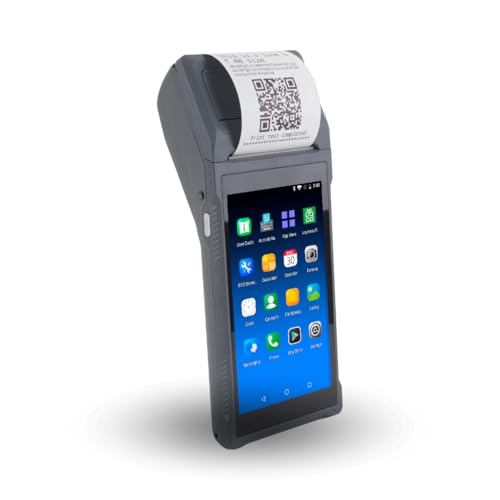
The Multzo Q2i is a compact handheld POS designed for retailers who need mobility. It combines an Android 11 device with a 58mm receipt printer and a 1D barcode scanner. Best for: pop-up shops, market stalls, or grocery departments needing on-the-go checkout. Limitation: smaller screen and 58mm receipt printer may slow throughput in high-volume checkout lines. Caution: ensure stable Wi-Fi coverage in store areas where mobile devices will be used.
Buying Guide: Key Considerations for Grocery POS Choices
What kind of store are you equipping? For small grocers and convenience stores, consider a system with a large, readable touchscreen, fast receipt printing, and durable cash drawer. If you expect high transaction volume, prioritize models with robust processors, multiple peripherals, and strong card processor options.
What peripherals will you need? Ensure the POS supports barcode scanners, customer displays, and receipt printers you already own or plan to buy. Check ports (USB, HDMI, LAN) and expansion options to avoid compatibility issues.
Software and licensing matter. Some bundles come with activated software, while others require separate licenses. Clarify included features like inventory management, analytics, and vendor integrations, and confirm ongoing costs.
Deployment and maintenance. Windows-based systems offer familiar interfaces but may require regular updates and IT support. Android-based handheld options provide mobility but may rely on external ecosystems for software. Consider staff training time and ease of use.
Security and payments. Look for devices that support secure payment processing and comply with PCI standards, especially if you handle multiple payment providers. Consider future-proofing for contactless and mobile wallets.
Frequently Asked Questions
- What should I prioritize in a grocery POS system?
– Prioritize speed, reliability, ease of use, and compatibility with peripherals and payment processors used in your store. - Is an all-in-one POS better for small grocers than separate components?
– All-in-one systems simplify setup and maintenance, but ensure they offer the required ports and processor performance for growth. - Do I need Windows or Android for my POS?
– Windows-based systems offer broad software compatibility; Android-based handhelds provide mobility. Choose based on staff workflow and software ecosystem. - Can I expand a POS later if my store grows?
– Many models support additional peripherals and software modules. Check upgrade paths and vendor support before buying. - Are there hidden costs with POS bundles?
– Some bundles include hardware only; software licenses or subscriptions may be additional. Confirm all costs in writing before purchase.