Best Drawing Projectors for Kids: Fun, Safe Tracing and Art Toys
Looking for a kid-friendly projector that makes drawing easy and enjoyable? This guide highlights top drawing projectors designed for children, with clear lists on who each product is best for. These picks emphasize safety, creative growth, and mess-free tracing so young artists can build confidence and fine motor skills. The top options below are ideal for parents, teachers, and gift-givers who want engaging, educational art experiences for ages 5 and up.
Summary table of selected products:
- Flycatcher Flycatcher Smart Sketcher 2.0 Projector — Best for budding artists who want step-by-step tutorials.
- Tara Toys Disney Tracing Projector — Best for Disney character fans who want familiar subjects to trace.
- Yoturetoys AI Drawing Projector — Best for turning ideas into drawings with AI guidance.
- KETIEE Unicorn Drawing Projector — Best for unicorn lovers and beginners who enjoy discs and patterns.
- Blue Marble Learn to Draw Projector — Best for structured, kid-friendly step-by-step lessons.
Flycatcher Smart Sketcher 2.0 Projector

Best for aspiring artists who want a wide range of content and app-based enhancements. This projector offers image projection for tracing, step-by-step tutorials, and customizable options to foster personal expression. An app connection expands content with interactive tutorials and the ability to edit photos before projecting to trace. The kit includes a large content library with over 60 pre-loaded images and additional cartridge packs for ongoing inspiration.
Who it’s for: young creators ages 5+ who enjoy guided drawing and the option to personalize projects. Caution: app features require a compatible device and stable Bluetooth connection for seamless use.
Tara Toys World Of Disney Tracing Projector
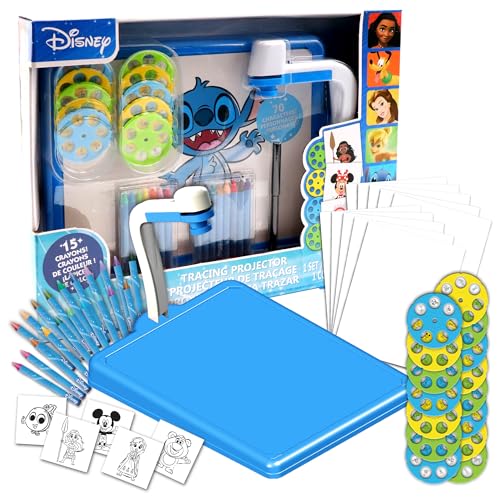
Best for kids who adore Disney characters and want a complete tracing kit. This projector set includes a projector, 10 discs, tracing marker, 10 tracing sheets, and 20 crayons, making it a self-contained, ready-to-create package. It’s simple to set up and offers immediate drawing opportunities with familiar subjects, boosting motivation and consistency.
Who it’s for: children who benefit from structured prompts and a Disney-centric drawing experience. Caution: limited disc themes beyond Disney characters may require additional creative expansion.
Yoturetoys AI Drawing Projector
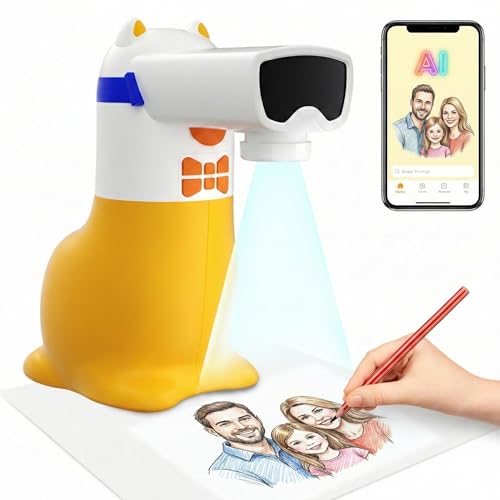
Best for turning kids’ ideas into drawings with AI assistance. This projector emphasizes a corded design for safety and longer use, with USB power options for portability. It features an AI capability to help children move from “I can’t” to “I created,” boosting confidence as kids translate thoughts into visible art. The kit is well-suited for ages 5–12 and parents seeking a tech-assisted creative experience.
Who it’s for: families seeking AI-guided drawing with a focus on process and expression. Caution: corded power means it’s less convenient for long travel sessions unless a power source is available.
KETIEE Unicorn Drawing Projector

Best for fans of whimsical themes and easy setup. This unicorn projector includes 12 discs with 96 patterns, allowing a broad range of tracing options and color experimentation. Rotating the projector head and adjusting focus helps kids achieve clear projections, supporting steady practice and pattern recognition. It’s a playful pick for early learners who enjoy themed artwork.
Who it’s for: children who love unicorns and want short, varied tracing sessions. Caution: requires three AAA batteries (not included) for projection, so plan for replacement power.
Blue Marble Learn to Draw Projector

Best for a structured, step-by-step learning approach. The patent-pending design enables full-image tracing without blocking light. It includes nine markers and four image discs, plus a curated tutorial disc for a guided drawing experience. This option emphasizes clear instructions and color suggestions to help kids learn drawing fundamentals while offering room for creativity.
Who it’s for: beginners who benefit from guided lessons and color cues. Caution: may require parental guidance to navigate disc changes and setup initially.
Buying Guide
- Intended age and skill level: Choose a projector with content and discs appropriate for your child’s age and drawing experience. Younger kids benefit from simple templates and guided tutorials; older children may enjoy more complex patterns and creative customization.
- Content library and expandability: Look for devices offering pre-loaded discs or image packs, plus options to add more cartridges or digital content via apps or USB connections.
- Power and portability: Consider whether a corded model is acceptable or if a battery-powered/USB-powered option better fits your home or travel needs.
- Image clarity and focus controls: A projector with adjustable focus and a stable projection is essential for clean tracing. Tests should confirm that projected lines are easy to follow without fatigue.
- Safety and durability: Seek rugged builds and non-toxic materials. Look for products designed for quick assembly and kid-safe operation, especially for younger children.
- Creative potential vs. guidance: Decide if you want more guided tutorials and structured steps or open-ended tracing with customizable features to foster personal expression.
- Value and continuity: If you anticipate ongoing use, prioritize kits with multiple discs or packs to keep drawing sessions fresh and engaging.
Frequently Asked Questions
- What age is best for a drawing projector?
Most products target ages 5 and up, with early kits suitable for younger children and more complex options available for older kids who want advanced patterns. - Do these projectors require batteries or power?
Many models run on batteries or USB power; some require direct power. Check the product details for your preferred setup. - Can kids create their own designs with these projectors?
Yes. Several models offer the ability to insert own images, customize colors, or use app features to expand activities beyond pre-loaded discs. - Are projectors safe for kids to use unsupervised?
Most are designed with safety in mind, but supervision is recommended for younger children during assembly and setup, especially with small discs and parts. - Which projector offers the best value for a beginner?
Consider Blue Marble or Flycatcher bundles for a balance of guided lessons and expandability at a reasonable price point. - What is the primary difference between a tracing projector and a free-draw projector?
A tracing projector provides outlines to follow, developing accuracy and hand-eye coordination; a free-draw setup emphasizes creativity without preset templates.