Best RGB Fan Controller: Top Picks for Precise Control and Spectacular Lighting
The right RGB fan controller unifies cooling performance and vibrant lighting across your PC build. This guide highlights five standout options that balance PWM fan control, ARGB lighting management, and ease of installation. Whether you’re building a compact rig or a full-tower setup, these controllers help synchronize fans and LEDs for a cohesive look and reliable cooling. Below is a quick summary of the chosen products to help you compare features at a glance.
| Product | Brand | Key Benefit | Channels/Fans |
|---|---|---|---|
| NZXT RGB & Fan Controller AC-CRFR0-B1-6 | NZXT | Six lighting channels and multiple fan channels | 6 RGB, up to 9 PWM fans |
| Corsair Commander Duo | Corsair | Dual ecosystem control with iCUE integration | Two channels for PWM and ARGB, up to 12 daisy-chained fans |
| NZXT Control Hub | NZXT | Centralized RGB and PWM control for single-frame fans | 5 PWM fans, synchronized lighting |
| ASUS TUF Gaming ARGB PWM Fan Hub | ASUS | Six fan connections with clear power indicators | Six fans plus RGB |
| darkFlash DM12PRO 3-Pack Fans with Hub | darkFlash | All-in-one ARGB and PWM hub with remote control | 9 ports (ARGB + PWM) with hub and remote |
NZXT RGB & Fan Controller AC-CRFR0-B1-6 RGB Lighting Channels
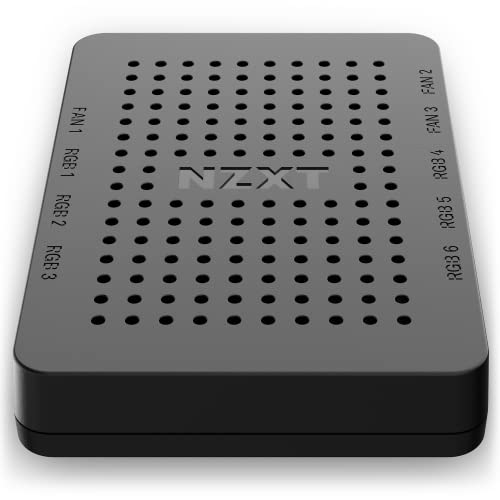
NZXT’s RGB & Fan Controller offers a practical balance of fan speed management and RGB customization. It supports up to nine PWM fans while providing six RGB lighting channels to coordinate compatible accessories via NZXT CAM. The installation is designed for flexibility, with built-in magnets and adhesive strips, plus mounting holes for SSD brackets. This controller is well-suited for users who want extensive lighting control without sacrificing airflow management.
Key features include optimal PWM control, where you can tailor a fan profile to your system’s thermal needs, and fully customizable lighting via NZXT CAM software. The unit’s magnetic mounting and SSD-bracket compatibility simplify integration into compact builds or cases with limited space. If you already lean toward NZXT’s ecosystem, this controller offers cohesive software-driven control for both fans and lighting.
CORSAIR Commander Duo iCUE Link RGB and PWM ARGB Fan Controller

Corsair’s Commander Duo blends ARGB and PWM control across two flexible channels with iCUE ecosystem compatibility. This enables seamless integration of two independent fan and lighting ecosystems through a single interface. Each channel supports up to six daisy-chained fans, effectively doubling the fan count compared with some single-channel hubs. The Commander Duo is ideal for builds that already utilize Corsair’s iCUE hardware or users who want a robust, centralized control that scales as their system grows.
The dual-channel approach provides distinct control paths for ARGB lighting and PWM fan speeds, with a focus on synchronized visuals and performance. The device is designed to work as a hub for multiple devices, allowing system-wide customization without juggling disparate controllers. For enthusiasts seeking maximum scalability and a unified Corsair experience, this hub is a strong option.
NZXT Control Hub – Digital RGB Lighting and PWM Fan Speed Controller

NZXT’s Control Hub focuses on simplifying RGB and PWM control for a set of single-frame fans. It’s designed for precise speed tuning with 8-pin PWM and RGB headers, enabling synchronized lighting across up to five NZXT RGB components. The Zero RPM mode helps achieve silent cooling during light loads, making it a practical choice for builds that emphasize quiet operation. By consolidating lighting and fan controls into a single interface, it provides a clean, centralized management experience for NZXT fans and accessories.
With straightforward installation and a compact footprint, this hub appeals to builders prioritizing an integrated NZXT experience. The emphasis on cohesive lighting across a smaller number of components helps users maintain visual harmony while ensuring reliable fan performance during daily tasks and gaming sessions.
ASUS TUF Gaming ARGB PWM Fan Hub

The ASUS TUF Gaming ARGB PWM Fan Hub is designed to connect up to six case fans with PWM and RGB support in a single hub. The hub provides clear power and operation indicators, helping users quickly verify status during assembly or troubleshooting. This option is attractive for TUF builds or fans that rely on straightforward, no-nonsense monitoring alongside vivid ARGB lighting. The integration is intended to deliver reliable cooling performance while maintaining an aesthetically cohesive lighting setup across ASUS-compatible components.
CORSAIR Commander Duo iCUE Link RGB and PWM ARGB Fan Controller
Note: The Commander Duo section is repeated here to emphasize its relevance for users who want a robust, dual-ecosystem control solution that combines ARGB and PWM fans under a single, streamlined interface. With two channels that can accommodate up to twelve daisy-chained fans, it’s geared toward larger builds or future expansions where cohesive lighting and cooling orchestration is a priority. The iCUE ecosystem provides extensive customization options and real-time feedback across connected devices.
Buying Guide: How to Choose the Right RGB Fan Controller
When selecting an RGB fan controller, consider pairing functionality with your case design and expansion goals. Here are key purchase considerations and comparisons to help you decide:
- Channel count and fan compatibility: Determine how many fans you plan to run and whether you need separate channels for ARGB lighting versus PWM fan control. Some hubs handle up to six or nine ARGB and PWM ports, while others offer dual ecosystems for future growth.
- Software integration: If you already use a specific software suite (e.g., NZXT CAM or Corsair iCUE), a controller that integrates with that software can simplify management and synchronization of lighting and fan profiles across components.
- Mounting and installation: Look for magnetic mounting, adhesive options, or screw-hole compatibility that fit your case layout. A compact form factor helps for small builds, while SSD-bracket mounting can be advantageous in tight spaces.
- Lighting customization: Consider whether you need six or more lighting channels and whether the controller supports per-channel customization, effects, and color palettes that match your overall build theme.
- Power delivery and stability: Ensure the hub provides stable power delivery, especially for ARGB lights with many LEDs. Check for a dedicated SATA power input and safeguards against overcurrent scenarios.
- Future-proofing: Some controllers offer broader support for RGB accessories beyond fans, such as LED strips and peripheral lighting, which can be valuable for expanding a build later.
Depth of control varies by model—from NZXT’s single-brand ecosystems to Corsair’s dual-channel setups. If you value a cohesive software experience and straightforward installation, NZXT options tend to excel in ecosystem integration. For users seeking maximum fan-count expansion and flexible compatibility across ARGB and PWM devices, Corsair’s Commander Duo provides notable scalability. The ASUS TUF hub offers a practical, no-frills option with clear indicators, while darkFlash focuses on a bundled ARGB/PWM solution with remote control for quick adjustments.