Best Samsung Tablet for Drawing: Top Options for Artists and Students
Finding the right tablet for drawing means balancing screen quality, pen responsiveness, and portability. The Samsung Galaxy Tab lineup blends lightweight designs with precise S Pen input and robust displays, making it a solid pick for artists, students, and hobbyists. Below are five Samsung tablets that stand out for sketching, illustrating, and note-taking on the go. Each model offers a different balance of screen size, storage, and performance to fit varied drawing styles and budgets.
| Product | Screen Size | Storage | Pen | Notes |
|---|---|---|---|---|
| Galaxy Tab S6 Lite (2025) Oxford Gray | 10.4″ | 64–128GB | S Pen included | Great balance of portability and pen accuracy |
| Galaxy Tab A9+ Tablet | 11″ | 64–128GB (expandable) | Stylus support via S Pen ecosystem | Big screen for drawing and media |
| Galaxy Tab S10 FE | 11″ | 256GB | S Pen included | Excellent multitasking and display |
| Galaxy Tab S11 | 11″ | 256GB | S Pen included | High-end performance for art apps |
| Galaxy Tab S6 Lite (Mint Tone) 2025 | 10.4″ | 64–128GB | S Pen included | Compact and colorful option |
The following sections highlight five Samsung tablets that are particularly well-suited for drawing tasks, including note-taking, illustration, and creative workflows. Each section includes a brief overview, key features, and why it matters for artists and designers working on the go.
Samsung Galaxy Tab S6 Lite (2025) Oxford Gray

This 10.4-inch tablet targets everyday drawing and note-taking with the included S Pen, a crystal-clear display, and Dolby Atmos surround sound. The S Pen enables precise sketching, handwriting, and annotating documents, making it a practical companion for students and artists who value portability. Its slim, modern design fits easily into bags for on-the-go creativity, and the Mint color option adds a fresh aesthetic for users who enjoy personalization.
Key features include an integrated S Pen for writing and sketching, a lightweight form factor, and expandable storage to accommodate art apps, reference images, and project files. The tablet’s balance of price, performance, and pen support makes it a strong choice for those who want a capable drawing tablet without a heavy investment.
Samsung Galaxy Tab A9+ Tablet 11”
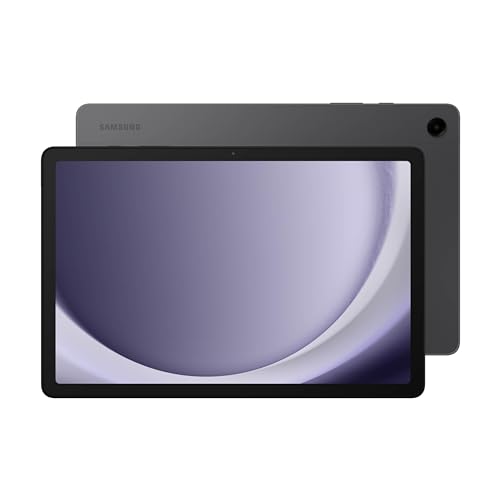
The Galaxy Tab A9+ offers a larger 11-inch display with a bright 1920×1200 resolution and a 90Hz refresh rate, which helps with smoother drawing interactions. Quad speakers and Dolby Atmos provide immersive audio for video references and creative tutorials. The option for higher RAM and storage configurations, plus up to 1TB expandable storage, supports more extensive art libraries and multi-app workflows.
With a robust processing backbone and expandable storage, this model is well-suited for artists who need a bigger canvas and the flexibility to store high-resolution sketches and reference images. The tablet’s durable, slim profile makes it a practical travel companion for daily art routines and collaborative projects.
SAMSUNG Galaxy Tab S10 FE 256GB

The Tab S10 FE combines a large display with strong performance, making it a capable platform for digital drawing, painting, and creative apps. Its 256GB storage, 90 Hz refresh rate, and dual speakers enhance both reference material viewing and multimedia production. Handwriting and S Pen integration enable precise sketching and note organization, which is ideal for artists who multitask between ideas and project tracking.
Circle to Search and other AI-assisted features streamline workflows, allowing quick retrieval of ideas or assets while you work. This model suits users who want a feature-rich drawing device with a roomy display and strong ecosystem compatibility for creative software.
Samsung Galaxy Tab S11 256 GB

Designed for power users, the Tab S11 delivers a high-end display and performance package suitable for demanding art apps, large canvases, and complex workflows. Its 256GB storage capacity accommodates substantial art libraries, brushes, textures, and project files. The Dynamic AMOLED 2X display provides crisp color accuracy, helping artists preview final results with confidence. The S Pen input remains central to a natural drawing experience, while the device’s slim, portable form keeps it practical for on-the-go studios.
For illustrators and graphic designers who demand dependable multitasking alongside precise pen input, the S11 represents a premium option that emphasizes speed, color fidelity, and responsive controls in a single tablet package.
Galaxy Tab S6 Lite Mint (2025)

The Mint-colored version of the S6 Lite stands out as a compact drawing companion with the same core benefits: a precise S Pen for note-taking and sketching, a vibrant display, and solid battery life. It’s particularly appealing for students and casual artists who want a portable device with a cost-efficient yet capable drawing experience. The included S Pen remains central to the creative process, offering a convenient tool for quick sketches, markups, and annotations on the go.
With the S6 Lite’s proven performance and DeX support for a PC-like experience, this option emphasizes simplicity and portability while still delivering a reliable drawing workflow for everyday projects.
Buying Guide: Key Purchase Considerations And Comparisons
When choosing a Samsung tablet for drawing, consider screen size, pen usability, and processing power. Larger displays like 11 inches offer more room for detail but add weight; smaller screens are more portable but may feel cramped for complex sketches. Look for a responsive S Pen with low latency to ensure a natural drawing feel.
Storage and RAM impact multitasking and file handling. If you plan to store high-resolution canvases, textures, and reference images, opt for models with expandable storage or higher base storage. A fast processor helps keep art apps smooth as you switch between brushes, layers, and effects.
Display quality matters for color accuracy. Devices with vibrant, high-resolution panels and good brightness levels help you preview tones accurately and work in varied lighting scenarios. 90 Hz refresh rates contribute to smoother drawing and navigation within apps, which can improve overall productivity.
Battery life is also important for longer sessions away from a power source. Models claiming extended endurance are beneficial for artists who paint or sketch for several hours without interruption. Consider charging capabilities and whether fast charging is available to minimize downtime between sessions.
Software and ecosystem matter as well. Galaxy devices offer strong compatibility with popular art apps, cloud storage, and cross-device syncing. If you rely on a specific app or file format, verify app availability and support on Android for a seamless workflow across devices.
In sum, choose a Samsung tablet that aligns with your typical drawing sessions, preferred canvas size, and storage needs. For students and casual artists, the S6 Lite variants provide a balanced mix of portability and pen performance. For power users or professionals needing bigger canvases and faster workflows, the S10 FE or S11 series deliver higher-end features and more robust multitasking capabilities.