Best Scanners for Large Documents: Top A2/A3 Options for Large Format Needs
Finding a reliable scanner for large documents means prioritizing size, clarity, and usability. This guide highlights five prominent options that excel with A2/A3 formats, suitable for researchers, archivists, teachers, or professionals who routinely digitize oversized magazines, maps, posters, or architectural drawings. Each pick is evaluated for best-use scenarios, with practical caveats to help you choose confidently.
| Product | Best For |
|---|---|
| VIISAN Large Format Book & Document Scanner | Owners needing up to A2/A3 capture with high resolution and flexible mounting |
| CZUR Shine Ultra Pro Portable 24MP | Travel-friendly large-format scanning |
| ScanSnap iX2500 | Office-wide daily scanning with cloud and USB/Wi‑Fi |
| Epson Workforce ES-580W | Wireless, stand-alone scanning to cloud or USB |
| CZUR Shine Ultra Smart Portable | Thin-book OCR and portable flatbed scanning |
VIISAN Large Format Scanner With A2/A3 Capture

Best for: Archivists, researchers, and publishers needing large-format capture with high resolution. This scanner supports A2 and A3 sizes with a 26MP capture resolution, ideal for detailed documents, maps, or thick journals. The design includes an adjustable height and a 90-degree foldable hinge to adapt to different scanning setups. When paired with VIISAN’s software, it delivers crisp detail up to 26MP (5888 × 4522) and enhanced scanning up to 600 DPI for finer textures and print lines.
Why chosen: It directly targets large-format work with a robust 594×420 mm maximum capture area and a flexible overhead configuration. It suits environments where books or large papers must be scanned flat without distortion, provided the software is run on compatible Windows or macOS systems.
Caution: The bundled OfficeCam software supports only x64/x86 Windows and macOS; ARM-based devices are not compatible. Plan for a traditional PC or Mac setup to ensure full feature access.
What to know: This option is best when you regularly scan large sheets and need strong detail preservation. It is less ideal if you rely on ARM-based devices or require plug-and-play simplicity without driver considerations.
CZUR Shine Ultra Pro Portable 24MP

Best for: Travelers or small offices that need a robust, portable A3-capable scanner with auto-flatten and deskew. The CZUR Shine Ultra Pro emphasizes auto-flattening and high-speed capture, making it suitable for fieldwork or shared workspaces where space is limited. It supports A3 large format and touts quick turnaround with per-page processing fast enough for frequent use.
Why chosen: Its ultra-portable form factor and fast scanning make it a practical pick for users who must move between locations or work in compact settings without sacrificing large-format capability.
Limitations: Not all OCR languages are listed; verify language support if multilingual OCR is essential. Some users may prefer more bulk-friendly options for very thick books.
Choose this if you need a compact, fast solution for occasional large-page scans and want easy A3 handling in a portable package.
ScanSnap iX2500 Wireless or USB High-Speed Document Scanner

Best for: Office users needing reliable daily scanning with built-in cloud options and a large touchscreen. The iX2500 offers 45 ppm duplex scanning, a 100-page ADF, and connectivity via Wi-Fi or USB-C, with easy transfer to PCs, Macs, or cloud services.
Why chosen: It balances speed, flexibility, and cloud compatibility, enabling quick digitization of many pages without a PC being constantly attached. Suitable for shared workspaces where multiple people need fast access to scanned files.
Limitation: While not a dedicated large-format scanner, its strength lies in everyday document handling. For oversized items, you may need to rotate or segment pages for best results.
Pick this if your primary need is fast, reliable general-document scanning with optional cloud storage and flexible connectivity.
Epson Workforce ES-580W Wireless Color Duplex Scanner

Best for: Offices seeking wireless scanning to mobile devices and cloud storage, with a robust 100-sheet ADF and a user-friendly touchscreen. The ES-580W focuses on ease of use, wireless operation, and direct-to-cloud capabilities.
Why chosen: It excels in environments that want minimal computer dependence, allowing scans to go directly to cloud services or via USB to a drive. It integrates well with mobile workflows and shared networks.
Limitation: Wireless performance depends on network stability; setup may require some initial configuration. It is not specialized for ultra-large formats but handles standard A4/Letter sizes well in bulk.
Choose this if wireless convenience and cloud integration are top priorities in a mid- to large-office setting.
CZUR Shine Ultra Smart Portable Doc Scanner
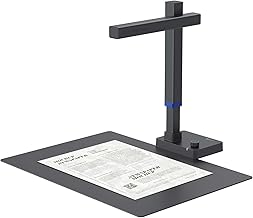
Best for: Professionals needing a thin, lightweight flatbed-style device with strong OCR and A3 capture capabilities, plus USB connectivity. It is a fit for users who want a portable scanner with robust OCR across many languages.
Why chosen: The Shine Ultra Smart Portable merges a compact form with powerful OCR and a broad language set, making it versatile for multilingual work and on-the-go scanning needs.
Limitation: Some languages, including Thai, Hebrew, and Arabic, may not be fully supported depending on the OCR data updates. Check current language coverage if essential for your work.
Choose this if you need a portable scanner with strong OCR features and cross-platform compatibility, especially when traveling between sites.
Buying Guide
What size do you actually need? For frequent large-page work, prioritize A2/A3 capture capability, flatness, and a sturdy adjustable stand. If you rarely scan oversized items, a portable A3 option may suffice.
How important is OCR and language support? For archiving multilingual documents, verify OCR accuracy, multi-language recognition, and whether the software supports your languages. Some models have language limitations or require updates.
Connectivity and storage: Consider whether you prefer USB-only, Wi-Fi, or cloud integration. Cloud features save local disk space and support remote collaboration but may require reliable internet access.
Paper handling and speed: Look for a high-capacity automatic document feeder (ADF) if you quantify large volumes. For overhead or book scanning, assess the page flattening and scanning speed per page to maintain workflow efficiency.
Portability vs. form factor: Portable scanners are ideal for on-the-go use and tight spaces, while larger floor models excel in dedicated offices or labs. Balance size with your workspace and transport needs.
Software compatibility: Ensure the bundled software runs on your operating system and architecture (x86/x64 vs. ARM). If you rely on macOS or Windows ARM devices, verify compatibility before purchase.
FAQ
- What is the best scanner for large documents? The choice depends on your needs. For true A2/A3 formats and detailed pages, the VIISAN Large Format scanner is a strong option, with high-resolution capture and adjustable setup.
- Do these scanners support OCR in multiple languages? Many do, but language coverage varies. Check the specific model’s OCR language list before buying if you need non-English recognition.
- Can I scan large documents to cloud storage directly? Some models offer direct cloud transfer via Wi‑Fi or cloud apps. Verify cloud compatibility and required apps during evaluation.
- Is portability important? If you travel or work in small spaces, portable A3/A4 options like CZUR Shine Ultra Pro provide convenient scanning without sacrificing large-format capability.
- Do I need an ADF for large volumes? An ADF is helpful for batch scanning. If you frequently scan many pages, choose a model with a high-capacity ADF and reliable feeder mechanism.
- What about compatibility with ARM-based PCs? Some bundled software may not support ARM. Ensure you use a compatible Windows or macOS environment or check for ARM-compatible drivers.