Best Simple Alarm Clocks for Seniors That Are Easy to Use
Finding a straightforward alarm clock can improve sleep routines and mornings for seniors. This guide highlights five easy-to-operate options, emphasizing large displays, simple controls, and dependable alarms. Each pick is well-suited for seniors needing clear readability, audible alerts, and minimal setup. The top choices favor different needs—front-button controls, built-in night lights, battery backups, and dual alarms. Below is a quick comparison table to help you scan features at a glance.
| Product | Best For | Key Benefit | Limitation Mentioned |
|---|---|---|---|
| Sharp Digital Alarm Clock with Keyboard Style Controls | Absolute beginners | Front-accessible keyboard controls | Requires manual setup |
| Amazon Basics Small Digital Oval Alarm Clock | Compact spaces | Nightlight and easy snooze | Smaller display |
| Sharp LED Digital Alarm Clock | Very large digits lovers | Bright, large red digits; built-in night light | Buttons on front only |
| Tinload 5.5″ Large No Ticking Analog Alarm Clock | Low-noise environments | Analog, silent operation with clear dial | Analog may be less precise for some |
| DreamSky Small Digital Alarm Clock | Bedroom with USB charging | Dimmer, USB charging port | Requires plug-in |
Sharp Digital Alarm Clock With Keyboard Controls

Best for absolute simplicity, this Sharp clock uses keyboard-style controls on the front. It is designed to be easy for adults, seniors, and children to operate with straightforward alarm and snooze functions. The 9-minute snooze can be pressed repeatedly, helping heavy sleepers wake gradually. The clock includes battery backup for power outages, ensuring alarms still sound. Best for buyers who want tactile, front-facing controls and a clear LED display.
Caution: Front-access controls may still require a brief initial setup to tailor alarm times. Battery backup relies on separate power stability for full function.
Amazon Basics Small Digital Oval Alarm Clock

Best for compact spaces and travelers who still want a clear bedside display. The 0.7-inch green LED display provides quick time checks, while a built-in nightlight softly illuminates the room. The repeating snooze helps extend wake-up time without resetting the alarm. This model suits rooms with limited surface area and users who value a gentle rise in the morning.
Limitation: The display is smaller, which may be harder to read from across a larger room or for users with very impaired vision.
Sharp LED Digital Alarm Clock
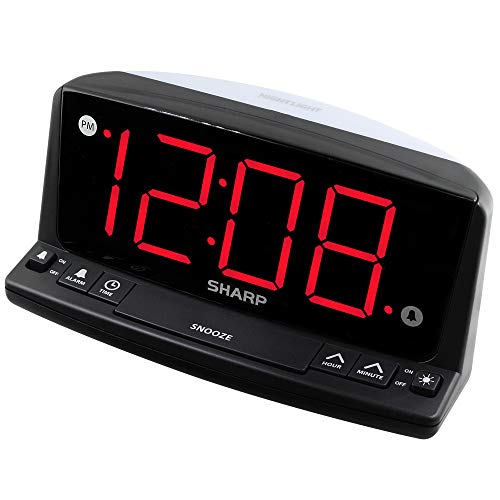
Best for users who want extremely large digits and a built-in night light. This Sharp model emphasizes front-panel controls for simple operation and a bright red display that remains readable in low light. A built-in night light supports nighttime visibility without turning on bright room lights. It’s a strong pick for bedrooms where a large, immediate wake-up signal is needed.
Caution: Front controls are straightforward, but some users may prefer physical buttons with tactile feedback for every function beyond the basic alarm and snooze.
Tinload 5.5″ Large No Ticking Analog Alarm Clock

Best for seniors who prefer a traditional analog face without ticking sounds. The large white dial with bold black numerals offers high readability, and the 5.5-inch size provides a stable, easy-to-view display. The clock is battery-operated with a simple snooze and a momentary light, which is helpful for nighttime checks. Choose this if you want a classic look with easy set features.
Limitation: Analog accuracy depends on the battery and may not match digital precision in all settings.
DreamSky Small Digital Alarm Clock

Best for bedrooms where a dimmable display and USB charging are desirable. The 2-inch jumbo digits ensure readability, and a brightness dimmer helps protect sleep quality. A USB-C adapter-powered design allows convenient charging of devices at the bedside. This option suits users who want integrated charging alongside time display.
Limitation: Requires a wall plug for all core functions; battery backup is not mentioned as a standard feature for full operation during outages.
Buying Guide
What features matter most to seniors when choosing an alarm clock?
- Display readability: Look for large digits, high-contrast colors, and optional brightness control.
- Ease of use: Front-facing controls, clearly labeled buttons, and minimal steps to set alarms.
- Audible alarm quality: Choose a tone and volume that reliably wakes without causing distress.
- Power options: Battery backup or dual power options help ensure alarms ring during outages.
- Additional aids: Night lights, snooze duration, dual alarms, and USB charging can add practicality.
Which clock type is best for different use cases?
- Best for front-control simplicity: Clocks with all buttons on the front offer the easiest operation for seniors with limited dexterity.
- Best for readability from a distance: Large-digits clocks with high-contrast displays are ideal for rooms far from the bed.
- Best for quiet environments: Analog clocks with no ticking or digital models with silent operation are preferred in bedrooms needing calm.
- Best for multi-user households: Dual-alarm clocks support different wake times without reprogramming.
How should you balance features and reliability?
- Prioritize a built-in night light for late-night checks and a reliable alarm.
- Consider whether a battery backup or USB power is essential for your daily routine.
- Check for snooze length and simplicity of reactivating alarms after snooze.
FAQ
- Q: Do these clocks work without internet access? A: Yes. They are standalone devices that do not require Wi-Fi.
- Q: Are the displays easy to read in the dark? A: Many have night lights or brightness controls to improve readability at night.
- Q: Can I set two wake times? A: Some models, like the Netzu clock, offer dual alarms for different schedules.
- Q: Do these clocks have a backup power option? A: Several offer battery backups to preserve alarm settings during outages.
- Q: Are large-digit displays better for vision impairment? A: Generally, yes; larger digits and high contrast aid readability.
- Q: Is there a risk of complicated setup? A: Most highlighted options emphasize simple, front-access controls and minimal setup steps.