Best Simple Printers for Seniors: Easy, Worry‑Free Picks
Finding an easy-to-use printer for seniors means prioritizing simplicity, reliability, and straightforward setup. This guide highlights five printers that are particularly friendly for everyday tasks such as printing documents, photos, and recipes. Each pick is explained with who it’s best for and why it stands out. The table below summarizes the key choices to help quick comparisons for shoppers seeking a low‑friction printing experience.
| Product | Type | Best For | Notable Benefit |
|---|---|---|---|
| HP DeskJet 2923 Wireless All‑in‑One | Color Inkjet | Home users needing color print, scan, copy | AI‑assisted formatting to reduce wasted pages |
| NDYIN N80 Portable Printer | Wireless Thermal | Travelers, minimal ink maintenance | No ink, compact and lightweight |
| HP Envy 6555e Wireless All‑in‑One | Color Inkjet | Home offices with mixed tasks | Auto duplex and AI‑assisted layout |
| Brother HL‑L2460DW | Monochrome Laser | Text‑heavy documents, small offices | Fast, duplex printing; reliable for memos |
| HP LaserJet M209d | Monochrome Laser | Simple, fast black‑and‑white printing | Compact with duplex option |
HP DeskJet 2923 Wireless All‑in‑One

Overview: The DeskJet 2923 is designed for basic color printing and simple scan/copy tasks. It includes a 60‑sheet input tray and supports mobile and wireless printing, making setup and daily use straightforward. Best for seniors who print everyday documents, grocery lists, or form letters.
Who it’s best for: Seniors who want a compact, user‑friendly color printer for home use with easy wireless printing. Why selected: Strong balance of essential features—color printing, scan, copy, and a modest paper tray—without extra complexity.
Limitations: AI features focus on formatting rather than advanced editing; ensure your device supports HP AI features for optimal results. Caution: May require occasional driver updates for full functionality on newer computers.
NDYIN N80 Portable Printer

Overview: The N80 is a compact portable thermal printer that uses no ink. It prints US Letter and A4 size papers via Bluetooth, with USB‑C for laptop connections. Best for travelers or seniors who need quick receipts or lightweight documents on the go.
Who it’s best for: Seniors who value portability and low maintenance over photo printing or color graphics. Why selected: No ink or toner required, which reduces ongoing costs and maintenance.
Limitations: Thermal paper is required; not suitable for regular page layouts or color photos. Caution: Bluetooth setup can require app configuration and device compatibility checks.
HP Envy 6555e Wireless All‑in‑One
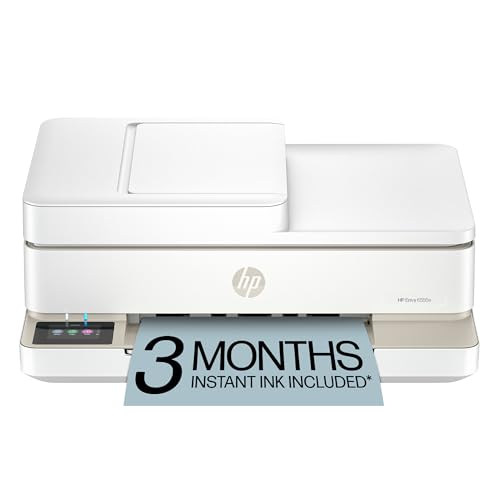
Overview: The Envy 6555e is a versatile color printer offering print, scan, and copy with auto duplexing and a 100‑sheet input tray. It emphasizes clean, well‑formatted prints and user‑friendly operations, aided by HP AI formatting.
Who it’s best for: Seniors who need a capable home printer for schoolwork, letters, and photos, with efficient paper handling. Why selected: Strong all‑in‑one features with AI formatting to minimize waste and awkward layouts.
Limitations: Color printing quality is solid but not aimed at high‑end photo work; ensure you have adequate space for the tray and control panel.
Brother HL‑L2460DW

Overview: This monochrome laser printer is compact and fast, with duplex printing and multiple connectivity options. It’s ideal for text‑oriented documents and everyday office tasks.
Who it’s best for: Seniors who mostly print text documents and need reliable duplex printing in a small footprint. Why selected: Consistently solid text output and efficiency for home offices or small teams.
Limitations: Lacks color printing; not ideal for photos or color graphics. Caution: Driver updates and mobile app features vary by device and OS.
HP LaserJet M209d

Overview: The M209d is a compact monochrome laser printer with duplex capability, designed for straightforward black‑and‑white printing. It’s well‑suited for fast, legible documents.
Who it’s best for: Seniors who require simple, dependable black‑and‑white printing with minimal setup. Why selected: Strong performance in a small form factor, with duplex printing to save paper.
Limitations: No color printing and wired connection only; ensure your workspace has USB access or consider a wireless alternative if needed.
Buying Guide: Key Purchase Considerations
- Printing needs: Choose color vs. monochrome based on typical documents. Color is helpful for recipes or photos; monochrome is usually faster and cheaper for text.
- Ease of use: Look for straightforward interfaces, clear manuals, and reliable wireless/app support. AI formatting can reduce wasted paper and misprints.
- Paper handling: Consider the input tray size and whether auto duplexing matters for your routines. A larger tray reduces refills for frequent printing.
- Portability vs. desk use: Portable thermal printers excel for on‑the‑go tasks; home‑office printers focus on reliability and print quality.
- Connectivity: USB, Wi‑Fi, and mobile printing support impact how easily you print from tablets or smartphones.
- Cost of ownership: Ink or laser toner costs, and availability of supplies, influence long‑term use. Inkless options minimize ongoing costs but have compatibility limits.
- Reliability and size: For seniors, a compact footprint with clear status indicators can reduce confusion and errors.
FAQ
- Q: Which printer is easiest for seniors to use? A: Printers with simple layouts, large control panels, and reliable wireless setup—such as straightforward all‑in‑one inkjets or compact monochrome lasers.
- Q: Is color printing necessary for daily tasks? A: Not always. For documents and lists, monochrome printers are often faster and cheaper to run.
- Q: Do I need a scanner? A: If you frequently digitize documents, a built‑in scanner adds convenience; otherwise, a basic print‑only option is sufficient.
- Q: Are inkless printers a good fit? A: They reduce maintenance and running costs but are typically limited to specific paper types and formats.
- Q: Should I choose auto duplexing? A: Yes, if you print many double‑sided pages, it saves paper and effort in the long run.
- Q: What about setup and support? A: Look for devices with guided setup, clear online help, and a reputable brand’s customer support.