Best Smart Locks for Interior Doors: Secure Keyless Entry for Home and Office
Looking for a smart lock that’s ideal for interior doors such as bedrooms, offices, or hotel rooms? This guide highlights five top choices, with clear reasons for who each lock suits best. It covers fingerprint, keypad, and app-controlled models to help you pick the right level of convenience and security for your space.
| Product | Best For | Key Feature |
|---|---|---|
| Evanshow Fingerprint Door Lock Biometric Door Knob | Families with mixed access needs | 0.5s fingerprint, 100 fingerprints, 50 passwords |
| Keypad Smart Door Lock with Knob, Yamiry | Front doors, high security | Aluminum body, 50 stored credentials |
| Evanshow Smart Door Lock with Knob | Remote management lovers | Tuya app, 0.5s unlock, temporary codes |
| Keypad Smart Door Knob Lock, Yamiry | Install-friendly, standard doors | IP54 weather rating, 20 codes |
| Smart Door Handle Lock with Keypad, Yamiry | Multi-method access, DIY install | 6-in-1: fingerprint, app, codes, fobs, keys, Alexa |
Evanshow Fingerprint Door Lock Biometric Door Knob

This 4-in-1 smart lock uses fingerprint, password, two mechanical keys, and IC cards. It supports up to 100 fingerprints and 50 passwords for versatile access control, with a fast 0.5-second fingerprint recognition. Best for: households with multiple users and guests who need quick, reliable entry. Caution: administrator fingerprint must be registered before use; without an admin, any fingerprint could unlock the door. Note: the USB port provides emergency power but cannot charge internal batteries.
Keypad Smart Door Lock with Knob, Yamiry

Designed for front doors and standard US doors, this aluminum-bodied lock emphasizes security and ease of use. It stores up to 50 passwords and supports easy installation with a screwdriver. Best for: homeowners seeking a sturdy, straightforward upgrade with quick local programming. Limitation: remote control features require a gateway; built-in Bluetooth alone is not enough for remote access.
Evanshow Smart Door Lock with Knob

This lock supports multiple entry methods including fingerprint, keypad, NFC card, and mechanical key, with remote control capabilities via the Tuya app. Best for: users who value flexible access modes and remote monitoring for an apartment or office. Limitation: remote features rely on app connectivity and may require an internet gateway for full remote access.
Keypad Smart Door Knob Lock, Yamiry

Aluminum alloy construction delivers security and weather resistance (IP54). It supports a backlit keypad, 20 codes, and a one-time guest code, with a simple 15-minute installation. Best for: renters or small households needing a quick, textured keypad solution. Caution: while robust, the backlight and weather seals are designed for typical residential use and may be less durable in extreme environments.
Smart Door Handle Lock with Keypad, Yamiry

Offers six unlocking options: fingerprint, Bluetooth app, coded passcodes, key fobs, mechanical keys, and optional Alexa voice unlock with a gateway. Best for: tech-forward homes that want comprehensive access control and remote management. Limitation: Alexa unlocking requires an additional gateway; set-up may be more involved for non-technical users.
eufy Security Smart Lock FamiLock C32
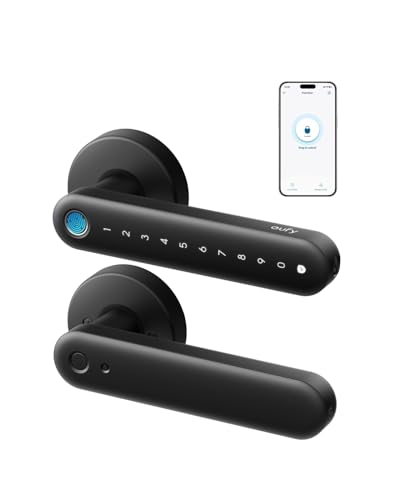
Built-in Wi-Fi enables remote management from anywhere, with 0.3-second fingerprint unlocking and 360-degree recognition. It runs on four AA batteries with USB-C emergency backup. Best for: households prioritizing quick biometric access and reliable remote control without a separate hub. Caution: Rekeying compatibility is noted as not supported within the product listing and should be verified for specific installation contexts.
Buying Guide
- Access methods: Choose between fingerprint, keypad, app control, cards, or a combination. If you frequently host guests, a model offering temporary codes or timed access is advantageous.
- Installation: Look for models designed for standard American doors and simple screwdriver-based installation. Reversible handles increase compatibility with left- or right-handed doors.
- Remote features: Built-in Wi-Fi or gateway compatibility matters if you want remote unlocking or monitoring. Bluetooth-only devices limit remote use to proximity.
- Battery life and power: Consider battery type (AA vs. rechargeable) and emergency power options in case of a dead battery.
- Security considerations: Check for anti-pry features, weather resistance, and the ability to disable or limit access for guests or contractors.
- Data handling: If you require logs or access history, prefer locks with app-based audit trails and clear privacy terms.
FAQ
- Do these locks fit interior doors? Yes, all listed models are designed for interior doors, including bedrooms, offices, and apartments.
- Can I install these without professional help? Most are designed for DIY installation with basic tools and standard door prep.
- Is remote access secure? Reputable models use encryption and require gateway setups; read the app’s permission settings carefully.
- What happens during power loss? Many models include USB-C or external power options for emergency entry; check the specific model’s manual.
- Do these locks support multiple users? Yes, most support multiple fingerprints, codes, fobs, or cards to accommodate families and guests.
- Can one lock multiple doors? Some models are designed for front doors or interior doors; confirm compatibility with your door type before purchase.