Best Soundbar Adapters for TV: ARC to Optical Converters for Clear TV Sound
Answering the common question, these soundbar adapters let you route TV audio to a soundbar or home theater system when your TV only has an HDMI ARC or you need an optical output. This guide highlights five reliable options and who each is best for. It also includes a quick buying table and practical tips to help you avoid compatibility pitfalls.
Summary of selected products:
| Product | Best For | Key Benefit | Notes |
|---|---|---|---|
| 192KHz HDMI ARC to Optical Audio Adapter (IHTHER) | TVs with ARC, want optical output | High sampling rate, plug & play | ARC only, not eARC |
| XPTSFDU HDMI ARC Adapter 4K60Hz | ARC TVs needing L/R + 3.5mm | Simultaneous L/R and 3.5mm output | Check TV ARC settings |
| LiNKFOR eARC/ARC Audio Extractor | eARC/ARC TVs, soundbars | 192kHz, clear signal | Requires CEC for some features |
| VPFET HDMI ARC Audio Extractor | Older speakers or headphones | Optical or 3.5mm output | ARC port only |
| PROZOR eARC/ARC to Optical Audio Extractor | eARC/ARC modern TVs | 192kHz, high-fidelity optical output | Optical only output |
192KHz HDMI ARC to Optical Audio Adapter by IHTHER

Best for: TV owners with HDMI ARC looking to feed a soundbar or receiver via optical output. This device extracts digital audio from the TV’s ARC port and converts it to optical outputs with minimal signal loss at 192KHz/24-bit. Use for PCM, LPCM, Dolby 5.1, or DTS 5.1, provided your audio system supports those formats. It is plug-and-play—no drivers required—and uses a USB power connection. The LED indicators show Power and Input status to simplify setup.
Limitations: It does not support HDMI eARC and requires an ARC-enabled TV. If your content relies on advanced eARC lossless formats, this adapter may not pass them through. Best for straightforward ARC-to-optical setups rather than future-proof, high-bandwidth audio needs.
XPTSFDU HDMI ARC Adapter 4K60Hz

Best for: ARC-enabled TVs that need both L/R and 3.5mm outputs for external speakers or headphones. The adapter converts ARC audio to stereo outputs, with an important note that it’s primarily compatible with ARC-enabled TVs and may require enabling ARC-related settings on the TV. Users should verify that the TV’s ARC port is used and that the connection adheres to the supported HDMI standard (HDMI 1.4+ recommended).
Why chosen: It solves the common problem of missing analog outputs on some TVs by providing simultaneous L/R and 3.5mm options. Caution: some brands require manual ARC/CEC adjustments to enable audio return and may necessitate a high-speed HDMI cable for stability.
LiNKFOR eARC/ARC Audio Extractor
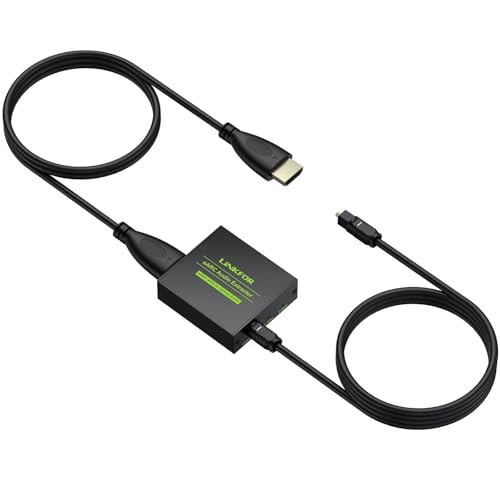
Best for: TVs with eARC or ARC looking to deliver high-fidelity audio to a soundbar or headphones. This extractor supports 192kHz sampling with Dolby 5.1 and DTS 5.1, converting HDMI ARC/eARC signals into optical output as needed. It emphasizes compatibility with eARC/ARC-equipped TVs, and notes that enabling CEC may be required on some TVs to activate features.
Limitation: Some TVs require specific CEC settings to enable ARC features; without proper configuration, you may not receive audio from the HDMI ARC port. Use this option when you want robust compatibility with modern TVs and high-resolution audio formats.
PROZOR eARC/ARC to Optical Audio Extractor

Best for: TV setups that require a high-fidelity optical output from eARC/ARC sources. It supports 192kHz/24-bit audio and PCM 2.0, Dolby 5.1, and DTS 5.1 formats, making it suitable for high-quality home theaters. It is designed as a dedicated optical extractor and notes that the adapter’s output is optical only, so plan your speaker system accordingly.
Why choose: The eARC upgrade improves bandwidth and reduces compression for certain formats, delivering a more precise soundstage to your soundbar or receiver. Caution: It outputs solely via Toslink; ensure your downstream equipment supports optical input and that your TV port is confirmed as ARC/eARC-capable.
Buying Guide: Key Considerations for TV Sound Quality
- Compatibility: Confirm your TV’s HDMI port is labeled ARC or eARC. Some TVs require enabling CEC and ARC in the settings to transmit audio correctly.
- Output Format: Check supported formats (PCM, LPCM, Dolby 5.1, DTS 5.1) and ensure your soundbar or receiver can decode them. If you need Dolby Atmos or DTS:X, ARC adapters may not pass through those formats.
- Output Type: Decide between optical, RCA, or 3.5mm outputs. Optical tends to preserve digital quality, while analog outputs are more broadly compatible with older equipment.
- Audio Delay and Lip Sync: Some adapters introduce minimal delay. If you notice lip-sync issues, look for devices that specify low-latency or adjustable delay.
- Power and Setup: Most adapters are plug-and-play with USB power. Ensure your TV’s HDMI ARC port is stable and use a high-quality HDMI cable as recommended by the manufacturer.
- Future-Proofing: If you anticipate upgrading to eARC/Atmos-capable gear, consider adapters that explicitly support eARC or plan to connect directly to your sound system when possible.
- Brand and Support: Choose products from established brands with clear documentation. Look for compatibility notes and setup tips in the product description to minimize troubleshooting.
Frequently Asked Questions
- Do HDMI ARC adapters work with all TVs? Most work with ARC-enabled TVs, but many do not support all eARC features. Check the product’s note on ARC vs. eARC compatibility.
- Can I get Dolby Atmos through an ARC adapter? Typically no. ARCs do not pass Atmos through most adapters; you’ll need a directly connected audio path to your Atmos-capable device.
- Will I lose HDMI inputs by using an ARC adapter? No. ARC adapters only convert audio signals; they do not replace the TV’s HDMI inputs.
- Is it better to use optical output instead of HDMI ARC? If your TV lacks a reliable audio out or your soundbar has a strong optical input, optical can be a stable choice with clear sound.
- Do I need drivers for these adapters? No. These devices are designed to be plug-and-play with no software required.
- What should I do if there’s no sound after connecting? Verify TV audio output is set to PCM 2.0 or the correct audio format, and ensure ARC/CEC settings are enabled on the TV. Also confirm the adapter is powered and connected correctly.