Best Split Keyboard for Mac: Ergonomic Options for Comfort and Productivity
Answering the search for a split keyboard for Mac, this guide highlights five top options tailored for Mac users who want improved posture, reduced strain, and seamless Mac integration. The best picks vary by need: long-form typing and premium ergonomics, portability with a standard Mac layout, or multi-device versatility for power users. This overview helps you compare each model’s strengths, potential limitations, and the type of buyer it suits best.
| Product | Best For |
|---|---|
| Kinesis Freestyle2 Ergonomic Keyboard w VIP3 Lifters (Mac) | Best for custom separation and elevated posture |
| Kinesis Freestyle2 USB Keyboard for Mac (9″ Standard Separation) | Best for compact Mac setups |
| Kinesis USB Freestyle2 Keyboard for Mac (20″ Extended Separation) | Best for maximum separation and alignment |
| Logitech Ergo K860 Wireless Ergonomic Keyboard | Best all-around ergonomic design with wrist support |
| Macally Ergonomic Keyboard for Mac Wireless | Best multi-device wireless for Mac family |
Kinesis Freestyle2 Ergonomic Keyboard with VIP3 for Mac
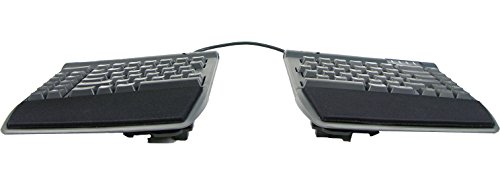
The Freestyle2 model for Mac features an award-winning split design that allows you to separate the key modules up to 9 inches. This enables natural hand, wrist, and forearm alignment tailored to your body. It includes adjustable tenting via the VIP3 accessory, offering 5, 10, or 15 degrees of elevation with cushioned palm supports to maintain a neutral forearm posture. The standard Mac layout ensures familiar shortcuts and a 2-port hub. No software or drivers required. Best for users who want highly customizable positioning and a native Mac key arrangement.
Best for: typists who need precise, individualized alignment and palm-supported tenting. Better for users who value posture customization over compact footprint. Limitation: larger desk space is needed for full 9″ separation and tenting setup.
Kinesis Freestyle2 USB Keyboard for Mac (9″ Standard Separation)

This model offers a 9-inch standard separation with a Mac layout featuring Mac-specific hotkeys and media controls. It uses low-force key switches designed to reduce finger fatigue while maintaining tactile feedback. No software or drivers are required, making setup quick and straightforward for Mac users who need reliable ergonomic support without extra steps. Best for: Mac users wanting a balance between separation, Mac-specific keys, and easy plug-and-play setup. Caution: the standard 9″ separation may be less suitable for very tall desks or users needing more than 9 inches of module drift.
Kinesis USB Freestyle2 Keyboard for Mac (20″ Extended Separation)

This extended model allows up to 20 inches of separation, giving maximum freedom to position each module for ultimate ergonomic alignment. It maintains a standard Mac layout and includes low-force key switches to reduce fatigue. Best for: users seeking the most adaptable separation to match unique body dimensions. Caution: the larger separation requires more desk space and may take longer to adjust to full comfort.
Logitech Ergo K860 Wireless Ergonomic Keyboard

Logitech’s Ergo K860 features a curved, split keyframe with a padded wrist rest for improved posture and comfort. It offers wireless Bluetooth and USB connectivity with compatibility across Windows and Mac systems. The design emphasizes better typing posture, a soft wrist rest with memory foam, and scooped keys to match fingertip shapes. Best for: users wanting a ready-to-use ergonomic option with strong support and wireless convenience. Limitation: not purely a split keyboard; the entire layout is curved rather than modular, which may affect alignment for some users who prefer true modularity.
Macally Ergonomic Keyboard for Mac Wireless

This Macally model uses a space-saving split design with a compact 86-key layout and cushioned palm rest to facilitate natural hand positioning. It supports wireless Bluetooth connections and can switch between up to three devices, making it a good option for multi-device Mac users. Best for: Mac users seeking a wireless, multi-device keyboard with a split design and integrated palm support. Caution: some users may prefer a larger layout for numeric input or heavy keyboard shortcuts.
Buying Guide
- Separation vs. footprint: If desk space is limited, a 9″ separation (or a compact 9″ vertical arrangement) may be preferable. For total customization, models offering up to 20″ provide more adjustability but require more room.
- Mac layout compatibility: Look for standard Mac keyboard layouts with Mac-specific hotkeys and shortcuts to preserve productivity.
- Tenting and palm support: Tenting angles (5–15 degrees) reduce forearm pronation. Consider cushioned palm supports for neutral alignment.
- Connection type: USB, Bluetooth, or hybrid options determine ease of use with multiple Apple devices. Wireless models enable seamless switching but watch for battery life.
- Key switch feel: Low-force switches reduce fatigue. Some users prefer tactile feedback, others prefer soft membranes—choose accordingly.
- Device switching: For multi-device ecosystems (Mac, iPad, iPhone), a keyboard with easy device switching can save time and reduce reconnecting steps.
- Ergonomic shape vs. modular design: Modular designs offer precise customization but can be heavier. All-in-one curved designs emphasize comfort with less setup.
FAQ
- What is a split keyboard? A keyboard with two or more modules separated to position hands and wrists in a natural alignment, reducing strain.
- Are split keyboards compatible with Mac? Yes, most models offer Mac-specific layouts and hotkeys; check the product description for Mac compatibility.
- Do split keyboards require software? Many models work without software, but some may offer optional configurators for key remapping or tilt settings.
- Is a larger separation beneficial for everyone? Not necessarily. It benefits users with larger torso or shoulder widths who need greater forearm freedom; others may prefer moderate separation.
- Can I use these keyboards with multiple devices? Some models support switching between multiple devices via Bluetooth or a USB dongle; verify the number of supported devices before buying.
- Do split keyboards improve typing speed? They can improve comfort and reduce fatigue over long sessions, which may indirectly support longer, more consistent typing sessions.