Best SSDs for Steam Deck Upgrades for Quick Load Times and More Storage
The Steam Deck invites gamers to bring their library on the go, but it also benefits from faster storage and more space. This guide highlights five solid SSDs that fit the 2230 form factor or help maximize performance on Steam Deck, ROG Ally, and other handhelds. Each option blends speed, capacity, and compatibility to help you pick the right upgrade for portable gaming.
Buying Snapshot: Top 5 SSDs For Steam Deck Upgrades
- Crucial P310 2TB M.2 2230 NVMe SSD — PCIe Gen4, up to 7,100 MB/s
- Crucial P310 1TB M.2 2230 NVMe SSD — PCIe Gen4, up to 7,100 MB/s
- SABRENT Rocket 2230 1TB NVMe SSD — Gen4 x4, up to 5,000 MB/s
- WD_BLACK SN770M 1TB M.2 2230 NVMe SSD — Gen4, up to 5,150 MB/s
- SABRENT Rocket Q4 2230 NVMe SSD 2TB — Gen4, up to 5,000 MB/s
All listed options are compact 2230 form factor drives designed to fit Steam Deck, ROG Ally, and other handhelds or compact PC builds. They emphasize fast read speeds for quicker game loading, efficient power use, and ample capacity for your growing library.
Crucial P310 2TB 2230 NVMe SSD

Crucial’s P310 2TB delivers PCIe 4.0 performance with up to 7,100 MB/s read and 6,000 MB/s write speeds, designed for faster game load times and smoother multitasking on portable devices. Its compact M.2 2230 form factor makes it a practical upgrade for Steam Deck and similar handhelds. The 2TB capacity provides ample space for AAA games, apps, and media, helping users avoid frequent external storage swaps. Broad compatibility includes Steam Deck, ASUS ROG Ally, Microsoft Surface, and select Dell laptops, enabling flexible upgrades across multiple devices.
Crucial P310 1TB 2230 NVMe SSD
The 1TB variant shares the same architecture and PCIe 4.0 performance as its larger sibling, delivering up to 7,100 MB/s read and 6,000 MB/s write speeds. It’s a balanced choice if you want solid storage without over-allocating space. The 1TB capacity remains suitable for storing a healthy library of modern titles and essential apps. Compatibility spans Steam Deck, ROG Ally, Microsoft Surface, and select Dell laptops for easy, portable upgrades.
SABRENT Rocket 2230 1TB NVMe SSD
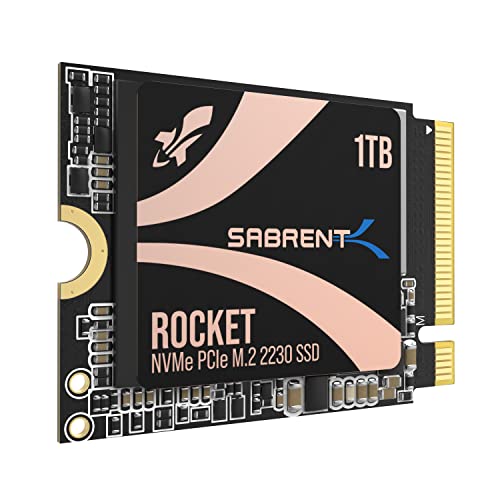
The SABRENT Rocket 2230 1TB is a Gen4 x4 SSD built for tight spaces. It delivers up to 5000 MB/s read and 4300 MB/s write speeds and 800K IOPS, enabling rapid game loading and snappy boot times. Its DRAM-less design uses Host Memory Buffer (HMB) to reduce power consumption and heat, making it a practical choice for handheld gaming and compact ultrabooks. Before purchasing, verify device compatibility with the 2230 slot to ensure a proper fit.
WD_BLACK SN770M 1TB 2230 NVMe SSD

The WD_BLACK SN770M is a trusted option for handheld devices, offering up to 5,150 MB/s read on some capacities and robust 2230 compatibility. The 1TB model provides ample space for a growing game library while maintaining PCIe Gen4 performance for faster installations and level loading. SanDisk/NAND reliability is a consideration for users seeking durability alongside speed in portable setups like Steam Deck and ASUS ROG Ally.
SABRENT Rocket Q4 2230 2TB NVMe SSD

The SABRENT Rocket Q4 2230 2TB stands out with a larger capacity in the same compact form factor. It delivers up to 5,000 MB/s read and 4,300 MB/s write speeds and uses a DRAM-less design with QLC flash to maximize space at a reasonable cost. The true M.2 2230 footprint makes it a strong candidate for Steam Deck users who want a big library without adding bulk to their system. Compatibility should be confirmed for non-standard 2230 slots in some devices.
Buying Guide: Key Considerations For Selecting Steam Deck SSDs
- Form Factor And Fit: The Steam Deck uses a compact M.2 2230 slot. Ensure the product is specifically listed as 2230 to avoid clearance issues in tight spaces.
- Performance And Speed: Look for PCIe Gen4 support for higher read/write speeds (aim for 5,000–7,100 MB/s read in 2230 drives) to reduce load times and improve multitasking.
- Capacity Needs: Determine how many games you want stored locally. AAA titles require significant space, so 1TB or 2TB options can be practical choices for larger libraries.
- Power And Thermal Management: DRAM-less designs save space and power but may run warmer under heavy loads. If possible, pair with proper cooling or a heat sink when using handheld devices for extended sessions.
- Compatibility: Confirm device compatibility beyond the Steam Deck (ROG Ally, Surface Pro, certain laptops) to ensure seamless upgrades across devices you own or may own in the future.
- Reliability And Warranty: Prioritize brands with solid track records in PC storage. Look for warranties and customer support quality to protect your investment during travel or frequent use.
- Installation Simplicity: Many 2230 drives are straightforward to install; check your device’s backplate access and screws to avoid tool-related delays.
- DRAM vs. DRAM-Less: DRAM-less designs save cost and space but can influence sustained performance. If you anticipate long gaming sessions, a DRAM-equipped option may offer steadier performance.
- Heat Management Accessories: For some handheld devices, adding a heatsink or cooling pad helps maintain performance during extended play sessions.
These perspectives help compare speed, capacity, compatibility, and thermal considerations. By weighing these factors, you can select an SSD that aligns with your gaming style, whether you prioritize load times, large libraries, or a balance of both.