Best Tablets for Education: Top Picks for Learning at Home or School
Choosing the right tablet for education combines performance, screen quality, parental controls, and durable design. This guide highlights five capable options that support studying, reading, note-taking, and interactive learning. Each product offers features suitable for students of different ages, from early learners to teens, with options for expandability and kid-friendly modes.
Summary of selected products:
| Product | Brand | Key Benefit | Memory / Storage | Ideal For |
|---|---|---|---|---|
| TABWEE T20 10″ Android Tablet | TABWEE | Gemini AI 2.0 for faster multitasking | 24GB RAM, 256GB ROM, expandable to 2TB | Students needing heavy app use and keyboard/mouse setup |
| SHARECLOUD Android 16 Tablet | SHARECLOUD | Balanced performance with WiFi 6 | 20GB RAM, 128GB ROM, expandable to 1TB | Family use and multimedia-heavy schooling |
| LeapFrog LeapPad Academy | LeapFrog | Kid-friendly learning platform | Standard kid-grade storage | Young children starting formal learning |
| ZZB Kids Tablet 10″ | ZZB | Extended RAM and parental controls | 8GB RAM, 32GB ROM, expandable to 1TB | Parents seeking control and growth potential |
| CFVOCUY 2025 Kids Tablet | CFVOCUY | Eye protection and preloaded education apps | 8+64GB storage, 1TB expandable | Kids’ education with safety features |
TABWEE T20 10″ Android Tablet

The TABWEE T20 blends Android 16 with Gemini AI 2.0 to boost multitasking and security. With 24GB RAM (8GB physical + 16GB virtual) and 256GB ROM, plus support for up to 2TB microSD expansion, it is designed for heavy classroom software, note-taking apps, and media-heavy assignments. A detachable keyboard, pen, mouse, case, and screen protector make it a versatile setup for remote learning, virtual classes, and research. The tablet’s battery life targets several study sessions between charges, supporting productivity in and out of school.
SHARECLOUD Android 16 Tablet

This 10.1-inch tablet runs Android 16 with a T7250 octa-core processor and 20GB RAM (4GB physical + 16GB virtual). It also offers 128GB internal storage with expansion up to 1TB, making it capable of handling web research, video streaming, and educational apps. The IPS display delivers clear visuals for reading and interactive learning, and the device supports GPS, WiFi 6, and Bluetooth 5.2 for connected study tools.
LeapFrog LeapPad Academy Kids’ Learning Tablet

Designed for early learners, LeapPad Academy includes 20 educational apps and creativity tools developed by LeapFrog, plus a kid-friendly web browser LeapSearch and a free trial of LeapFrog Academy. It emphasizes age-appropriate learning experiences, with a focus on foundational literacy and numeracy. The tablet supports kid-safe online exploration while offering structured guided activities to build confidence in reading, writing, and problem solving.
ZZB Kids Tablet 10 Inch

ZZB’s 10-inch tablet targets young learners with Android 15.0 and a total of 8GB RAM (3GB physical + 5GB virtual). It provides 32GB storage with expandable capacity up to 1TB and dual cameras for video calls and projects. Parental controls help manage screen time and app access, while a kid-friendly preset ensures safe, age-appropriate content for homeschooling and remote learning environments.
CFVOCUY 2025 Kids Tablet
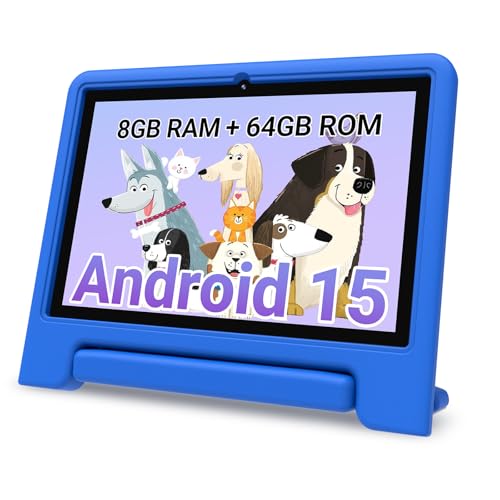
CFVOCUY offers a 10.1-inch kids tablet with eye protection and pre-installed educational apps. It includes parental controls, allowing parents to set screen time limits and content filters. The device ships with an EVA protective case and a built-in stand, supporting hands-free viewing and interactive learning. The 1TB expandable storage provides ample room for apps, videos, and educational content, making it suitable for homeschool use and family learning sessions.
Buying Guide: Key Considerations For Education Tablets
- Age-appropriate features: Young students benefit from kid-friendly modes, parental controls, durable cases, and preloaded educational content. Older students typically need more RAM and storage for multitasking and heavy apps.
- Performance and memory: Look for multi-core processors, sufficient RAM (8GB or more recommended for multitasking), and expandable storage options to keep pace with apps, videos, and projects.
- Display quality: A clear, bright display with anti-glare or eye-care features reduces eye strain during long study sessions and reading tasks.
- Battery life: Long battery life supports full days of classes, research, and multimedia without frequent recharging.
- Storage options: Internal storage plus expandable microSD or TF card support helps store apps, learning materials, and offline resources.
- Software ecosystem: Compatibility with educational apps, parental controls, and offline access to content can influence learning consistency.
- Durability and accessories: Protective cases, screen protectors, and included peripherals (keyboard, stylus, or mouse) improve usability in classrooms and at home.
- Security and privacy: OS version, app permissions, and integrated AI features should balance convenience with data protection.
- Connectivity: Wi-Fi standards (WiFi 6 is advantageous), GPS for location-based learning, and Bluetooth for pairing accessories.
- Future-proofing: Consider devices with software support and easy storage expansion to extend the device’s usability across multiple grades.